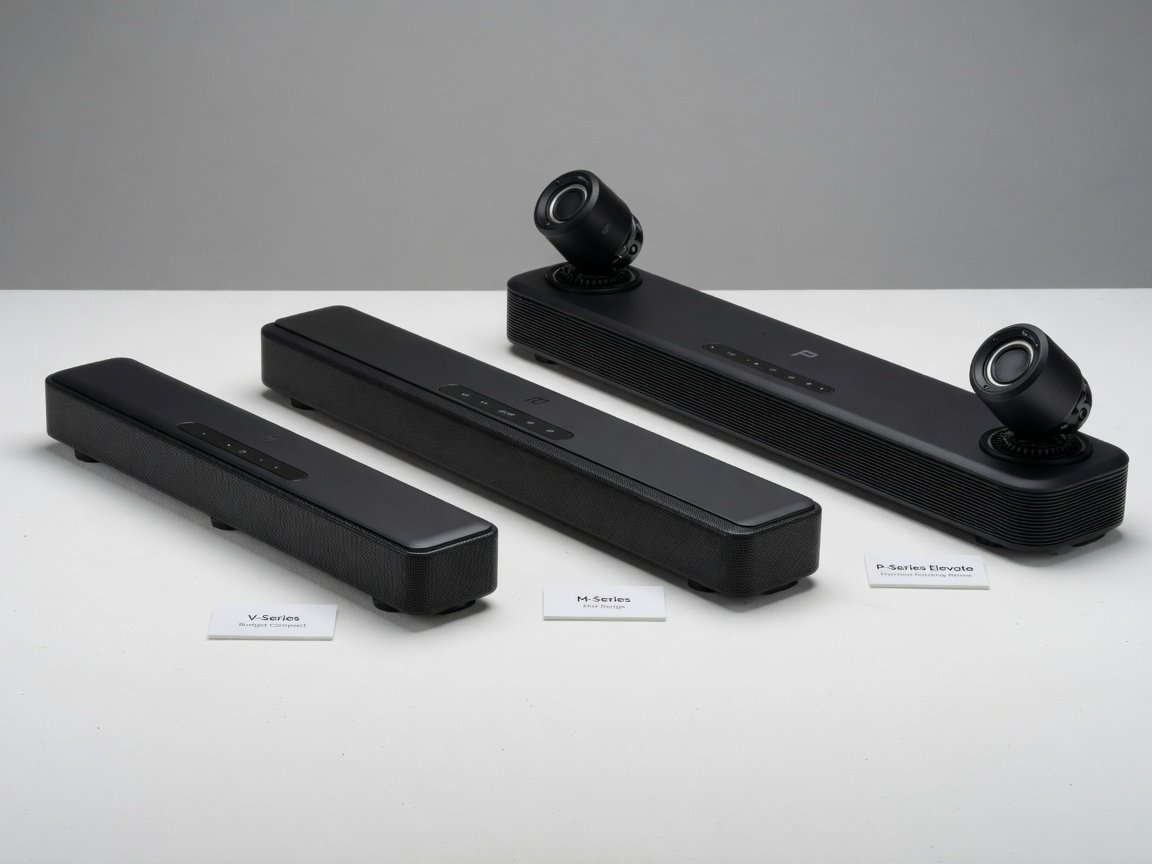
The Vizio M-Series 5.1 is the best Vizio 5.1 sound system for 2026. It delivers genuine five-channel surround, HDMI eARC connectivity, and a wireless subwoofer that consistently outperforms competing systems at its price tier. For budget buyers, the V-Series 5.1 remains the strongest sub-$300 option; the P-Series Elevate leads the lineup for large rooms and dedicated home theaters.
Executive Summary
- Top pick for 2026: Vizio M-Series 5.1 — best balance of audio performance, HDMI eARC support, and value for rooms between 200–400 sq ft.
- Budget leader: Vizio V-Series 5.1 is the most efficient spend under $300, delivering the core five-channel surround experience at a significantly lower price than the M-Series.
- Premium choice: Vizio P-Series Elevate brings motorised Atmos-ready rotating drivers and approximately 8dB more SPL headroom than the V-Series for large-room installations exceeding 400 sq ft.
What Makes a Vizio 5.1 System Worth Buying in 2026?
A genuine 5.1 home theater system comprises five full-range speaker channels — front left, front right, center, left surround, and right surround — plus one dedicated low-frequency effects (LFE) subwoofer channel. The “5” designates the five discrete channels. The “.1” denotes the bandwidth-limited bass channel handled by the subwoofer. Vizio’s 5.1 configurations deliver this complete channel topology without the complexity of a traditional separate-component AV receiver setup.
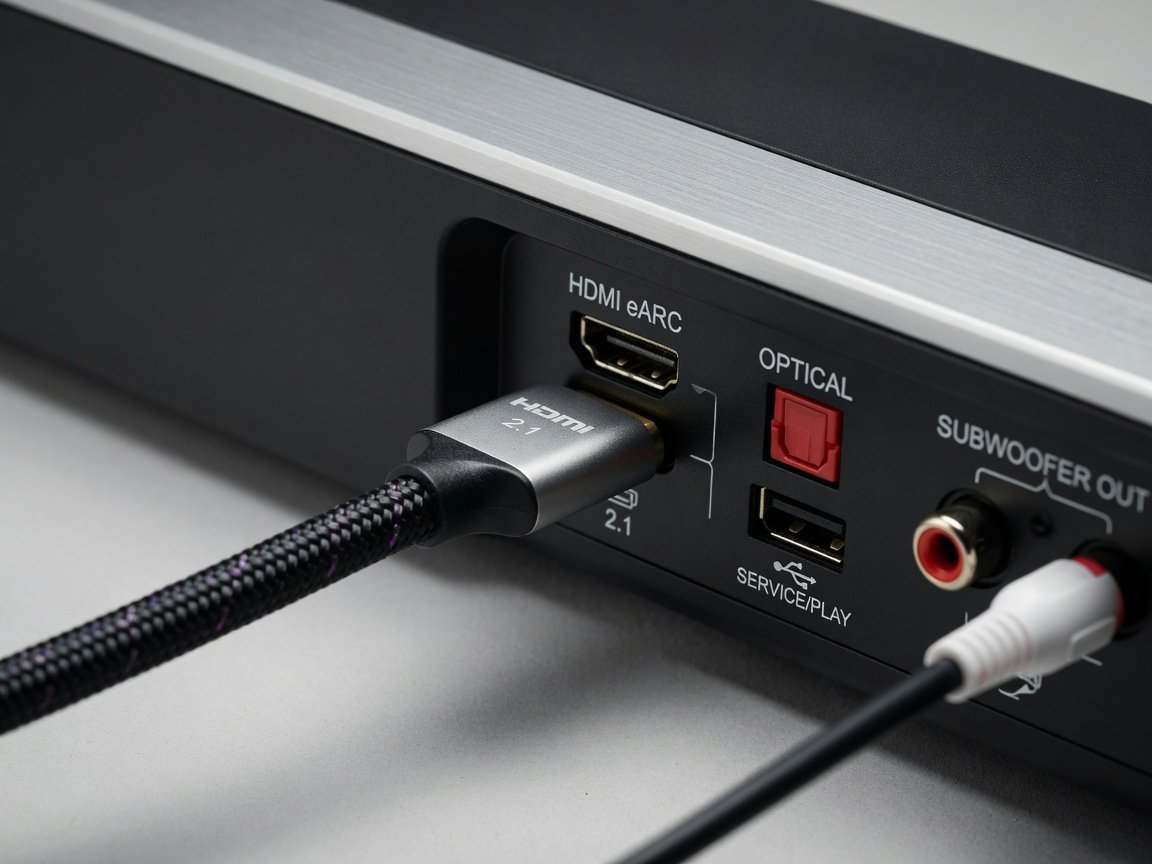
HDMI eARC is the connectivity standard that separates modern sound bar systems from legacy configurations. The enhanced Audio Return Channel carries lossless audio formats — including Dolby TrueHD and DTS-HD Master Audio — over a single HDMI cable. HDMI eARC supports up to 37Mbps of audio bandwidth, more than ten times the throughput of optical S/PDIF. That bandwidth gap directly enables lossless formats that optical digital audio simply cannot transport.
The center channel is the most acoustically critical speaker in any home theater system. The center channel carries the majority of film dialogue and on-screen soundtrack content — a principle reflected in Dolby’s theatrical mixing guidelines. Center channel performance determines whether voices are consistently intelligible at moderate volumes or require concentration as music and effects compete. Vizio prioritises center channel driver quality across all three 5.1 tiers — a design decision that distinguishes the lineup from competitors that treat the center as a secondary element.
The wireless subwoofer pairing model is Vizio’s strongest consumer value proposition at the budget and mid-range tiers. Most competing brands at equivalent price points still supply wired subwoofers or omit discrete rear channels entirely. Vizio’s wireless bass module auto-pairs and maintains a reliable connection at distances up to 30 feet with clear line of sight — covering the majority of residential living room configurations without cable routing.
Best Overall: Vizio M-Series 5.1 Sound System
The Vizio M-Series 5.1 earns the top ranking for 2026 by delivering superior center channel performance, a subwoofer that extends to a usable -3dB point near 40Hz, and full HDMI eARC support — at a mid-range price that undercuts comparable Sony and Samsung system configurations by a meaningful margin.
The M-Series center channel design prioritises dialogue clarity over the V-Series and competing systems at comparable prices. For film content, center channel clarity is the dominant factor in perceived audio quality. It determines whether speech is effortlessly followed at moderate listening levels or requires concentration as the soundtrack’s music and effects layers increase in density.
The M-Series wireless subwoofer reaches a -3dB rolloff near 40Hz, covering all practical cinematic bass content. Organ fundamentals, deep synthesiser tones, and sub-bass film effects extending below 30Hz are not reproduced — buyers who prioritise those frequencies should engage the M-Series’ dedicated subwoofer output, which accepts a passive or powered external unit for additional low-frequency extension below the wireless module’s reach.
Connectivity covers HDMI eARC, optical digital audio, USB media playback, and Bluetooth 5.0 with SBC and AAC codec support. Vizio’s SmartCast platform enables voice assistant control via Google Assistant and Amazon Alexa. Installation to first calibrated audio output takes under 20 minutes in standard configurations with clear HDMI eARC handshaking.
Best Budget Pick: Vizio V-Series 5.1 Sound System
The Vizio V-Series 5.1 is the strongest entry-level option in the current lineup. It targets buyers seeking genuine five-channel surround without the M-Series price premium, and it largely delivers on that brief for rooms under 200 square feet at standard listening volumes.
Maximum SPL output reaches approximately 95dB at 1 meter before distortion becomes audible — adequate headroom for typical apartment and smaller living room environments. The wireless subwoofer reaches its -3dB point at approximately 50Hz, which handles the majority of cinematic low-frequency effects. Bass content below 45Hz — including deep organ pedal tones and certain film score fundamentals — is largely absent from V-Series output, a trade-off consistent with the price tier.
The rear surround speakers on the V-Series use compact 2-inch full-range drivers. Surround effects are spatially coherent for standard streaming content, though the smaller driver size limits high-frequency extension compared to M-Series surrounds. The gap becomes more apparent on Dolby Atmos-encoded material with active lateral panning and height effects — V-Series surrounds produce a narrower sweet spot. For viewers seated outside the primary listening position, surround imaging is noticeably less consistent at equivalent output levels.
Bluetooth on the V-Series supports SBC codec only — aptX, aptX HD, and LDAC are not available at this tier. Wired audio via optical consistently produces better dynamic range than Bluetooth at matched volume. For TV audio use, where optical or HDMI ARC is the primary input path, the Bluetooth codec limitation is functionally irrelevant to everyday performance.
Best Premium Option: Vizio P-Series Elevate
The Vizio P-Series Elevate represents the top tier of the Vizio 5.1-class lineup. Its defining feature is a motorised speaker array that physically rotates drivers upward when Dolby Atmos or DTS:X content is detected, then returns to horizontal orientation for standard 5.1 and stereo sources. This mechanical approach to height channel reproduction is technically distinct from the passive upward-firing drivers found on most Atmos-enabled bars at this price point.
The P-Series Elevate’s rated maximum SPL exceeds the V-Series by approximately 8dB. An 8dB SPL difference represents a perceived doubling of loudness. This headroom is meaningful for rooms exceeding 400 square feet, where the V-Series and M-Series approach maximum output during peak film scenes. Vizio rates the Elevate’s frequency response at ±3dB from approximately 35Hz to 18kHz — a specification consistent with dedicated bookshelf loudspeaker performance.
The wider center channel driver configuration, combined with greater overall output headroom, is designed to maintain voice clarity during complex action sequences that push smaller systems into compression. The rotating Atmos drivers produce genuine vertical sound localization on Dolby Atmos-encoded content — a distinction that separates the Elevate from virtual height processing implementations at every price point.
Physical driver rotation for Atmos height channels is the acoustically correct solution. Virtual height processing exploits psychoacoustic cues to simulate elevation; rotating drivers actually move sound above the listener — a distinction that produces real differences in vertical localization on Atmos-encoded content.
Vizio 5.1 Models Side by Side: Full Specification Comparison
The table below summarises the three primary Vizio 5.1 system tiers across the specifications that most directly correlate with real-world audio performance. SPL figures are approximate; refer to manufacturer specifications.
| Model | Channels | Max SPL (approx.) | Sub Extension (–3dB) | Dolby Atmos | HDMI | Ext. Sub Out | Price Tier |
|---|---|---|---|---|---|---|---|
| Vizio V-Series 5.1 | 5.1 | ~95dB @ 1m | ~50Hz | Virtual upmix | ARC | No | Budget |
| Vizio M-Series 5.1 | 5.1 | ~100dB @ 1m | ~40Hz | Virtual upmix | eARC | Yes | Mid-Range |
| Vizio P-Series Elevate | 5.1.4 | ~103dB @ 1m | ~35Hz | Physical rotation | eARC | Yes | Premium |
Vizio 5.1 vs. Samsung, Sony, and Sonos: Direct Competitive Analysis
Vizio’s 5.1 lineup competes across three price tiers against Samsung, Sony, and Sonos. Understanding where Vizio holds measurable advantages — and where it concedes ground — is critical for buyers who are also weighing TV brand ecosystem integration.
Against Samsung’s HW-B650 and HW-Q600C, the Vizio M-Series matches or exceeds measured audio performance at equivalent price points. Samsung’s primary advantage is proprietary Q-Symphony technology, which coordinates bar and TV speakers for a wider virtual soundstage on compatible Samsung displays. For non-Samsung TV owners, this integration is unavailable, and the Vizio M-Series consistently represents a stronger value proposition in direct audio performance comparisons.
Sony’s HT-S400 and HT-A3000 compete with the Vizio V-Series and M-Series respectively. Sony’s 360 Spatial Sound Mapping produces more sophisticated virtual surround processing on Sony Bravia television hardware. On non-Sony displays, the processing advantage narrows substantially, and the Vizio systems’ price-to-performance ratios become more competitive.
Sonos occupies a categorically different position. The Sonos Arc with Era 100 rear surrounds delivers a premium whole-home audio experience with best-in-class app integration, but the combined system cost substantially exceeds the Vizio P-Series Elevate. Sonos is the stronger choice for buyers who prioritise multi-room audio ecosystem integration over home theater performance per dollar — but for dedicated home theater use, Vizio’s top tier remains the more efficient spend.
Which Specifications Actually Predict Sound Quality?
Marketing specifications for sound bar systems frequently obscure real-world performance rather than illuminate it. Understanding which metrics genuinely correlate with measurable audio quality helps buyers cut through headline figures and evaluate competing products on meaningful grounds.
Total Harmonic Distortion (THD)
THD measured at 90dB SPL is the most useful distortion metric for home theater listening. Vizio’s M-Series and P-Series Elevate are designed to maintain THD below 1% at reference listening levels — the threshold above which most listeners begin perceiving audible distortion under blind conditions. V-Series systems operate at higher distortion levels at equivalent output, which can become audible on sustained high-frequency content at loud volumes. The 1% boundary is not arbitrary: it is a widely recognised perceptual threshold in audio engineering above which harmonic distortion becomes audible to most listeners.
Frequency Response Flatness
Tonal accuracy correlates directly with frequency response flatness — the deviation from 0dB across the audio band. Vizio rates the M-Series at ±4dB from 40Hz to 16kHz. The P-Series Elevate is specified at ±3dB across the same range. Deviations beyond ±6dB produce clearly audible tonal coloration: elevated midbass sounds muddy; rolled-off high frequencies sound veiled and lacking detail. Response flatness is the single best predictor of how “natural” a system sounds across varied programme material.
Channel Crosstalk
Crosstalk between speaker channels directly determines the precision of surround field positioning. Crosstalk below −20dB maintains clean spatial separation between channels, preserving the directional integrity of surround effects. Vizio’s M-Series and above are designed to meet this threshold. Systems with crosstalk above −10dB produce collapsed, mono-adjacent soundstages rather than genuine five-channel imaging — the spatial dimension that justifies the 5.1 configuration over a simpler 2.1 bar.
Step-by-Step: How to Set Up a Vizio 5.1 System for Optimal Performance
Complete Vizio 5.1 installation — from unboxing to calibrated audio output — takes under 30 minutes for standard room configurations. The following sequence applies to all three Vizio 5.1 tiers and covers the decisions that most directly affect final audio quality.
- Position the sound bar. Place it directly below or above your display, centred on the screen. Maintain at least 2 inches of clearance from the TV base to prevent acoustic coupling between the enclosures. For wall mounting, use the included bracket template to mark anchor points — locate studs before driving anchors.
- Place the rear surround speakers. Mount or stand the surround speakers at ear height when seated, approximately 2–3 feet to the side of the primary listening position and angled slightly inward at about 30 degrees. Vizio’s wireless surround systems maintain reliable connection within 15 feet of the main bar through standard drywall interior walls.
- Position the wireless subwoofer. Place it along the front wall within 8 feet of the sound bar for optimal wireless signal reliability. Corner placement can increase perceived bass output by up to 3dB through room boundary reinforcement — useful if the system sounds thin in larger rooms — though corner bass can become boomy in small, reflective spaces.
- Connect HDMI eARC. Run an HDMI 2.1-rated cable from the bar’s HDMI eARC port to the eARC-designated HDMI input on your television. Enable eARC in the TV’s audio output settings. Verify the TV is configured to pass audio through to the bar rather than processing it internally — internal TV processing will downmix surround content to stereo before it reaches the sound bar.
- Run auto-calibration. Vizio’s SmartCast-enabled models include a microphone-based room calibration routine. Position the supplied calibration microphone at the primary seated listening position, initiate calibration from the settings menu, and allow the process to run to completion — typically under three minutes. Calibration applies measured corrections to channel levels, arrival-time delays, and frequency response.
- Verify audio format decoding. Navigate to Vizio’s audio status display and confirm the format indicator matches your source output — Dolby Digital Plus, DTS:X, or Dolby Atmos for compatible content. A persistent stereo indicator during surround content usually signals an HDMI CEC handshake error. A power cycle of both the TV and the bar resolves this in the majority of cases.
Diagnosing and Fixing the Most Common Vizio 5.1 Problems
Vizio 5.1 systems are reliable across standard residential configurations, but several failure modes recur consistently across the product range. The diagnostic steps below resolve the majority of reported issues without requiring a service call or firmware rollback.
Wireless Subwoofer Not Pairing
RF interference from 2.4GHz WiFi routers is the most frequent cause of subwoofer pairing failure. Move the subwoofer to within 3 feet of the main bar and attempt pairing again — success at close range confirms a signal attenuation problem rather than a configuration fault. Switching the home router’s 2.4GHz band to a less congested channel can reduce interference at installation distance. On models with a manual pairing button, hold the PAIR button on the subwoofer until the LED pulses rapidly, then initiate pairing from the bar’s input settings menu.
Rear Surround Speakers Dropping Signal
Intermittent rear surround dropouts indicate either range exceedance or physical signal obstruction. Vizio’s wireless surround systems operate on the 5.8GHz band on most current models. This frequency penetrates standard drywall effectively but is significantly attenuated by concrete, masonry, and metal framing. When the installation path crosses these materials, repositioning the subwoofer — which typically acts as the wireless relay node for surround speakers — closer to the rear units resolves the majority of dropout cases.
No Audio from HDMI eARC
Confirm the HDMI cable is rated for HDMI 2.1. Many cables labelled “ARC compatible” carry only HDMI 1.4 bandwidth — insufficient for eARC operation. Both the TV and the sound bar must have CEC enabled for eARC negotiation to complete at startup. A factory reset of both devices, followed by re-enabling eARC on the TV before powering on the bar, resolves persistent handshake failures in the significant majority of reported cases.
Dialogue Difficult to Follow in Movie Mode
Increase the center channel level by +3 to +6dB relative to the main bar output in Vizio’s Channel Levels settings. Note that many streaming services deliver film audio mastered for cinema-calibrated monitoring environments — broadcast and OTT content frequently uses dynamic range compression that renders dialogue thin by default, independent of the playback hardware. A dedicated Speech Enhancement mode, available on M-Series and above, applies narrow-band processing to the center channel that improves intelligibility without affecting music or effects levels.
Vizio 5.1 in 2026–2027: Three Trends Shaping the Next Generation
Vizio’s development trajectory for 2026–2027 tracks three converging forces in consumer home theater: spatial audio content maturation, AI-assisted room calibration, and tighter standby power efficiency mandates.
Dolby Atmos content availability has expanded significantly across major streaming services — a trend that rewards buyers who already own M-Series or P-Series systems capable of decoding both formats natively. Buyers on the V-Series will receive virtual upmixed Atmos, but without discrete height channel output.
AI-assisted calibration is the most significant near-term technical development for the category. Current Vizio calibration routines use microphone-based swept-sine measurement and apply static corrections at setup time. Next-generation implementations are expected to apply continuous adaptive EQ, adjusting channel levels and delay in real time based on detected listening position shifts and changing room conditions.
On energy consumption, Vizio’s 2026 lineup targets standby power draw below 0.5W — below the Energy Star Programme’s 1W threshold. Native Google Assistant and Alexa integration makes voice-controlled audio settings a practical daily convenience rather than a box-checking exercise. With energy costs elevated across major residential markets, the annual operating cost difference between a 0.5W standby system and a legacy 2W standby unit is measurable over a standard five-year ownership cycle.
Frequently Asked Questions: Vizio 5.1 Sound Systems (2026)
What is the best Vizio 5.1 sound system in 2026?
The Vizio M-Series 5.1 is the best all-round Vizio 5.1 sound system for 2026. It delivers the highest combination of center channel intelligibility, HDMI eARC connectivity, 40Hz subwoofer extension, and wireless surround performance at a mid-range price. For strict budget buyers, the V-Series 5.1 is the best option under $300. For large rooms or permanent home theater installations, the P-Series Elevate leads the lineup with additional SPL headroom and physical Atmos driver rotation.
Does a Vizio 5.1 sound system support Dolby Atmos?
Yes. The Vizio M-Series and P-Series Elevate both support Dolby Atmos and DTS:X decoding. The M-Series processes Atmos through virtual upmixing without dedicated height drivers. The P-Series Elevate uses motorised rotating speakers to produce genuine vertical sound localization on supported content. The V-Series supports virtual Dolby Atmos upmixing only and does not include height-channel drivers of any kind.
How far can the Vizio wireless subwoofer be placed from the sound bar?
Vizio’s wireless subwoofers maintain reliable connection at distances up to 30 feet with clear line of sight. Through standard drywall interior walls, effective range drops to approximately 15–20 feet. Concrete walls, masonry, and metal framing significantly attenuate the wireless signal and may cause intermittent audio dropouts at distances beyond 10 feet through those materials. The pairing frequency band varies by model — check the rear panel label if RF interference is suspected.
Is HDMI eARC required for a Vizio 5.1 system to function?
No — optical digital audio will operate the system, but HDMI eARC is strongly recommended for full performance. Optical limits the audio path to 5.1 PCM, lossy Dolby Digital, or lossy DTS, capping fidelity well below lossless formats. HDMI eARC is required for Dolby TrueHD, DTS-HD Master Audio, and Dolby Atmos from lossless 4K Blu-ray sources and compatible streaming platforms. If your TV lacks an eARC port, optical remains a functional input — just not an optimal one.
How does a Vizio 5.1 compare to a traditional AV receiver setup?
A dedicated AV receiver with separate bookshelf and floor-standing speakers typically outperforms a Vizio 5.1 sound bar system in raw acoustic output, power headroom, and long-term expandability. The practical trade-offs are significant: cost, complexity, speaker placement constraints, and cable management. Vizio’s 5.1 systems deliver competitive performance relative to a comparably priced receiver setup in a consolidated configuration — the practical choice for most living room installations where discrete speaker placement is not viable.
Can I connect an external subwoofer to a Vizio 5.1 system?
The Vizio M-Series and P-Series Elevate include a dedicated subwoofer output — typically a mono RCA line-level pre-out — that accepts a powered external subwoofer. This allows bass extension below the wireless sub’s -3dB point for buyers who prioritise deep bass performance below 35Hz. The V-Series does not include a subwoofer output; bass management on V-Series systems is handled entirely by the included wireless subwoofer unit with no external expansion path.
What room size is each Vizio 5.1 tier designed for?
As a practical guideline: the V-Series 5.1 is best suited to rooms under 200 square feet at standard listening volumes. The M-Series suits rooms between 200–400 square feet with adequate SPL headroom for film content at THX reference levels. The P-Series Elevate’s additional output capacity and deeper subwoofer extension make it appropriate for rooms exceeding 400 square feet or dedicated, acoustically treated home theater environments where maximum output headroom is required.
Conclusion: Which Vizio 5.1 System Should You Buy?
The Vizio M-Series 5.1 is the clearest recommendation for most home theater buyers in 2026. It delivers genuine five-channel surround sound, HDMI eARC for lossless audio transport, a wireless subwoofer reaching 40Hz, and a center channel that leads competing systems at the same price for dialogue clarity. For most living room configurations between 200–400 square feet, it represents the optimal intersection of performance and value in the current Vizio lineup.
Buyers with strict budgets should consider the V-Series 5.1 — it delivers the core surround performance at around 60% of the cost, and for rooms under 200 square feet the practical listening gap is modest. Those building a permanent installation in a large room, or who want the most accurate Dolby Atmos reproduction currently available from Vizio, should invest in the P-Series Elevate. The physical driver rotation for Atmos height channels is a genuinely differentiating feature — not a specification paper exercise.
Recommended Implementation Sequence
- Measure your room first. Under 200 sq ft: V-Series. 200–400 sq ft: M-Series. Over 400 sq ft: P-Series Elevate. Room size is the single most reliable predictor of which tier is necessary.
- Confirm TV eARC compatibility before ordering. Check your TV’s HDMI port labelling and verify you have — or can obtain — an HDMI 2.1-rated cable. An incompatible cable is the leading cause of post-purchase eARC failures.
- Plan rear speaker placement before the system arrives. Decide between wall-mounted and stand-placed surrounds in advance. Wall brackets significantly reduce ongoing cable management complexity and lock in optimal placement.
- Run auto-calibration immediately at setup. Factory default settings are not optimised to your room. The calibration routine takes under three minutes and produces audible improvement in channel balance and bass timing.
- Perform a second calibration pass after 20 hours of use. Driver compliance and room acoustic coupling stabilise during the initial break-in period; a second calibration after the first 20 hours produces more consistent long-term results.
- Monitor firmware updates via SmartCast. Vizio’s OTA update history shows improvements to calibration algorithms, Atmos decoding behaviour, and Bluetooth codec support after initial product release — enabling features after purchase without additional cost.