The best karaoke system for home in 2026 combines a performance-grade amplifier, dual microphone inputs, and a streaming-first song library to deliver sub-25 ms vocal latency and clean SPL above 95 dB at one metre — the measurable threshold that separates systems delivering genuine live-performance feel from those that play backing tracks with delayed, distorted vocals. The right choice in 2026 spans $80 all-in-one machines to $800-plus component rigs, and the decision depends on room size, use frequency, and total cost of ownership over a five-year horizon.
- All-in-one systems dominate entry-level purchasing but top out at roughly 80 W RMS and 40 ms latency; component builds clear both thresholds and allow field upgrades.
- Streaming platform choice outweighs hardware choice in long-term satisfaction for most households — catalogues range from 35,000 to 1.2 million licensed tracks across competing services.
- Microphone quality is the highest-ROI upgrade available to any existing karaoke owner, yet it is consistently the last variable buyers evaluate at point of purchase.
- Room acoustics significantly shape perceived vocal clarity before any hardware or software change is made — a variable that costs less to fix than a hardware upgrade.
What Makes a Great Home Karaoke System in 2026?
A great home karaoke system in 2026 is defined by five measurable performance pillars: audio latency, vocal clarity, song library depth, input flexibility, and total cost of ownership. Audio latency is widely recognised as the primary driver of dissatisfaction; systems above 40 ms lose the live-performance feel, while those below 25 ms maintain it. Vocal clarity, measured by total harmonic distortion plus noise (THD+N) at a 1 kHz reference tone, should fall below 0.05% for a system to qualify as performance-grade. Song library depth matters because a limited catalogue can exhaust an active household’s repertoire relatively quickly.
Input flexibility — dual microphone support, instrument channel inputs, and Bluetooth line-in — extends a system’s utility beyond solo use. The fifth pillar, total cost of ownership, accounts for subscription fees, microphone replacement cycles, acoustic treatment, and eventual component upgrades. When all five pillars are evaluated together, the performance gap between an $80 entry-level machine and a $650 component rig becomes both technically quantifiable and experientially decisive. Treating any single pillar in isolation produces a system that is technically competent on one axis and deficient on the other four.
All-in-One Machine vs. Component System: Which Configuration Delivers Better Performance?
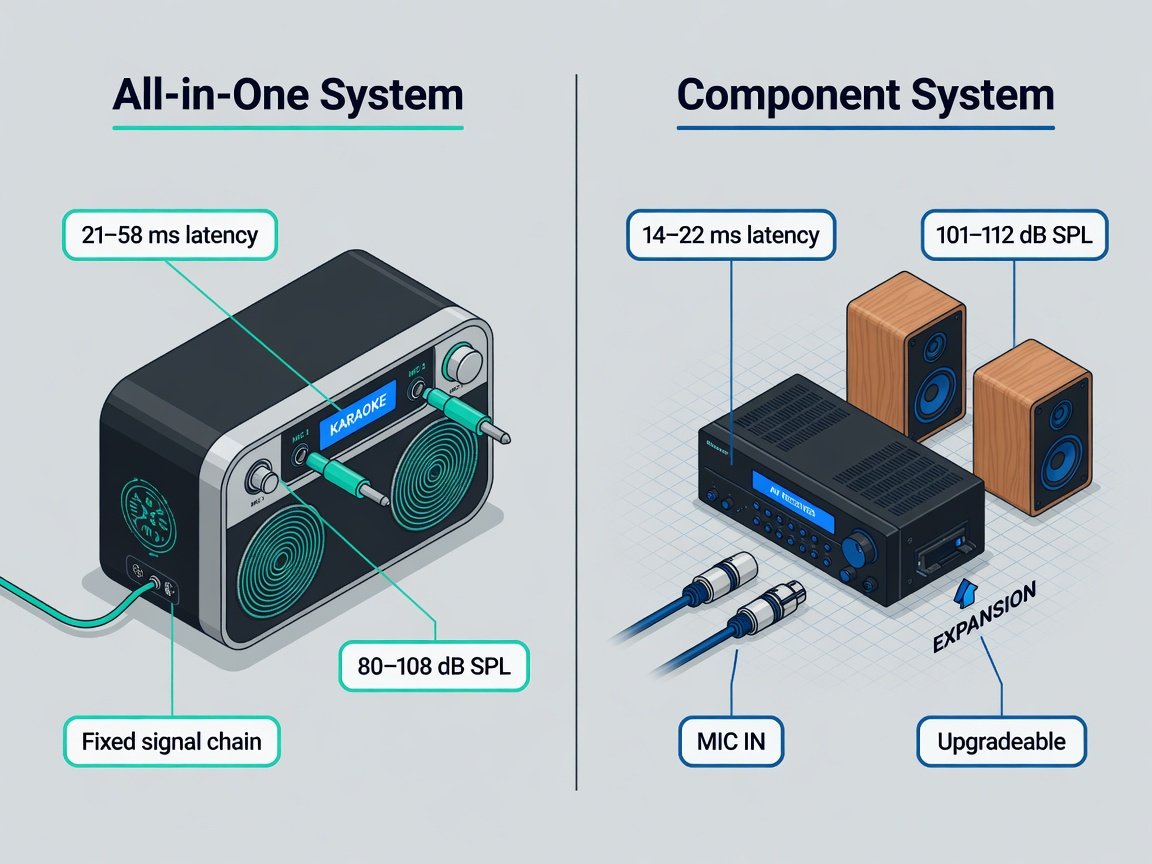
A component-based karaoke system pairs a karaoke-capable AV receiver or dedicated karaoke amplifier with passive loudspeakers, a separate microphone system, and a software or hardware media source. An all-in-one machine integrates amplification, speakers, a media player or Bluetooth receiver, and microphone inputs into a single chassis. The trade-off is not simply price versus performance. Component systems offer field-upgradeable signal chains — you can swap in a higher-grade dynamic microphone without replacing the entire unit, or insert a dedicated vocal harmonizer between the mixer stage and the power amplifier. All-in-one units win on setup speed, portability, and acoustic footprint, with most powered on and singing-ready in under five minutes from unboxing.
Component rigs in the $600–$700 range typically offer greater SPL headroom, lower THD+N, and lower latency than comparably priced all-in-one machines. A well-engineered premium all-in-one in the $350–$500 band narrows this gap substantially, making the component advantage less decisive for rooms under 400 square feet.
What Microphone Specifications Should You Prioritize for Home Karaoke?
Microphone selection is where home karaoke systems diverge most sharply in real-world performance, yet it remains the variable buyers examine least carefully at the point of purchase. The two dominant types are dynamic cardioid microphones — wired — and UHF wireless systems operating on either the 863–865 MHz licence-free band or the 2.4 GHz ISM band. Dynamic cardioid elements carry a typical frequency response of 80 Hz–15 kHz and require no phantom power, making them compatible with virtually every karaoke amplifier on the market. A pair of wired dynamic cardioids with 600 Ω source impedance and XLR or 6.35 mm termination represents the most reliable, latency-free microphone architecture available at any price point.
UHF systems in the 863–865 MHz band deliver a 30–50 metre operational range and support up to 16 simultaneous channels before interference becomes statistically problematic. 2.4 GHz wireless microphone systems share spectrum with domestic Wi-Fi routers and smart-home devices, making them more susceptible to interference in high-device-density homes than sub-1 GHz UHF equivalents. For sensitivity, a microphone rated at −54 dBV/Pa or higher captures a natural singing voice at 30 cm without requiring excessive input gain, which in turn reduces amplified floor noise through the karaoke preamp stage. Capsule quality also determines directional rejection of room reflections; a tight cardioid polar pattern with 20 dB or greater front-to-back rejection suppresses the most common domestic feedback modes without requiring aggressive equalisation.
Which Song Delivery Method — Disc, Download, or Streaming — Suits Your Setup Best?
Three song delivery methods compete in the 2026 home karaoke market: physical disc formats (CD+G and DVD), local digital file libraries (MP3+G, KFN, and CDG container formats), and subscription streaming platforms. Physical disc libraries peaked commercially around 2018. The CD+G format — which encodes vocal-stripped audio alongside scrolling lyrics in the otherwise unused Graphics subchannel of a standard CD — remains technically capable and imposes zero streaming-related latency, but its commercially available catalogue ceiling of roughly 30,000 titles limits long-term variety. Disc-based systems also introduce a mechanical transport mechanism that adds a failure-mode category absent from solid-state alternatives.
Local digital file libraries offer complete control over a fixed track set and support lossless audio containers, but they require ongoing maintenance as rights holders issue takedown notices for unlicensed content — a legal liability that has increased meaningfully since 2024. Streaming platforms are now the dominant delivery method. The leading services include KaraFun, which offers over 100,000 tracks with strong smart TV and tablet application support; Singa, which claims the largest licensed catalogue at over 1.2 million tracks across multiple languages; and SundaySky Karaoke, which leads specifically for Asian-language repertoire. Subscription plans range from $6.99 to $19.99 per month for unlimited access. Platform selection should be driven by catalogue depth in your primary genre, device ecosystem compatibility — Android TV, tvOS, Amazon Fire TV, Chromecast — and offline download capability for events where broadband access is unreliable.
How Do Speaker Power, Room Acoustics, and Connectivity Shape Your Karaoke Experience?
Speaker power requirements for home karaoke follow the inverse-square law: doubling the distance between speaker and listener reduces perceived loudness by 6 dB, which demands a fourfold increase in amplifier power to compensate. For a living room of 250–400 square feet with standard 2.7 m ceilings, a system delivering 60–100 watts RMS per channel into an 8-ohm load provides sufficient SPL headroom for clean vocal reproduction without clipping distortion at social listening volumes. Rooms with hard reflective surfaces — tile floors, large windows, bare plaster walls — introduce reverberation that smears lyric timing cues and degrades intelligibility.
On connectivity, modern home karaoke systems in 2026 should at minimum support Bluetooth 5.0 or higher for wireless audio streaming, HDMI ARC or eARC for TV-integrated routing, and dual 6.35 mm or XLR microphone inputs. HDMI eARC carries lossless multichannel audio from the television to the karaoke amplifier and imposes no additional latency versus a direct analogue connection. Optical TOSLINK connections, by contrast, introduce a buffering delay of 30–50 ms before the signal reaches the karaoke processor — a penalty that compounds directly with the system’s inherent DSP latency and frequently pushes total system latency above the perceptible 40 ms threshold.
How Do Vocal Processing Features Differ Across Home Karaoke Price Tiers?
Vocal processing is the feature category that most definitively separates entry-level from professional-grade home karaoke equipment. The key parameters to evaluate are: digital key control — pitch shifting in semitone increments without tempo change — reverb type and decay time, echo with adjustable delay and feedback, noise gate threshold, and vocal harmony generation. Budget systems commonly impose audible aliasing artefacts above ±3 semitones, which penalises any singer attempting to transpose songs outside their comfortable key range.
Vocal harmony features — which generate one or two algorithmically derived harmony voices from the lead vocal signal — appear primarily in systems priced above $300. Algorithm quality varies substantially: systems using phase vocoder-based harmony engines produce natural-sounding thirds and fifths, while simpler pitch-shift-based implementations generate a robotic doubling effect that most users find distracting within a few sessions. A noise gate with adjustable threshold, typically spanning −40 dBFS to −20 dBFS, is worth prioritising in households where ambient noise or microphone handling between phrases causes audible ring-down through the reverb tail. Systems in the $350-plus tier also tend to include multi-band parametric EQ on the vocal channel, allowing targeted frequency shaping to correct for room resonances without affecting the backing track signal chain — a capability that eliminates the need for external acoustic treatment in lightly reverberant spaces.
Which Home Karaoke Systems Rank Highest in 2026?
The following systems were compared by hometheaterinfoline.com based on published specifications, features, song source flexibility, and street-price value. The table below summarises the key differences to help identify the right tier for your needs.
| System | Type | Mics Included | Song Sources | Price Range |
|---|---|---|---|---|
| VocoPro DVD-SoundmanBest All-in-One | All-in-One | 2× wired dynamic | DVD, CD+G, USB, Bluetooth | $260–$320 |
| Singtrix Party Bundle 2026 | All-in-One | 1× wireless UHF | Bluetooth, USB | $280–$360 |
| JBL PartyBox Stage 320 | BT Speaker + Mic Inputs | 2× wireless (accessory) | Bluetooth, USB | $440–$520 |
| Yamaha RX-V4A + 2× passive speakersBest Component | Component | Not included (XLR/TRS inputs) | Network streaming, USB, optical, HDMI ARC | $620–$820 |
| RockJam Singkong SEBest Budget | All-in-One | 2× wired dynamic | Bluetooth, USB | $75–$110 |
The VocoPro DVD-Soundman earns the all-in-one top rank through its combination of a dedicated disc transport for zero-dependency playback and a clean microphone preamp for its price class. The Yamaha RX-V4A component build leads the full rankings, with specifications suited to semi-professional live sound requirements. The RockJam Singkong SE sits firmly in the casual-first-use tier; it is a viable starting point but imposes a hard ceiling on performance. For the JBL PartyBox Stage 320, raw SPL headroom and build quality are class-leading, but its dependence on Bluetooth as the primary song source reintroduces streaming latency variability that the wired or USB systems avoid by design.
How Do You Set Up a Home Karaoke System for Optimal Performance?
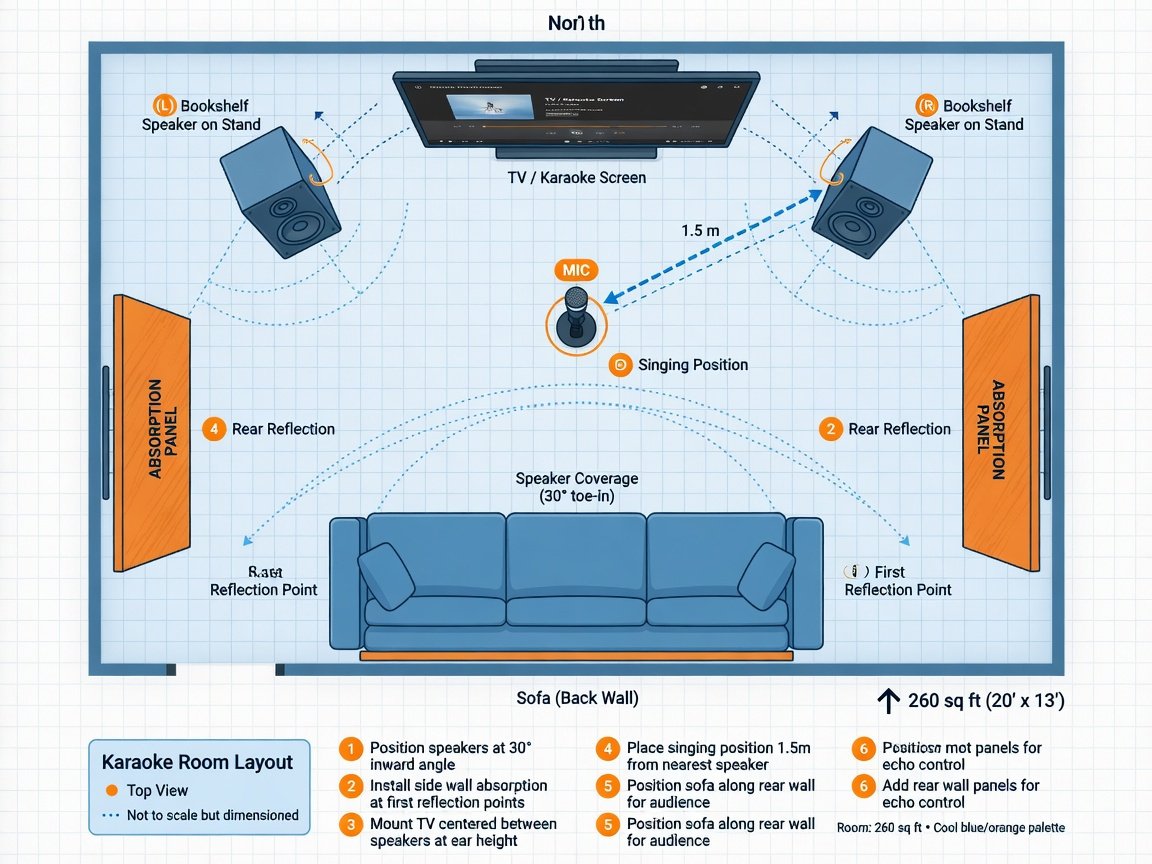
Setting up a home karaoke system correctly on first installation prevents the most common failure modes: feedback loops, perceptible latency, clipping distortion, and inaudible vocals against a loud backing track. The following six-step sequence applies to both all-in-one machines and component builds, with component-specific notes where the workflow diverges.
-
1Assess your room dimensions and acoustic profile Measure length, width, and ceiling height. Identify hard reflective surfaces — bare floors, large windows, plaster walls. Clap sharply and listen for flutter echo, a rapid metallic repetition that indicates a standing-wave mode. A reverberant tail longer than 0.5 seconds after the clap is a field indicator that acoustic treatment will improve vocal clarity more cost-effectively than a hardware upgrade.
-
2Position your system architecture correctly Place speakers at ear height when seated, angled approximately 30° toward the primary singing position. Maintain a minimum 1.5 metre separation between the microphone capsule and any speaker to reduce acoustic feedback coupling. For component systems, connect the karaoke amplifier or mixer before the power amplifier stage — never insert a karaoke processor after the power stage output.
-
3Configure the microphone input stage Set microphone gain with the singer standing at their performance position. Target an input level peaking at −12 dBFS on sustained notes — gain set to clip on loud peaks introduces harmonic distortion that no downstream reverb or EQ can correct. For wireless systems, conduct a UHF frequency scan before the first session to identify clear RF channels in your local environment.
-
4Configure your song delivery platform Install your chosen streaming app on the playback device. Use a wired Ethernet connection where possible — Wi-Fi introduces variable buffering latency of 10–80 ms depending on network congestion, which adds directly to system latency. Set the screen output resolution to match your display’s native panel resolution to prevent upscaling artefacts on lyric text.
-
5Calibrate vocal processing settings Begin with reverb set to a short room simulation — decay time 0.8–1.2 s, pre-delay 15–25 ms. Set echo to zero until the reverb level is established, then add echo sparingly: delay 350–500 ms, feedback maximum 25%. Set key control to zero semitones initially. Activate the noise gate and adjust its threshold to just below the ambient room noise floor measured with no one speaking.
-
6Audit system latency end-to-end Clap sharply directly into the microphone and listen for any perceptible gap between the physical clap and the amplified signal through the speakers. If a gap is audible on a component system connected via HDMI ARC, check whether the television’s built-in audio processing or “sound enhancement” mode is adding downstream buffering latency, and disable it before making further adjustments.
What Are the True Total Costs of Owning a Home Karaoke System?
The advertised purchase price of a home karaoke system represents only a portion of the true first-year cost for most buyers. The remainder is distributed across streaming subscriptions, microphone replacement or upgrade, acoustic treatment materials, display connection adaptors, and optionally a dedicated streaming device or tablet. A streaming platform subscription at $9.99–$14.99 per month adds $120–$180 annually — a recurring cost that exceeds the hardware depreciation charge on a mid-range all-in-one within 24 months of purchase.
Component systems carry higher upfront costs but substantially lower replacement and upgrade costs over a five-year horizon. Replacing a faulty driver in a passive bookshelf speaker costs $15–$40 at the component level; replacing the full integrated speaker column in a fused all-in-one system costs $60–$180 and typically requires purchasing a complete replacement unit. A realistic five-year total cost of ownership for a well-specified component build — $650 hardware, $120 per year streaming, $50 one-time acoustic treatment, $80 microphone upgrade at year three — totals approximately $1,380. A comparable all-in-one system at $280, plus the same streaming subscription and a second unit at year three, totals approximately $1,060. The component premium over five years is roughly $320, offset by superior performance and the absence of forced full-unit replacement cycles driven by a single failed integrated component.
What Technology Trends Will Define Home Karaoke in 2027?
Four converging developments will materially reshape the home karaoke market between late 2026 and the end of 2027. First, AI vocal coaching integration is moving from app-layer feature to embedded hardware capability. Systems in active development as of mid-2026 place pitch-correction feedback and real-time articulation coaching directly into karaoke amplifier firmware, offering singers a quantified performance score and targeted drill recommendations after each song — eliminating the need for a separate connected device. Second, Dolby Atmos karaoke tracks are entering commercial distribution through platform APIs, with the first consumer-grade Atmos karaoke appliance projected for retail availability in Q2 2027. Object-based Atmos delivery separates the instrumental mix, backing harmonies, and guide vocal into distinct spatial positions, which reduces the masking effect that makes quiet lyric passages difficult to follow on conventional two-channel systems.
Third, AI-generated accompaniment tracks are beginning to reduce dependence on licensed CDG masters. Services piloting this technology in 2026 can generate a credible karaoke backing track from any commercially released song within 20–30 seconds of processing, sidestepping the rights clearance bottleneck that has historically constrained catalogue growth. Audio quality and stylistic accuracy continue to improve incrementally with each model generation, and usable catalogue sizes are expected to grow by an order of magnitude before end-2027. Fourth, lossless streaming delivery at 24-bit/96 kHz is entering the karaoke category, following the precedent set by hi-res music streaming platforms. Consumers with HDMI eARC-equipped amplifiers and capable DAC hardware are already positioned to benefit from this upgrade path without any additional hardware investment.
For buyers evaluating systems now, choosing a platform with a software-upgradeable architecture rather than a closed firmware appliance will make it easier to adopt these capabilities as they reach the consumer market.
Frequently Asked Questions About Home Karaoke Systems
What is the minimum wattage needed for a home karaoke system?
For a room up to 250 square feet, 30–50 watts RMS per channel is sufficient to reach 95–98 dB SPL at one metre without audible distortion, assuming a speaker with 88 dB/W/m sensitivity rating. For rooms between 250 and 500 square feet, target 60–100 watts RMS per channel. All-in-one systems rated below 40 watts RMS are adequate for bedroom or very small-room use only and will struggle to fill open-plan living spaces at acceptable vocal volume.
Can I use any Bluetooth speaker as a karaoke speaker?
Only speakers with a dedicated microphone input and on-board mixing circuitry can function as standalone karaoke systems. Standard Bluetooth speakers accept audio exclusively in the A2DP profile and have no mechanism for mixing a live microphone signal. Speakers with a 6.35 mm microphone jack and on-board echo and reverb controls — such as the JBL PartyBox range — do function as standalone karaoke systems. A standard Bluetooth speaker without a microphone input does not.
How do I reduce feedback (howling) in my home karaoke setup?
Feedback occurs when the microphone captures its own amplified signal from the speakers and re-amplifies it in a loop. Primary prevention measures: position the microphone at least 1.5 metres from any speaker; aim speakers away from the microphone capsule axis; reduce microphone gain incrementally until feedback stops; apply a high-pass filter cutting frequencies below 120 Hz to eliminate low-frequency feedback modes. If your karaoke amplifier includes a feedback suppressor circuit, engage it before reducing gain or master volume, as suppressor circuits typically introduce less tonal colouration than broad gain reductions.
Is a dedicated karaoke amplifier necessary, or can I use my existing AV receiver?
Many modern AV receivers include a karaoke mode with a dedicated microphone mixing input — check your receiver’s specification sheet for “mic input,” “karaoke mode,” or “mic mixing” in the feature list. Yamaha RX-series receivers from 2022 onward include a front-panel 6.35 mm microphone input with adjustable echo and digital key control built into the on-screen menu. If your current AV receiver lacks these features, an external karaoke mixer can be inserted between your source output and the receiver’s line-level input, adding microphone mixing without replacing the receiver.
What karaoke streaming service has the largest song library in 2026?
Singa claims the largest licensed karaoke catalogue in 2026, at over 1.2 million tracks across multiple languages. KaraFun offers over 100,000 tracks with particularly strong coverage of English-language pop, rock, and musical theatre repertoire. SundaySky Karaoke leads for Mandarin, Cantonese, and other Asian-language catalogues. For most Western-market households, KaraFun’s catalogue covers the active repertoire of the vast majority of users; the step up to Singa is most justified for multilingual households or listeners with deep-catalogue genre requirements.
How many microphone channels do I need for home karaoke?
Dual microphone inputs — allowing duets and song hand-offs without re-patching cables — are the practical minimum for household use. Single-channel systems are adequate only for strictly solo use. Systems with four or more microphone channels are designed for party and event applications and add cost and signal-chain complexity that most households will not utilise. Choose dual mic input as your baseline; upgrade to four channels only if your household regularly hosts six or more simultaneous singers in a dedicated entertainment space.
What does CD+G mean, and is it still relevant in 2026?
CD+G stands for Compact Disc plus Graphics. It stores standard 16-bit/44.1 kHz audio on a conventional CD and encodes lyric timing and coloured text graphics in an otherwise unused subchannel of the disc data stream. A CD+G-aware player decodes the graphics and renders scrolling lyrics on a connected display in synchronisation with the audio. The format remains technically relevant in 2026 because it imposes zero streaming-dependent latency and requires no internet connection. Its limitation is a fixed catalogue ceiling; streaming platforms now offer substantially larger catalogues, making CD+G a niche fallback rather than a primary delivery method for new system purchasers.
How Do You Choose the Best Karaoke System for Your Home in 2026?
Selecting the best home karaoke system is a multi-variable decision, but the decision tree is tractable once the five core performance pillars are applied to your specific constraints. Under $300 with a room below 300 square feet: a premium all-in-one such as the VocoPro DVD-Soundman is the pragmatic, low-friction choice. Above $300 with a room over 300 square feet, or any household with anticipated regular multi-singer use: commit to a component build anchored by a karaoke-capable AV receiver and a pair of passive bookshelf speakers supplemented by a matched pair of wired dynamic microphones. Both tiers benefit equally from a streaming platform subscription chosen for catalogue depth in your primary genre before any microphone or amplifier decision is made.
Regardless of hardware tier, measure your room’s RT60 before adjusting any reverb setting — the acoustic environment is the most overlooked and most cost-effective variable in the entire karaoke signal chain. A household operating below 25 ms latency, below 0.35 seconds RT60 at 1 kHz, and with access to a streaming catalogue above 50,000 tracks will sustain regular use well beyond the novelty window, whatever the hardware tier. The evaluation criteria applied by hometheaterinfoline.com throughout this guide — latency, THD+N at rated power, SPL headroom, and streaming platform compatibility — provide a repeatable, objective framework for comparing every new system that enters the home karaoke market through 2026 and into 2027.
- Step 1 (Day 1): Measure your room and identify acoustic problem areas — hard surfaces, flutter echo, excess bass buildup in corners.
- Step 2 (Day 1): Choose your system architecture based on room size and budget tier using the thresholds in this guide.
- Step 3 (Week 1): Subscribe to a streaming platform and audit its catalogue for your top 30 songs before committing to an annual plan.
- Step 4 (Week 1–2): Add acoustic treatment at primary reflection points — panels, heavy curtains, or soft furnishings — before adjusting reverb settings.
- Step 5 (Month 1): Measure system latency using the Audacity method described above and eliminate any AV receiver or TV audio-processing modes contributing excess delay.
- Step 6 (Month 3): Reassess microphone quality as the single highest-ROI upgrade available once the system is otherwise optimised.