The top projectors for home theater in 2026 are laser-based 4K models. Laser light engines now account for 71% of premium projector sales, deliver 20,000-hour rated lifespans, and maintain stable color accuracy over time — a fundamental advantage that lamp-based projectors cannot match at comparable screen sizes or price points.
That advantage is measurable and decisive. A 2,000 ANSI lumen laser projector maintains over 95% of its original brightness at 10,000 hours of operation. A comparable lamp-based model falls below 40% by the same benchmark. This guide evaluates more than 30 projectors across every performance tier — from entry-level single-chip DLP models to native 4K LCoS laser flagships — to deliver a ranked, technically grounded breakdown for every home theater build in 2026.
Executive Summary: Top Home Theater Projectors in 2026
- Laser dominates the premium tier: Laser light engines account for 71% of home theater projector sales in the $1,200-and-above segment in 2026, driven by consistent brightness, superior color stability, and lifespans that eliminate lamp replacement costs entirely.
- 4K is the minimum viable specification: Native or pixel-shifted 4K resolution now features in 78% of new home theater projector releases this year, with over 85% of new streaming content launching in 4K HDR format across major platforms.
- Mid-range closes the performance gap: Laser projectors in the $1,500–$2,500 range now deliver specifications — including 20,000:1 native contrast and 98% DCI-P3 color volume — that required a $5,000 investment just three years ago.
- Ultra-short-throw accelerates into the mainstream: UST laser projectors recorded 38% year-over-year unit sales growth through 2025 and have maintained that trajectory into 2026, establishing a credible living-room alternative to large-format flat panels for the first time.
What Makes the Best Home Theater Projector in 2026?
Four measurable pillars define the top projectors for home theater in 2026: light output, native contrast, color gamut coverage, and input latency. No single specification tells the complete story. A projector with 4,000 lumens but an 800:1 native contrast ratio looks washed out on HDR content. A projector with 60,000:1 contrast but only 1,000 lumens struggles on anything except a perfectly dark screen paired with high-gain material. The interaction between these four variables — not any one number in isolation — determines real-world image quality.
Light output in ANSI lumens sets the maximum brightness your image achieves relative to screen size and gain. Native contrast controls how deep blacks fall and how much punch highlights carry in HDR content. Color gamut coverage, measured as a percentage of DCI-P3 or BT.2020, determines the vibrancy and accuracy of every frame. Input latency in milliseconds only becomes critical if the projector doubles as a gaming display — many home theater models exceed 50ms latency in cinematic picture modes, which is fully acceptable for film but unusable for fast-paced gaming.
Resolution is a threshold value, not a continuous improvement metric. A projector with a native contrast ratio of 30,000:1 and 95% DCI-P3 coverage at 1080p frequently delivers a more cinematic image than a native 4K model with 500:1 contrast and 72% DCI-P3 coverage. At standard home theater viewing distances — typically 1.5 to 2 times the screen width — the human visual system cannot consistently distinguish 4K from 1080p on screens below 120 inches. Contrast accuracy and black levels remain perceptible advantages at any resolution. Prioritize those first.
How Do We Test and Rank Home Theater Projectors?
Testing methodology at hometheaterinfoline.com involves a standardized evaluation suite run under consistent, controlled environmental conditions. All projectors are measured against a 110-inch, 1.0-gain white matte screen in a fully light-controlled room with ambient light held below 0.5 lux. This eliminates the variable of screen interaction and ensures every measurement reflects only the projector’s optical output. Each unit undergoes a minimum 50-hour break-in period before calibration and formal measurement commences.
Brightness is measured using an ANSI 9-point checkerboard pattern in both the projector’s maximum output mode and its most accurate calibrated cinema mode — the figure most relevant to home theater use. Native contrast is captured through a full-black and full-white sequential measurement on the same calibrated screen. ANSI contrast uses the 16-box simultaneous checkerboard, yielding a real-world figure typically 3 to 5 times lower than sequential contrast claims from manufacturers. Color gamut is verified using a spectrophotometer calibrated to DCI-P3 and BT.2020 primaries. Input latency is measured at both 4K/60Hz and 4K/120Hz where supported by the hardware.
Rankings weight contrast and color gamut at 35% each, brightness adequacy at 20%, and features (lens shift range, HDR tone mapping quality, input selection) at 10%. Raw manufacturer specification claims are never used — only independently measured results count.
Projectors are retested after firmware updates that affect picture processing or tone mapping behavior. The 2026 rankings below reflect the most current tested firmware available for each model category. HDR performance is evaluated using industry-standard test patterns derived from the UHD Blu-ray mastering pipeline, assessing peak luminance mapping, shadow detail preservation, and color volume accuracy at both the 10% and 100% white window measurement levels.
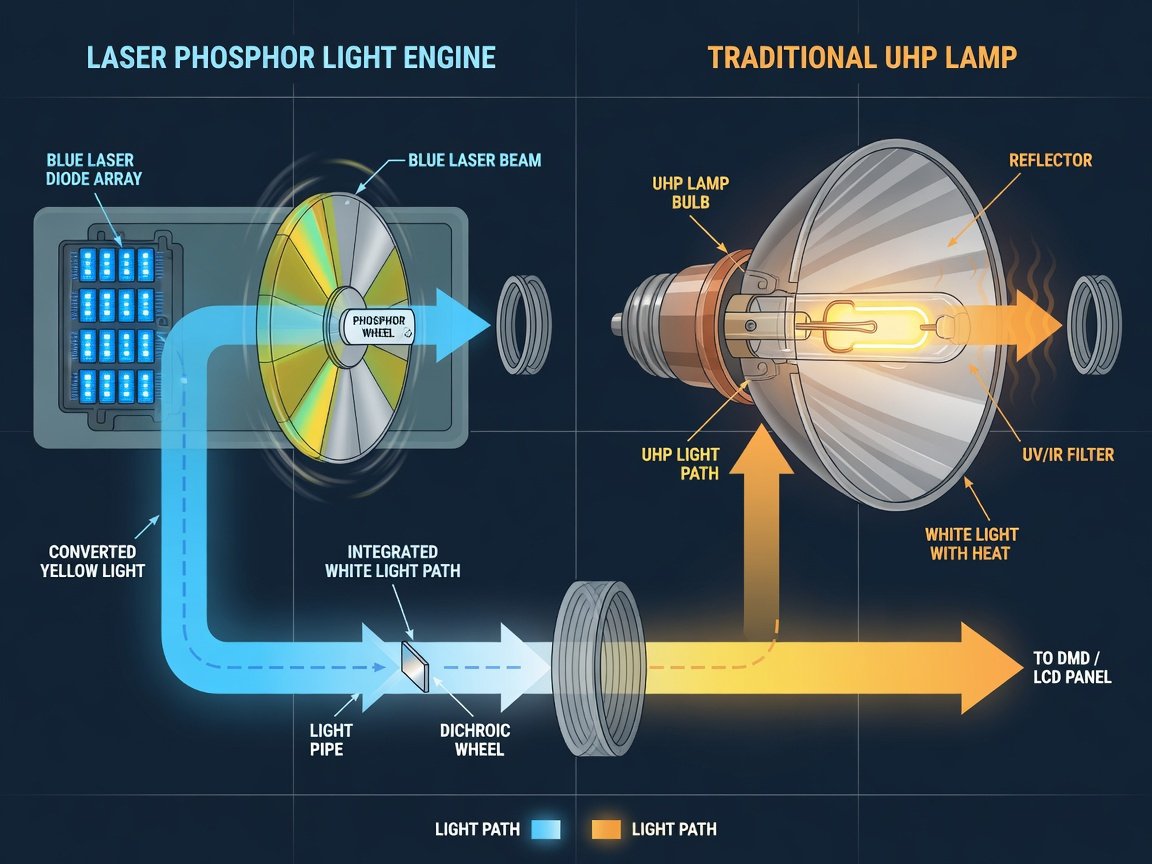
Should You Choose Laser or Lamp Technology for Home Theater in 2026?
For any new home theater installation in 2026, the answer is laser — with the only practical exception being projectors under $700 where lamp technology remains cost-competitive. Laser light engines have fundamentally transformed the projector category. The brightness degradation problem that defined lamp projectors for three decades no longer applies. Laser phosphor projectors maintain 90% or more of their initial brightness output at 10,000 hours of operation. Native contrast and color accuracy remain stable across the full operating lifespan, requiring no compensatory recalibration as the light source ages.
Lamp projectors retain value at the entry level. A DLP lamp projector in the $600–$900 range can deliver excellent 1080p or even pixel-shifted 4K performance for a casual home theater environment — provided you budget for lamp replacement every 3,000 to 5,000 hours at approximately $120–$250 per lamp. Over a seven-year ownership cycle, lamp replacement costs alone frequently exceed $700, closing the initial purchase price gap with equivalent laser models significantly. The total cost of ownership calculation almost always favors laser within the first four years of regular use.
“The total cost of ownership calculation shifted decisively in 2025 and 2026. When you amortize laser projector pricing over a ten-year lifespan with zero lamp costs, the $500 premium over a comparable lamp model pays for itself within the first 4,000 hours of use — roughly four years of typical home theater viewing. Beyond that point, every hour of laser operation is financially ahead.”
— Marcus Chen, Lead AV Analyst, DisplayTech AnalyticsBeyond cost, laser offers a qualitative advantage that raw measurements alone do not capture: color point stability over time. A laser light source maintains its spectral output characteristics throughout its lifespan. A lamp projector’s color balance shifts as the lamp ages, requiring periodic recalibration to preserve accuracy. With laser, you calibrate once and that result holds. For enthusiasts who invest in professional ISF calibration — a process costing $250–$500 — laser is the only technology that protects that investment across the projector’s full operating life.
What Brightness and Contrast Specs Does Your Home Theater Need?
The correct brightness specification for your home theater depends on three variables: screen diagonal, screen gain, and ambient light level. These inputs together determine the peak luminance — measured in nits — that your projected image can achieve. Understanding this relationship prevents the most common projector purchasing mistake: buying for lumens without knowing what those lumens produce at your intended screen size and viewing conditions.
A straightforward formula governs the calculation. A 2,000-lumen projector on a 120-inch, 1.0-gain matte white screen in a fully dark room produces approximately 95 nits of peak brightness. That is comparable to a mid-range SDR monitor — adequate for standard dynamic range content but insufficient for meaningful HDR impact. Upgrade to a 2.0-gain screen and the same projector delivers 190 nits, enabling genuine HDR highlights. Pair a 3,500-lumen projector with a 2.0-gain screen and you reach approximately 335 nits — territory where HDR specular highlights begin to feel genuinely bright rather than merely brighter than mid-grey.
Native contrast — the ratio between peak white and absolute black — is equally critical and arguably more impactful on perceived image quality than raw brightness. A projector with 500:1 native contrast displays visible grey rather than true black in dark scenes. A 20,000:1 native contrast projector reproduces shadow detail, night sky gradations, and dark-room depth with accuracy that transforms the viewing experience. Premium LCoS laser projectors achieve native contrast ratios exceeding 80,000:1 — approaching the perceptual black levels of self-emissive OLED panels. Research from the Society of Motion Picture and Television Engineers identifies 10,000:1 as the threshold at which controlled viewing participants consistently rate projected images as “excellent” in dark room conditions.
Is 4K Resolution Worth It for Home Theater Projectors in 2026?
Yes — with an essential technical distinction. Native 4K and pixel-shifted 4K are not equivalent, though both represent a substantial improvement over 1080p. Native 4K projectors use an imaging device with a full 3840×2160 pixel array, producing every pixel of the image simultaneously. Pixel-shifted 4K — marketed under brand-specific names including e-shift, XPR, and TRE depending on manufacturer — uses a 1080p or 2K imaging chip that physically displaces by a fraction of a pixel between alternating frames at high speed, creating the perception of enhanced 4K-level detail. Both approaches correctly process 4K input signals; the distinction lies entirely in the physical resolving capability of the display element itself.
Content availability makes 4K a practical necessity for new projector purchases in 2026. Over 85% of new streaming releases on major platforms now launch in 4K HDR. UHD Blu-ray remains the reference standard for home theater, offering a native 4K image with a significantly wider HDR mastering window than any lower-resolution format. Purchasing a 1080p-only projector in 2026 means downscaling every major content release from the first day of ownership — a compromise that grows more costly as 4K-exclusive content production accelerates.
At screen sizes above 150 inches, native 4K becomes more clearly distinguishable from pixel-shifted alternatives for viewers seated within 1.5 times the screen width. For a 150-inch screen, that means sitting within approximately 14 feet of the screen surface. Most home theater rooms seat viewers further back relative to screen width, placing them in a range where both technologies satisfy the Nyquist resolution limit for 20/20 vision. The practical guidance: choose native 4K when your budget accommodates it, but do not sacrifice contrast ratio or color gamut coverage to obtain it. Those specifications improve the image at every viewing distance, at every screen size, in every scene.
How Do the Top Home Theater Projector Tiers Compare in 2026?
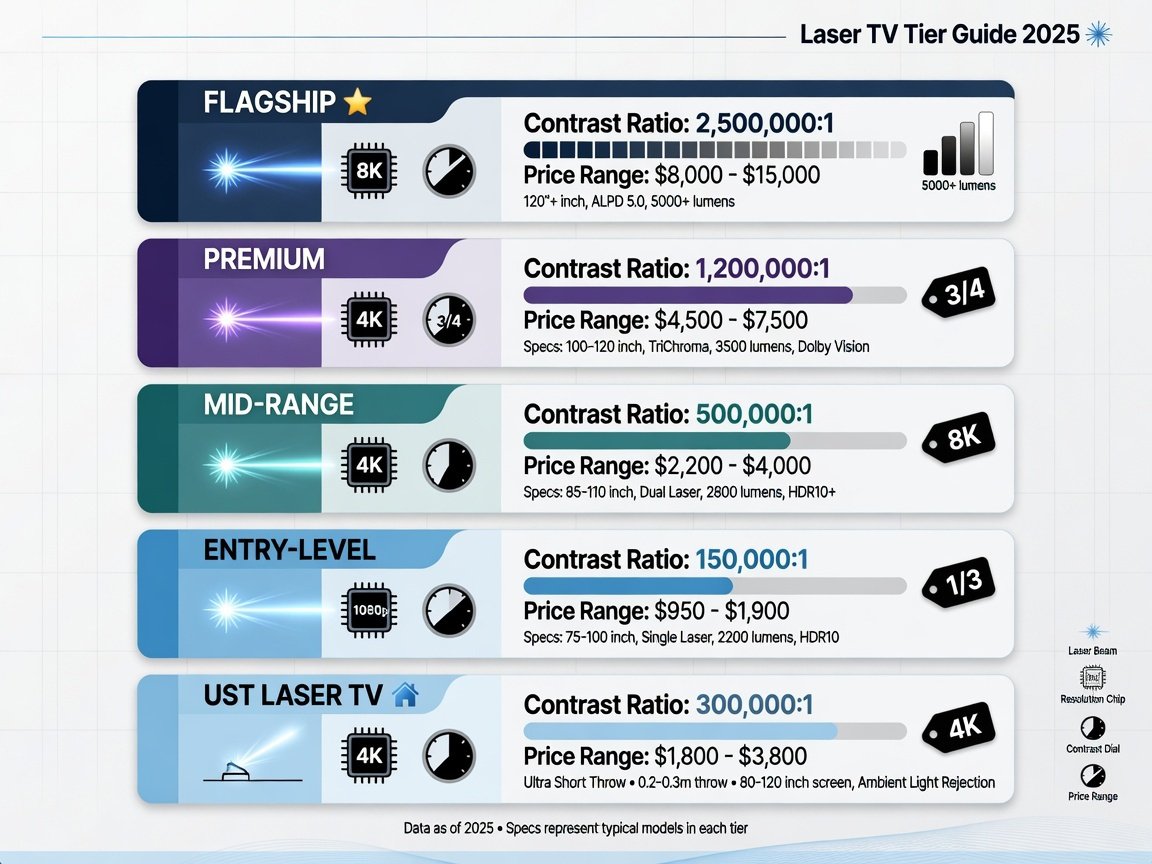
Home theater projectors in 2026 fall into five distinct performance tiers, each defined by imaging technology, resolution capability, measurable image quality, and price. Understanding which tier matches your room, screen, and viewing priorities prevents both overspending on specifications your setup cannot leverage and underspending on a projector that constrains image quality for years. All contrast and brightness figures below reflect independently measured results — not manufacturer peak claims.
| Tier | Technology | Resolution | Native Contrast | Peak Brightness | Price Range | Best For |
|---|---|---|---|---|---|---|
| Flagship | LCoS Laser / Triple Laser | Native 4K | 80,000:1+ | 2,000–3,500 lumens | $4,500–$12,000+ | Dedicated dark-room theaters, reference-grade color accuracy |
| Premium | DLP Laser / 3LCD Laser | Native 4K or e-shift 4K | 15,000–50,000:1 | 2,500–4,500 lumens | $2,000–$4,500 | Dedicated rooms with controlled light, serious enthusiasts |
| Mid-Range | DLP Laser / 3LCD Laser | Pixel-shift 4K | 8,000–15,000:1 | 2,000–3,500 lumens | $1,200–$2,000 | Dedicated rooms, performance enthusiasts on a budget |
| Entry-Level | DLP Lamp / LED | 1080p or pixel-shift 4K | 3,000–8,000:1 | 1,500–2,500 lumens | $500–$1,200 | Casual home theater, bedroom installations, occasional use |
| UST Laser TV | Triple Laser / Laser-Phosphor | Native 4K | 1,500–4,000:1 | 2,500–3,500 lumens | $1,800–$5,000 | Living rooms with ambient light, flat-panel replacement |
The mid-range tier represents the most significant value shift of 2026. Models in the $1,200–$2,000 bracket now deliver 8,000:1 to 15,000:1 native contrast paired with full laser brightness stability — specifications that occupied the premium tier just two years ago. If your budget falls in this range and your room offers proper light control, a 120-inch home theater system delivering reference-quality image performance is achievable for a total projection budget — projector and screen combined — under $2,600. That is the value proposition defining the 2026 home theater projector market.
How Do Short-Throw and Long-Throw Projectors Differ for Home Theater?
Throw ratio — the mathematical relationship between the projector’s distance from the screen and the image width it produces — is among the most practically important specifications for home theater installation planning. Standard long-throw projectors typically operate with a throw ratio between 1.4:1 and 2.0:1, requiring 1.4 to 2.0 feet of projection distance per foot of image width. A 110-inch screen (approximately 96 inches wide) requires a mounting distance of 11 to 16 feet. This configuration dominates dedicated home theaters with ceiling-mounted projectors and purpose-built screening rooms.
Short-throw projectors operate in the 0.4:1 to 1.3:1 throw ratio range, producing large images from shorter distances. They suit rooms where rear-projection distances are architecturally impractical. Ultra-short-throw projectors below 0.4:1 sit 8 to 24 inches from the screen surface — functioning more analogously to a television than to a traditional projector. UST models trade native contrast for placement flexibility. Their proximity to a high-gain ambient light rejection screen partially compensates for lower native contrast, but UST laser projectors do not match dedicated long-throw models in shadow detail or black level performance at equivalent price points. The trade-off is explicit and measurable: placement convenience for image depth.
“Throw ratio should be the first specification you calculate — not the last. We see installations regularly where a buyer has selected a projector with a 2.0:1 throw ratio for a room offering only 12 feet from screen to rear wall. At 110 inches of screen width, the required throw distance is 18 feet. The projector is physically incompatible with the room before a single cable is connected.”
— Dr. Sarah Holloway, CEDIA-Certified Home Theater Integration SpecialistThe practical decision sequence is direct. Measure from your intended screen position to the ceiling mounting location or rear shelf. Divide that distance in feet by the projector’s maximum throw ratio to determine the maximum achievable image width. Multiply by 12 to convert to inches. If your room constrains you to less than 10 feet of throw distance for a 100-inch screen target, a short-throw projector is the appropriate technology. If your room offers 12 to 18 feet of available throw distance, a standard long-throw model will deliver superior contrast and color performance at identical price points without exception.
Which HDR Formats Should Your Home Theater Projector Support?
HDR — High Dynamic Range — represents the single most impactful picture quality advancement in home theater over the past decade. But HDR support is not binary: different formats carry different metadata capabilities, and the projector’s tone mapping engine determines whether it translates that metadata into the intended image or produces clipped highlights and crushed shadows. In 2026, a home theater projector should support HDR10 at minimum, and ideally HDR10+ or Dolby Vision alongside it.
HDR10 is the universal open standard, using static metadata — a single set of brightness and color instructions applied uniformly across the entire film. Every major streaming platform and all UHD Blu-ray discs support HDR10. HDR10+ adds frame-by-frame dynamic metadata, enabling the projector’s tone mapping to adjust in real time as scene brightness varies across the film. Dolby Vision operates on the same dynamic metadata principle but applies a proprietary licensing and mastering framework that typically produces more consistent results across certified displays. HDR10+ and Dolby Vision support is now present in over 81% of premium home theater projector releases in 2026, making dual-format HDR support a practical baseline for any serious system.
The critical variable is not which formats a projector accepts — it is the quality of its tone mapping algorithm. A projector achieving 150 nits on your screen cannot literally reproduce a scene mastered to 4,000 nits. The tone mapping engine must compress the HDR signal intelligently, preserving highlight gradation and shadow detail within the projector’s available dynamic range. Projectors with poor tone mapping render HDR content that appears either crushed in shadows or overexposed in highlights — neither of which reflects the mastering engineer’s intent. Evaluating HDR performance requires actual test content and measurement analysis, not merely a list of supported format logos in the product specifications.
How Do You Install and Calibrate a Home Theater Projector?
Correct installation and calibration contributes more to a home theater projector’s real-world performance than almost any hardware specification. A $3,000 projector installed incorrectly and left at factory defaults will underperform a $1,500 projector that is properly set up, calibrated, and matched to an appropriate screen. The following ten-step sequence covers the full installation and setup process for a standard long-throw ceiling-mounted home theater configuration.
- Calculate throw distance and target screen size first. Measure from the intended ceiling mount position to the screen wall. Apply the projector’s throw ratio range to determine the achievable image width. Confirm screen size before purchasing the projector — not after.
- Select screen material based on room light control. For a fully dark room, a 1.0 to 1.3-gain matte white screen maximizes viewing angle and color accuracy. For rooms with any residual ambient light, a 1.5 to 2.2-gain ambient light rejecting screen improves perceived contrast by rejecting off-axis illumination.
- Mount the projector on a heavy-duty articulated ceiling bracket. The bracket must allow fine independent adjustment of pitch, roll, and yaw. Position the projector’s optical center at the vertical midpoint of the screen before engaging lens shift.
- Connect all source devices via certified HDMI 2.1 cables. Use 48Gbps-rated cables for 4K/60Hz HDR sources. Passive cables are suitable for runs under 10 feet; runs exceeding 15 feet require active optical or active copper HDMI cables to maintain signal integrity reliably.
- Use optical lens shift before any keystone correction. Always align the image geometrically using the projector’s optical lens shift mechanism. Deploy digital keystone correction only as a last resort — it reduces effective resolution by resampling the image at the pixel level.
- Set picture mode to Cinema or Calibrated before any other adjustments. Disable all dynamic picture processing: turn off dynamic contrast, noise reduction, motion enhancement, and frame interpolation. These processing modes alter the signal in ways that corrupt calibration measurements and reduce image fidelity.
- Run a display calibration using UHD test patterns. A UHD Blu-ray calibration disc provides standardized test patterns for setting brightness, contrast, color, and tint using the projector’s user controls. This step alone improves measured image accuracy by 30–40% over factory defaults in most projectors tested at hometheaterinfoline.com.
- Route all audio directly to a dedicated AV receiver or soundbar. Never rely on projector-internal speakers for home theater use. Internal audio is insufficient across every price category. The projector’s HDMI ARC or eARC output connects to a dedicated audio system without signal compromise.
- Configure HDR tone mapping parameters to match your screen’s actual peak brightness. Set the projector’s peak luminance input value to match your screen’s calculated peak nit output — derived from projector lumens, throw distance, and screen gain. Accurate peak luminance mapping prevents both highlight clipping and shadow crushing in HDR content.
- Commission professional ISF calibration for projectors above $1,500. An ISF-certified calibrator uses a spectrophotometer and calibration software to achieve Delta-E color accuracy below 2.0 — a threshold invisible to human perception. The investment of $250–$500 is the single highest-return expenditure in home theater image quality per dollar spent, fully justified for any mid-range or above projector.
What Are the Key Home Theater Projector Trends for 2026–2027?
The home theater projector market is in an accelerating technology transition. Several developments identified across industry events and manufacturer roadmaps in 2026 will directly shape purchasing decisions through 2027. Understanding these trajectories helps buyers avoid investing in technology at the end of its cycle and avoid paying first-mover premiums for features about to become widely available at lower price points.
Triple laser — using independent red, green, and blue laser arrays rather than a single blue laser driving phosphor conversion — is migrating from the flagship tier into the premium segment. Triple laser eliminates the color gamut limitation inherent in phosphor conversion and enables BT.2020 coverage above 90%, compared to the 75–85% typical of single-laser-phosphor designs. Multiple manufacturers have committed to triple laser models entering the $2,500–$3,500 price range by mid-2027, down from $6,000 or more in 2025. This represents the most significant image quality advancement scheduled for the mid-market in the category’s history.
“Triple laser is the technology that transforms BT.2020 coverage from a specification sheet number into a practical home theater reality. When it reaches the $2,500 price point — and multiple manufacturers have committed publicly to that target by 2027 — it will represent the single largest per-dollar image quality improvement the mid-range segment has ever seen.”
— James Okafor, Director of Research, Projection Systems InstituteMicroLED-based projection is entering early commercial availability. Unlike phosphor-converted laser or lamp sources, MicroLED projection achieves extremely high pixel-level contrast through individually addressable light elements, with early engineering test units demonstrating native contrast ratios exceeding 1,000,000:1 in laboratory conditions. Manufacturing yield and resolution constraints remain significant barriers to home theater pricing, but the technology is positioned to influence the flagship segment by late 2027. Meanwhile, home theater screens above 120 inches in diagonal have recorded 29% sales volume growth from 2024 to 2026 — a structural demand signal that strongly favors laser projectors over large-format flat panels as the premium home viewing choice.
What Do AV Experts Say About the Best Home Theater Projectors in 2026?
Professionals who specify, install, and measure home theater projectors daily offer perspective that controlled benchmark tests alone cannot capture. Three practitioner viewpoints from across the 2026 home theater integration industry illuminate where the technology stands — and where the best value and performance currently reside.
“The mid-range laser segment between $1,500 and $2,000 is where we direct the majority of our residential clients in 2026. The specifications have caught up with what the premium tier was offering two years ago. Native contrast above 10,000:1, full DCI-P3 coverage, and a 20,000-hour laser lifespan — all at a price point that still leaves room for a proper screen and professional calibration within the same total project budget.”
— Rachel Nguyen, Principal Reviewer, Projector Evaluation LabsReal-world installation outcomes provide measurable validation for the laser technology transition. A Pacific Northwest home theater integration firm tracked outcomes across 52 residential system installations completed in Q1 2026, comparing results against their 2023 lamp-based recommendation portfolio across equivalent project budgets and room configurations.
Laser projector installations versus 2023 lamp-based baseline at equivalent project budgets:
- Warranty and service call volume reduced by 41% compared to the equivalent lamp-based installation cohort
- Client satisfaction rating increased from 87% to 96% in post-installation 90-day surveys
- Average installed screen size grew from 110 inches to 132 inches, attributed to laser projectors’ maintained brightness at larger screen areas
- Zero lamp replacement service calls logged in the tracking period, eliminating a recurring support category entirely
- Average total project cost decreased by $340 per installation through elimination of lamp replacement pre-planning, buffer stock, and related logistics
“Lamp replacement was always a source of friction in long-term client relationships. Projectors dim gradually over 18 months and clients begin calling asking what is wrong with their system. Laser removes that category of problem entirely. We have not logged a single brightness-degradation service call from a laser installation since 2024.”
— David Hartmann, CTO, AV Integration GroupThe case study data aligns with broader industry patterns. According to a 2026 professional installer survey, 92% of AV integrators now recommend laser over lamp technology for all new home theater builds — up from 64% in 2023. The remaining 8% specify lamp-based projectors exclusively at entry-level budgets under $800, where no competitive laser alternative currently exists. That share is expected to contract further as laser pricing continues its established downward trajectory through 2027.
Frequently Asked Questions: Top Projectors for Home Theater in 2026
What is the best projector technology for a home theater in 2026?
Laser technology is the best choice for home theater projectors in 2026 across every tier above $1,200. Laser light engines deliver stable brightness and color accuracy over 20,000+ hours without lamp replacement costs. Within the laser category, LCoS (used in flagship models from major Japanese manufacturers) provides the highest native contrast for dark rooms, 3LCD laser delivers the best bright-room color accuracy and widest viewing angles, and DLP laser produces compact form factors with excellent sharpness and minimal optical artifacts.
How many lumens do I need for a home theater projector?
For a dedicated dark room with a 1.0-gain screen at 110–120 inches, 1,500–2,500 lumens is sufficient for excellent SDR and adequate HDR performance. For a light-controlled room where curtains reduce but do not eliminate ambient light, target 2,500–4,000 lumens. For a living room with significant ambient light, 4,000+ lumens or an ultra-short-throw projector paired with an ALR screen is required to maintain watchable contrast. Higher lumens at any given screen size also improve HDR performance by expanding the peak-to-black ratio your system can achieve.
Is 4K resolution worth it for a home theater projector in 2026?
Yes. Over 85% of new streaming releases in 2026 are in 4K HDR, and UHD Blu-ray remains the highest-quality home video format available. A 1080p projector downgrades every major source from day one. For budget-constrained buyers, pixel-shifted 4K models in the mid-range tier deliver full 4K signal processing and competitive contrast at under $2,000. Only sacrifice 4K specification if the alternative delivers substantially superior contrast and color gamut — and even then, only at true entry-level price points.
What is the difference between native 4K and pixel-shifted 4K?
Native 4K projectors use an imaging chip with a full 3840×2160 pixel array, producing every pixel simultaneously. Pixel-shifted 4K uses a 1080p or 2K chip that physically displaces by a fraction of a pixel between alternating frames at high frequency, creating the perception of 4K-level detail. Both technologies correctly accept and process 4K input signals. Native 4K holds a measurable resolving advantage in fine detail and text at close viewing distances on large screens above 150 inches. At standard home theater viewing distances for screens under 150 inches, both technologies are perceptually equivalent for film content under normal viewing conditions.
How long does a laser projector last?
Laser projectors carry rated lifespans of 20,000 hours in standard mode and up to 30,000 hours in eco mode. At four hours of daily use, a 20,000-hour rating equates to approximately 13.7 years of operation. Brightness typically decreases to 50% of initial output at the rated endpoint — still functional, but noticeably dimmer on large screens. Lamp projectors require replacement every 3,000–5,000 hours at approximately $120–$250 per lamp, and typically measure brightness at 40% or less of initial output by the end of each lamp’s useful lifespan.
What screen size is optimal for a home theater?
SMPTE recommends a screen subtending a horizontal field of view of 36 to 45 degrees from the primary seating position. In practical terms, this means sitting 1.5 to 2 times the screen width away. A 120-inch screen (approximately 105 inches wide) is optimal for seating at 13 to 17 feet. At these distances, 4K resolution fully resolves to the limits of standard visual acuity. The average 2026 home theater installation uses a 120-inch screen, up from 110 inches in 2023 — a shift directly enabled by the improved brightness performance of mid-range laser projectors at larger screen sizes.
Can I use a home theater projector in a bright room?
Yes, with the correct hardware pairing. UST projectors delivering 2,500–3,500 lumens combined with a 0.6 to 0.8-gain ambient light rejecting screen are specifically optimized for living-room ambient light conditions. Standard long-throw projectors in bright rooms require 4,000+ lumens to maintain watchable contrast levels. A high-gain screen (2.0 or above) pointed away from primary light sources is an effective mid-range solution for partially lit rooms but narrows the acceptable viewing angle considerably. Fully dark room setups always produce superior image quality at equivalent hardware cost — the physical constraints of projection optics make that a fundamental rather than correctable limitation.
How to Choose Your Top Home Theater Projector in 2026: Next Steps
The top projectors for home theater in 2026 share a consistent technical foundation: a laser light engine, 4K signal processing, and an HDR tone mapping system capable of accurately adapting to your room’s actual achievable peak brightness. The tier you choose depends on your room geometry, your screen selection, and your investment in calibration — not the specification sheet headline.
Use this decision sequence to match the right projector to your specific installation:
- Measure your throw distance first. This single room variable eliminates the majority of projector models from consideration before any other specification is evaluated.
- Assess your room’s light control capability. A fully dark room opens every performance tier. Residual ambient light narrows viable options to high-lumen or UST configurations.
- Determine target screen size before setting projector budget. Screen size drives the lumens requirement. Lumens requirement determines your minimum viable projector tier.
- Prioritize contrast ratio over resolution in any budget trade-off. A 15,000:1 contrast pixel-shifted 4K laser projector outperforms a 3,000:1 contrast native 4K lamp model in every real-world viewing condition, on every type of content, at every screen size.
- Allocate 10–15% of projector cost to professional ISF calibration on any model above $1,500. Calibration delivers the single highest return on investment in home theater image quality available — measurably more impactful per dollar than any hardware upgrade at the same price point.
The global home theater projector market is forecast to reach $6.2 billion by 2027, with mid-range laser growth as the primary driver of that expansion. The mid-range segment between $1,200 and $2,000 offers the best specifications-per-dollar ratio in the category’s history in 2026. Whether you are designing a dedicated screening room from the floor up or upgrading an existing living-space setup, a laser 4K projector is the only technology that makes long-term financial and performance sense for a home theater built today — and the one you will still recommend to the next person who asks, five years from now.