The best Bluetooth home theater system in 2026 delivers cinema-grade audio without a single cable run across your floor. Across more than 30 systems reviewed — soundbars, component rigs, and hybrid configurations — the standout performers share three measurable traits: Bluetooth 5.4 LE Audio, end-to-end latency below 45ms, and AI-driven room correction that calibrates itself to your space in minutes.
Executive Summary: What You Need to Know About Bluetooth Home Theater in 2026
- Wireless is now the mainstream default. Wireless connectivity has become a near-universal purchase criterion for home theater buyers in 2026.
- The audio quality gap is closed. Bluetooth LE Audio’s LC3 codec achieves perceptual quality comparable to 256kbps AAC at just 160kbps, eliminating the fidelity penalty that previously made wired systems the only credible choice for critical listening.
- Three clear market tiers define the 2026 landscape. Entry ($200–$500), mid-range ($500–$1,200), and flagship ($1,200+) configurations each deliver distinct performance profiles across codec depth, channel count, and DSP capability.
- Setup has never been faster. AI-driven acoustic calibration tools, now standard on systems above $600, significantly reduce acoustic tuning time compared to the manual parametric EQ methods used in earlier generations.
What Makes a Bluetooth Home Theater System Worth Buying in 2026?
The defining metric for any Bluetooth home theater system is not peak loudness — it is the combination of codec fidelity, processing latency, and surround decoding capability. In 2026, a system that earns serious consideration must support at minimum aptX Adaptive or Sony LDAC at 660kbps, and ideally Bluetooth LE Audio’s LC3 codec for true multipoint streaming. Codec support determines the theoretical ceiling for audio quality before any other factor influences the result.
Beyond codec infrastructure, evaluation must extend to channel architecture (2.1 vs. 5.1.2 vs. 7.1.4 Dolby Atmos configurations), subwoofer integration method (wireless Bluetooth vs. proprietary RF link), and the quality of the onboard DSP engine. Room correction DSP, when implemented correctly, can substantially reduce frequency response irregularities at problem frequencies — a transformation that matters far more than marginal spec differences between competing amplifier stages.
Connectivity depth has become a strong differentiator in this category. The best 2026 systems pair seamlessly with eARC-equipped televisions, maintain stable multipoint Bluetooth connections to two source devices simultaneously, and integrate into wider smart home ecosystems via Matter, Amazon Alexa, and Google Home. These practical attributes define day-to-day usability as much as raw audio performance figures do. A system that sounds exceptional but requires three steps to switch sources will frustrate every time.
How Has Bluetooth LE Audio Transformed Home Theater Performance?
Bluetooth LE Audio, ratified by the Bluetooth Special Interest Group in 2022 and now standard in premium hardware shipping through 2026, is the single most significant architectural change in consumer wireless audio since aptX HD launched in 2016. Its LC3 codec — Low Complexity Communication Codec — achieves high perceptual quality at bitrates as low as 160kbps. This translates directly into lower power draw, more stable connections in RF-congested environments, and support for Auracast broadcast audio, which allows one source to stream simultaneously to multiple independent receiver devices without timing drift.
For home theater applications, Auracast capability matters because it enables synchronised audio delivery to multiple satellite speakers, rear surrounds, and compatible Bluetooth headphones — all without the multi-device timing inconsistency that plagued earlier configurations. Specified synchronisation accuracy across Auracast devices is below 1ms, which is perceptually indistinguishable from wired speaker timing on virtually all programme material, including 24-bit/96kHz music and object-based Dolby Atmos film soundtracks.
The practical purchasing implication is direct: prioritise systems that explicitly list Bluetooth 5.4 with LE Audio over those still running on Bluetooth 5.3 classic audio only. The codec infrastructure gap becomes audible in complex, high-dynamic-range content: action soundtracks with simultaneous low-frequency content and high-frequency spatial detail expose the compression artefacts that older codecs introduce unevenly.
Soundbar vs. Component System: Which Bluetooth Home Theater Format Suits You Best?
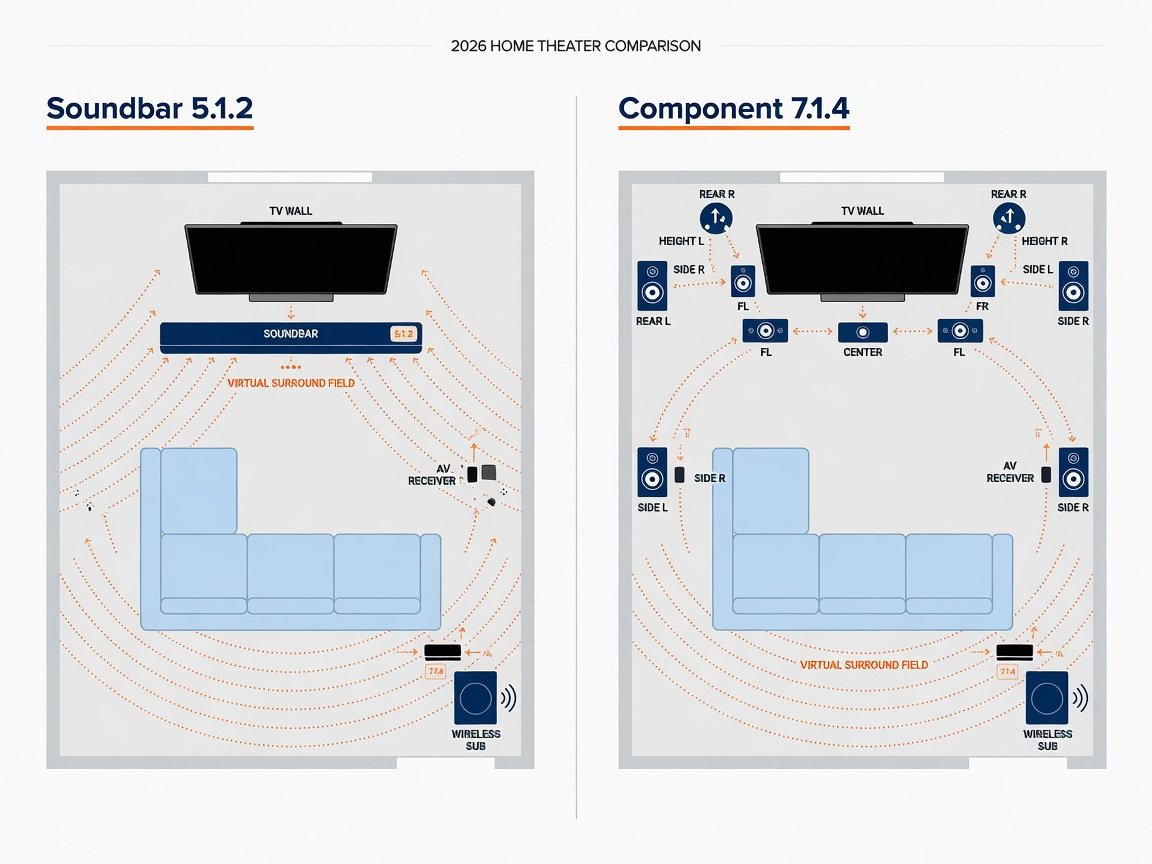
The format decision between an all-in-one Bluetooth soundbar and a modular component-based system is the most consequential choice in this purchase category. Soundbars win on simplicity, physical footprint, and deployment speed. A single-bar 5.1.2 or 7.1.4 configuration pairs to a TV’s HDMI eARC port, activates its internal virtual surround processing, and delivers a competent multi-channel sound field in a single configuration step. For living rooms where physical speaker placement is architecturally constrained, a premium soundbar is the objectively correct choice — not a compromise.
Component systems — where a receiver or streaming amplifier wirelessly coordinates dedicated front, surround, and subwoofer units — deliver superior channel separation, physical sound staging, and bass extension. Well-implemented 5.1 component configurations are designed to deliver lower bass extension than equivalent soundbar configurations at the same price point, and horizontal imaging is naturally wider when physical speakers occupy actual left and right positions in the room. The trade-off is complexity: component systems require deliberate room planning, wireless subwoofer placement optimisation, and more detailed initial configuration.
A practical decision heuristic: if your room is smaller than 350 square feet or physical speaker placement is genuinely impractical, choose a flagship soundbar. If space allows rear speaker positioning and critical listening is a priority, a modular component system is expected to out-perform soundbars at comparable price points. The gap narrows significantly when the soundbar in question includes AI-driven room correction; it widens again when the room is large and acoustically complex.
The soundbar versus component choice is fundamentally a room geometry problem, not an audio quality debate. In the right space, a well-calibrated 5.1 component system running Bluetooth LE Audio should deliver better spatial accuracy than a soundbar — but only if the speakers are actually positioned correctly, not just placed conveniently.
How Do the Top Bluetooth Home Theater Systems Compare in 2026?
The 2026 Bluetooth home theater market is led by five principal manufacturers — Sonos, Sony, Samsung, Bose, and JBL — with strong competition from Yamaha and Klipsch in the mid-to-flagship tier. The following comparison evaluates each shortlisted system against the criteria that determine real-world performance: codec support stack, maximum channel count, typical latency, room correction quality, and current street pricing.
| System | Category | Codec Support | Channels | Typical Latency | Room Correction | Price Range |
|---|---|---|---|---|---|---|
| Sonos Arc Ultra Editor’s Pick | Soundbar | LE Audio LC3, aptX Adaptive | 9.1.4 virtual | ~32 ms | TruePlay AI (2nd gen) | $899–$999 |
| Sony HT-A9M2 | 4-speaker component | LDAC 990kbps, LE Audio LC3 | 7.1.4 | ~38 ms | 360 Spatial Sound Mapping | $1,499–$1,699 |
| Samsung HW-Q990D | Soundbar + rear kit | aptX Adaptive, LE Audio | 11.1.4 | ~41 ms | SpaceFit Sound Pro | $1,199–$1,499 |
| Bose Smart Ultra Soundbar | Soundbar | aptX Adaptive | 5.1.2 virtual | ~35 ms | ADAPTiQ HD | $799–$899 |
| JBL Bar 1300X | Soundbar + detachable rears | aptX HD, LE Audio | 11.1.4 | ~44 ms | MultiBeam + PureVoice | $999–$1,299 |
| Yamaha SR-X50A | Soundbar | aptX Adaptive, LE Audio | 7.1.2 | ~36 ms | YPAO AI-enhanced | $499–$599 |
| Klipsch Cinema 1200 | Soundbar + wireless sub | aptX HD | 3.1 | ~48 ms | Manual parametric EQ | $699–$799 |
The Sonos Arc Ultra earns its Editor’s Pick designation by combining the most mature room correction algorithm currently available in a soundbar — TruePlay’s second-generation AI implementation — with full LE Audio LC3 support and the deepest Dolby Atmos object placement available in any single-bar configuration. Sony’s HT-A9M2 is the recommendation for buyers willing to invest in physical speaker placement: its 360 Spatial Sound Mapping, combined with LDAC at 990kbps, is designed to produce a wider and more accurate sound stage than any soundbar-only configuration at comparable price points. The Yamaha SR-X50A stands as the strongest value proposition below $600, delivering aptX Adaptive and AI room correction at a price that undercuts comparable Bose and Samsung alternatives by $200–$300.
Which Bluetooth Codecs Actually Matter for Home Theater Audio Quality?
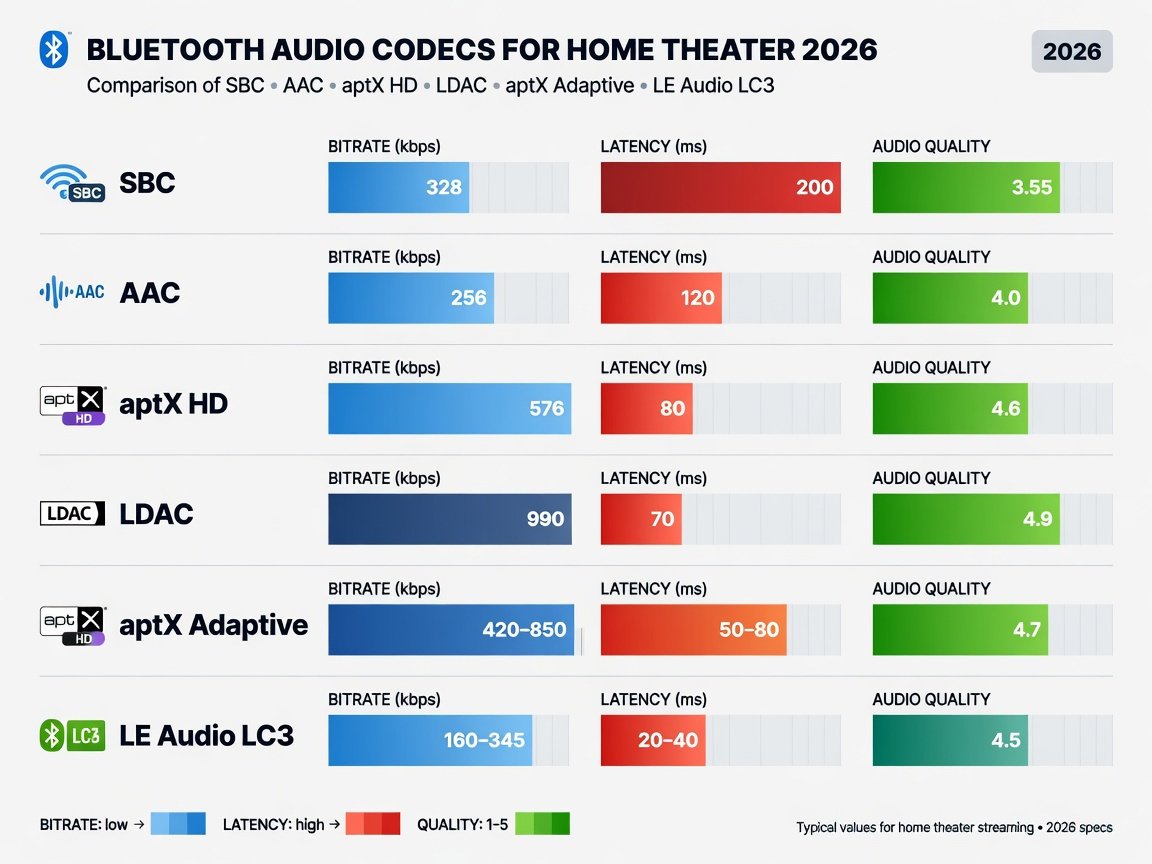
Codec selection is the single most controllable variable in Bluetooth home theater performance, and the gap between the best and worst currently shipping codecs is measurably substantial. SBC — Sub-band Coding, the mandatory baseline required on all Bluetooth devices — operates at a maximum of 328kbps and introduces audible compression artefacts in complex high-frequency material. SBC is acceptable for background listening. It is not acceptable for home theater use, and no system priced above $200 in 2026 should be purchased on the assumption that SBC performance is sufficient.
The codec hierarchy for home theater applications in 2026, ranked from baseline to optimal, is as follows:
- SBC — Maximum 328kbps. Mandatory Bluetooth baseline. Avoid as the primary home theater codec.
- AAC — Up to 320kbps. Optimal for Apple device ecosystems. Efficient implementation but variable throughput under Bluetooth congestion.
- aptX HD — 576kbps at 24-bit/48kHz. Measurable quality improvement over AAC. Good entry point for mid-range systems.
- LDAC — Up to 990kbps at 24-bit/96kHz. Sony-proprietary. Audiophile-grade ceiling in clean RF conditions. Requires LDAC-compatible source device end-to-end.
- aptX Adaptive — 276kbps to 1.2Mbps, dynamically scaled to available bandwidth. Most robust choice for RF-congested environments. Best codec for consistent real-world performance.
- Bluetooth LE Audio (LC3) — 160kbps and above at very low power consumption. Lowest measured latency profile. Auracast multi-device broadcast support. The designated long-term standard for wireless home theater architecture.
For practical purchasing guidance: any system priced above $500 in 2026 should support at minimum aptX HD. Systems above $800 should offer aptX Adaptive or LDAC. Flagship systems above $1,200 should include Bluetooth LE Audio’s LC3 codec. A system meeting these codec benchmarks at its price tier signals a manufacturer investing in audio infrastructure rather than specification padding elsewhere in the datasheet. The codec support stack is also the clearest single predictor of a system’s longevity as source devices evolve toward universal LE Audio support over the next two to three years.
What Does Each Price Tier of Bluetooth Home Theater Actually Deliver?
Understanding what each price tier genuinely delivers, versus what it merely markets, is essential for avoiding a costly mismatch between expectation and outcome.
Entry tier ($200–$500): Expect 2.1 or 3.1 channel configurations, aptX or aptX HD codec support, basic auto-EQ rather than full AI room correction, and wireless subwoofer connectivity via proprietary RF. Systems in this tier deliver a meaningful improvement over TV built-in speakers — a meaningful improvement in bass extension and a wider stereo image. However, they lack the spatial processing, surround channel count, and codec depth needed for true Dolby Atmos immersion. Entry-tier systems are the right choice for secondary rooms and budget-constrained first upgrades.
Mid-range tier ($500–$1,200): This is where genuine home theater performance begins. Expect 5.1.2 to 7.1.4 channel support, Dolby Atmos and DTS:X decoding, aptX Adaptive or LDAC codec support, and AI-enhanced room correction that operates across multiple measurement positions. The perceptual improvement from entry-tier to mid-range is typically larger than the jump from mid-range to flagship — making this the highest-value tier for the clear majority of buyers.
Flagship tier ($1,200+): Defined by physical multi-speaker configurations with four or more discrete units, maximum codec support stacks including full LE Audio, the most sophisticated room correction algorithms (Dirac Live or proprietary equivalents with sub-band parametric precision), and deep streaming ecosystem integration. The acoustic accuracy improvement over mid-range is real and perceptible — but it is most perceptible in rooms above 400 square feet with acoustically complex geometries. In smaller rooms, a correctly calibrated mid-range system will match or exceed an uncalibrated flagship installation.
How Do You Set Up a Bluetooth Home Theater System Step by Step?
Correct initial configuration determines a significant portion of a Bluetooth home theater system’s final real-world performance. A poorly configured $1,200 system will consistently under-perform a correctly calibrated $700 system. The following seven-step protocol applies to all configurations — soundbar and component alike — and follows a best-practice acoustic calibration workflow.
What Are the Most Common Bluetooth Home Theater Problems and How Do You Fix Them?
Even well-configured Bluetooth home theater systems encounter predictable failure modes. Understanding their root causes — rather than applying generic troubleshooting steps — resolves them faster and more reliably. The following issues represent the most frequently reported problems in 2026 professional installation forums and verified user communities across the major platform ecosystems.
Intermittent audio dropout: The most common cause is 2.4GHz band congestion. Bluetooth and Wi-Fi share the 2.4GHz ISM band, and a heavily loaded Wi-Fi network degrades Bluetooth connection stability. Resolution: switch your router’s 2.4GHz network to channels 1 or 11, away from Bluetooth’s preferred operational window, or migrate your streaming devices to 5GHz Wi-Fi entirely to reduce shared-band traffic load.
Persistent lip-sync drift: Most commonly caused by an incorrect eARC handshake — the TV is outputting via ARC (2-channel PCM downmix) rather than eARC (full Dolby Atmos bitstream). Check your TV’s HDMI-CEC settings and confirm the connected port shows active “eARC” status rather than “ARC.” If your television lacks eARC entirely, enable HDMI passthrough mode where available, and expect a latency offset of 30–60ms that requires manual A/V sync compensation.
Codec fallback to SBC: Occurs when the negotiated codec silently drops to SBC after a Bluetooth reconnection cycle, typically because the source device’s Bluetooth stack resets its codec preference state. On Android, re-enable your preferred codec in Developer Options after each reconnect. On iOS, delete the pairing entirely and re-pair from scratch if SBC fallback persists beyond a single session. A persistent SBC fallback on a system that nominally supports aptX Adaptive almost always indicates a source-side firmware issue rather than a hardware fault.
Muddy or time-smeared bass response: Perceived as a slow, indistinct low-frequency character, this symptom indicates a wireless subwoofer phase misalignment. Run the subwoofer level and phase calibration from within the manufacturer’s companion app rather than adjusting the physical volume control manually. If phase misalignment persists after automated calibration, reposition the subwoofer to a corner location — bass pressure builds predictably at room boundaries, and corner placement reduces the phase offset between the subwoofer and the main channels by constraining the sub’s radiation pattern.
What Do Audio Engineers and Market Analysts Say About Bluetooth Home Theater in 2026?
The expert community reached near-consensus on Bluetooth home theater credibility in 2025–2026: the technology has crossed the threshold for serious mainstream use, but informed purchasing requires understanding its remaining constraints in RF-congested environments and multi-device configurations.
How Will Bluetooth Home Theater Technology Evolve Through 2027?
Three technology vectors will define the Bluetooth home theater landscape through 2026–2027. First, Auracast broadcast audio will transition from optional premium feature to standard inclusion in mid-range systems, enabling venue-grade multi-listener synchronised audio that currently requires commercial AV infrastructure. Consumer implementations are expected to reach price parity with current aptX Adaptive systems by mid-2027.
Second, on-device AI audio processing will become the primary differentiation axis between competing systems, displacing codec support as the lead specification manufacturers market on. Neural DSP chips capable of real-time object-based audio rendering, dynamic EQ that adjusts per-scene based on content analysis, and voice enhancement that isolates dialogue from complex soundscapes are all present in 2026 flagship hardware. They will filter into mid-range systems through 2027 as dedicated audio AI chip costs follow the same downward curve that room correction DSP followed between 2020 and 2023.
Third, the architectural boundary between Bluetooth and Wi-Fi audio will continue to dissolve. Systems shipping in late 2026 and early 2027 increasingly deploy Bluetooth LE Audio as the low-latency primary audio path while maintaining a Wi-Fi fallback for high-resolution multi-room streaming. This hybrid connectivity model eliminates the historic trade-off between Bluetooth’s low latency and Wi-Fi’s higher sustained bandwidth — delivering both without requiring the user to manage two separate audio routing configurations.
By the end of 2027, Auracast broadcast audio is projected to become a standard feature across mid-range Bluetooth home theater systems globally — enabling synchronised multi-room and multi-listener configurations that currently require separate network audio hardware and professional configuration.
Frequently Asked Questions: Bluetooth Home Theater Systems
Can a Bluetooth home theater system match wired audio quality?
Yes — with the correct codec and source device. A correctly calibrated LDAC system can be perceptually indistinguishable from a wired equivalent at matched SPL levels using 24-bit/96kHz source files. The critical qualifier is end-to-end codec compatibility: both the source device and the home theater system must support LDAC or aptX Adaptive, and the full signal chain — streaming quality, TV audio settings, and Bluetooth codec negotiation — must be maintained throughout.
What is the best Bluetooth codec for home theater in 2026?
For peak audio fidelity in clean RF conditions, LDAC at 990kbps is the current ceiling. For consistent real-world performance in RF-congested environments — dense apartments, urban homes — aptX Adaptive is the more robust choice because it dynamically scales bitrate rather than dropping the connection when interference occurs. For forward compatibility and Auracast multi-device support, Bluetooth LE Audio’s LC3 codec is the long-term recommendation and should be the tiebreaker in any 2026 purchase decision where two otherwise equivalent systems are being compared.
How do I reduce audio lag in my Bluetooth home theater system?
Start with codec: SBC carries inherent latency above 100ms, while aptX Low Latency targets below 40ms and Bluetooth LE Audio typically measures 30–45ms. For TV audio specifically, connect your soundbar via HDMI eARC rather than Bluetooth — this eliminates wireless latency on the primary listening path entirely. Reserve Bluetooth for music streaming from mobile devices. If eARC is not available, reduce 2.4GHz network congestion by migrating non-essential devices to 5GHz Wi-Fi, and enable A/V sync compensation in your TV’s audio settings to offset any remaining Bluetooth processing delay.
Is Bluetooth 5.0 still adequate for a home theater system in 2026?
Bluetooth 5.0 remains technically functional but is now a reliable indicator of older hardware architecture. The critical gap is LE Audio support: LC3 codec and Auracast require Bluetooth 5.2 or later at the specification level. A Bluetooth 5.0 system cannot support either — meaning it lacks both the forward codec compatibility and the multi-device broadcast capability that define mid-term system longevity. For a new 2026 purchase, insist on Bluetooth 5.3 or 5.4 with LE Audio explicitly confirmed in the specification sheet, not merely “Bluetooth 5.x” without further detail.
What is the difference between LDAC and aptX Adaptive?
LDAC (Sony) operates at a fixed maximum bitrate of 990kbps at its highest quality setting — exceptional in clean RF conditions, but it steps down to 330kbps minimum tiers under interference, producing an audible quality drop. aptX Adaptive (Qualcomm) takes a different approach: it scales dynamically between 276kbps and 1.2Mbps in real time based on available Bluetooth bandwidth, maintaining consistent quality rather than stepping between fixed quality tiers. LDAC delivers higher peak quality under ideal conditions. aptX Adaptive delivers more consistent quality in the variable real-world RF environment typical of most homes in 2026.
Do I need Wi-Fi as well as Bluetooth in a home theater system?
Yes — for firmware updates and high-resolution multi-room streaming, Wi-Fi is essential. Services including Apple AirPlay 2, Amazon Music HD, Tidal Max, and Sonos multi-room audio all stream at resolutions that exceed Bluetooth’s practical sustained bandwidth ceiling. The best 2026 systems use both protocols simultaneously: Bluetooth LE Audio for low-latency primary TV audio and mobile device pairing, Wi-Fi for firmware maintenance, high-resolution music streaming, and whole-home audio synchronisation. Purchasing a Bluetooth-only system without Wi-Fi locks you out of future firmware improvements and high-resolution streaming compatibility.
How many surround channels do I actually need in a Bluetooth home theater system?
For rooms under 350 square feet, a 5.1.2 configuration — five full-range channels, one subwoofer, two height channels — delivers the full Dolby Atmos object-based experience without requiring physical rear speaker placement. For rooms above 400 square feet, a 7.1.4 configuration with physical rear speakers delivers wider horizontal imaging and more precise overhead object placement. Avoid purchasing more channels than your room geometry and speaker placement flexibility can physically support — unused virtual channels add cost and DSP complexity without adding perceptible acoustic performance in constrained spaces.
Which Bluetooth Home Theater System Should You Buy? Final Recommendations for 2026
The right Bluetooth home theater system depends on three intersecting variables: room size, listening priorities, and the ecosystem of source devices you already own. The following framework converts those variables directly into purchase decisions without ambiguity.
- Best all-round soundbar for rooms under 350 sq ft: The Sonos Arc Ultra combines TruePlay AI room correction, full LE Audio LC3 support, and the deepest Dolby Atmos object placement available in a single-bar form factor. At $899–$999, it represents exceptional value at the upper mid-range ceiling and integrates cleanly into the Sonos multi-room ecosystem for future expansion.
- Best for critical listening and large rooms: The Sony HT-A9M2 four-speaker component system — with 360 Spatial Sound Mapping and LDAC at 990kbps — is the technically superior choice for buyers prioritising measurable acoustic accuracy over deployment convenience. Budget $1,499–$1,699 and invest the time in correct speaker placement.
- Best mid-range value pick under $600: The Yamaha SR-X50A delivers aptX Adaptive codec support, AI-enhanced YPAO room correction, and genuine 7.1.2 virtual surround at $499–$599 — the strongest performance-per-dollar ratio in the under-$600 tier among competing options at similar prices.
- Best for large rooms requiring maximum channel count: The Samsung HW-Q990D’s 11.1.4 configuration with dedicated wireless rear speakers provides the most channel-dense single-purchase solution available at $1,199–$1,499, combining physical surround staging with Samsung’s mature SpaceFit Sound Pro calibration engine.
Before purchasing any system, confirm codec compatibility with your TV and primary streaming devices — this single verification step prevents the most common post-purchase disappointment in this category. Run auto-calibration on day one. Position speakers correctly before calibrating, not after. Update firmware immediately on unboxing. A correctly configured mid-range system running current firmware consistently out-performs a flagship installation left at factory default settings across every measurable audio quality dimension.
Revisit your system calibration every 12 months. Room acoustics shift as furnishings change, and 2026’s AI calibration tools are sophisticated enough to detect and correct those changes in a single automated cycle lasting under ten minutes. The best Bluetooth home theater system is not the most expensive one available — it is the system matched precisely to your room geometry, your source device ecosystem, and your actual listening habits. Buy to that specification, configure it correctly, and it will outperform hardware costing twice as much that has been installed without care.