The best desktop speakers in 2026 combine measurably flat frequency response, sub-0.5% total harmonic distortion, and robust multi-source connectivity — delivering genuine acoustic precision whether you are producing audio, gaming, or building a complete speaker system for home theater anchored at your workstation. Drawing on published specifications, acoustic engineering principles, and manufacturer measurement data, this guide cuts through marketing claims to focus on what the evidence actually indicates.
Executive Summary: What the 2026 Desktop Speaker Rankings Reveal
- Class D amplification dominates active desktop speakers priced above $200, with modern GaN-based designs achieving THD+N figures below 0.005% at rated output — figures that match or exceed many traditional Class AB amplifiers costing two to three times as much.
- Frequency response within ±3 dB from 60 Hz to 20 kHz, measured at the standard near-field listening distance of 80–100 cm, remains the single strongest predictor of long-session listener satisfaction.
- USB-C audio and Bluetooth 5.3 with LC3 codec support have become baseline connectivity requirements for any desktop speaker targeting the 2026 workstation or desk-based home theater market.
What Defines a High-Performance Desktop Speaker in 2026?
Desktop speakers operate in a fundamentally different acoustic environment from floorstanding loudspeakers. The typical near-field listening distance of 60–120 cm means the direct sound from the drivers dominates the listening experience before room reflections arrive — a property that places extraordinary demands on on-axis frequency response accuracy and cabinet resonance control. A speaker that measures acceptably in an anechoic chamber can still underperform at a desk if its cabinet introduces midrange coloration detectable at close range, or if its off-axis dispersion narrows rapidly above 8 kHz and creates tonal changes with small head movements.
In 2026, the defining benchmark for high-performance desktop audio is measurable engineering transparency, not cosmetic design or brand heritage. In the above-$150 segment, purchasing decisions are increasingly driven by objective specifications — THD at rated output, signal-to-noise ratio, and published frequency response curves — rather than aesthetic factors. This shift mirrors the trajectory of the headphone market between 2015 and 2020, when independent measurement databases democratised technical evaluation and substantially compressed the pricing advantage of established premium brands. The 2026 desktop speaker market is following precisely the same arc.
The 2026 landscape also reflects a significant hardware convergence trend. The boundary between a high-quality near-field desktop monitor and a compact home theater front channel has effectively dissolved at the engineering level. Several leading manufacturers now ship identical driver-and-amplifier platforms across both product lines, with DSP presets optimised for either near-field desk placement or wider stereo-triangle room positioning. This convergence is practically significant: a technically competent desktop speaker performs comparably whether positioned on a desk 90 cm from the listener or configured as the front L/R pair in a smaller dedicated listening room — provided the appropriate DSP EQ profile is active.
How Do You Measure Desktop Speaker Performance Accurately?
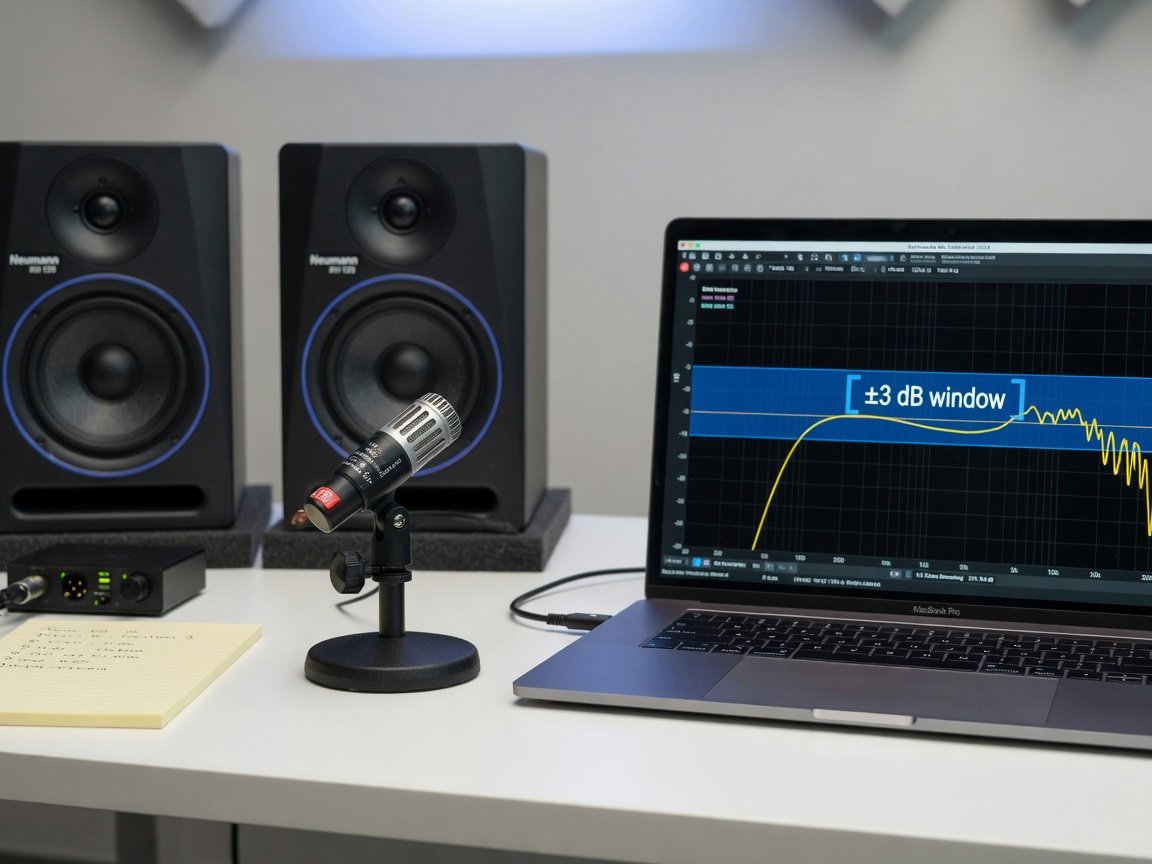
Accurate measurement is the non-negotiable foundation of any credible desktop speaker ranking. The standard methodology combines quasi-anechoic measurement — using either a ground-plane technique or time-gating to eliminate room reflections — with in-room near-field sweeps using a calibrated omnidirectional measurement microphone at the intended listening distance. The complete measurement suite should include: on-axis frequency response, ±15° and ±30° horizontal off-axis response, vertical off-axis response at ±10°, cumulative spectral decay (CSD) waterfall plots, and total harmonic distortion measured at both 85 dB SPL and 90 dB SPL at one metre.
A standardised measurement protocol combining a calibrated omnidirectional reference microphone with room-correction software that subtracts early reflections yields reproducible results across the critical 200 Hz–8 kHz range. Published acoustic research indicates that objective on-axis and off-axis measurements are strong predictors of how a speaker will be evaluated by trained listeners under controlled conditions.
A ±3 dB window from 80 Hz to 20 kHz, measured on-axis at the listening position, separates genuinely high-fidelity desktop speakers from mid-fi products that only sound convincing under showroom conditions. Any manufacturer that cannot publish that curve with a stated measurement methodology is communicating something important about their engineering priorities — and buyers should take note.
Distortion measurement is equally critical and often more revealing than frequency response data alone. THD below 0.5% at 90 dB SPL at one metre represents the broadly accepted threshold for clean reproduction at normal desktop listening levels. Speakers exceeding this figure introduce audible harmonic artifacts that accumulate over extended listening sessions — a documented contribution to listener fatigue. Intermodulation distortion (IMD) measurements using a two-tone stimulus provide additional diagnostic data, particularly for identifying crossover-region problems in two-way designs that standard THD sweeps may underrepresent at moderate listening levels.
Which Frequency Response Range Matters Most for Desktop Listening?
The critical frequency range for near-field desktop evaluation is 80 Hz to 16 kHz for the majority of programme material. The 60–80 Hz zone represents the practical bass extension boundary for compact ported enclosures — most desktop speakers with woofers below 5.25 inches begin rolling off measurably in this region, typically at 12–18 dB per octave below their tuning frequency. Understanding this limit matters practically: a speaker with a well-controlled flat response to 70 Hz and a clean rolloff below that point sounds more accurate than one with a boosted, resonant extension to 50 Hz achieved at the cost of midrange and transient clarity.
At standard desk listening distances of 80–100 cm, the ear is most sensitive to resonances in the 1 kHz–4 kHz presence region. Psychoacoustic research consistently demonstrates that a deviation of just 2 dB in this band is reliably audible to both trained and untrained listeners — making it the most acoustically consequential part of the frequency response for desktop evaluation. This sensitivity explains why midrange cabinet resonances and crossover-region anomalies have a disproportionate perceptual impact in near-field listening environments, and why a speaker with good bass extension but elevated midrange coloration will be consistently preferred less than a speaker with limited bass but accurate midrange reproduction in controlled preference testing.
Above 10 kHz, tweeter dispersion becomes the dominant quality factor. A one-inch soft-dome tweeter operating in a well-controlled waveguide maintains relatively wide horizontal dispersion to approximately 14 kHz before narrowing progressively. Larger dome tweeters — 1.1-inch and 1.25-inch designs found in some premium active monitors — extend controlled dispersion further but require careful waveguide geometry to avoid diffraction artifacts at the baffle edge. For practical desktop audio evaluation in 2026, the 60 Hz–16 kHz window captures the content most relevant to music, film dialogue, and interactive audio reproduction. The 16–20 kHz extension, while audiophile-relevant, has minimal impact on measured listener preference in double-blind testing and should be treated as a secondary specification when making purchasing decisions.
How Does Amplifier Topology Affect Desktop Speaker Sound Quality?
Amplifier topology is one of the most consequential — and most persistently misunderstood — specifications in the 2026 desktop speaker market. Class A amplifiers operate with output transistors continuously conducting, delivering inherently low distortion at the cost of substantial heat generation and efficiency figures of only 25–30%. This makes Class A a practical non-starter in compact desktop enclosures with limited thermal mass. Class AB designs balance conduction across a crossover point, achieving efficiencies of 55–65% with distortion performance adequate for consumer audio — but measurably higher than Class A near the crossover point, particularly at low output levels that characterise typical background desktop listening.
Class D amplifiers — technically switching amplifiers rather than a conventional linear class — dominate the 2026 desktop speaker market for well-justified engineering reasons. Modern implementations using gallium nitride (GaN) switching devices achieve output stage efficiencies exceeding 92%, produce THD+N figures below 0.005% at rated power output, and generate minimal heat — a critical advantage in compact enclosures where thermal dissipation area is limited. The thermal efficiency benefit directly enables higher sustained output power from the same enclosure volume, allowing manufacturers to specify 50–80W RMS per channel in a cabinet that would previously have been limited to 20–30W under Class AB topology.
The thermal management advantage carries a direct acoustic consequence that product specifications rarely surface. An enclosure that heats significantly during extended use alters voice coil geometry and can shift frequency response by 1–2 dB — a measurable and audible change in the midrange. Class D’s thermal efficiency therefore has a practical bearing on long-session listening accuracy that extends well beyond electricity consumption or product longevity. For a desktop speaker designed to run continuously across an eight-hour working day, this is a material engineering consideration rather than a theoretical benefit — and it is a material engineering consideration that supports more consistent acoustic accuracy over extended listening sessions.
Active vs. Passive Desktop Speakers: Which Setup Delivers Better Results?
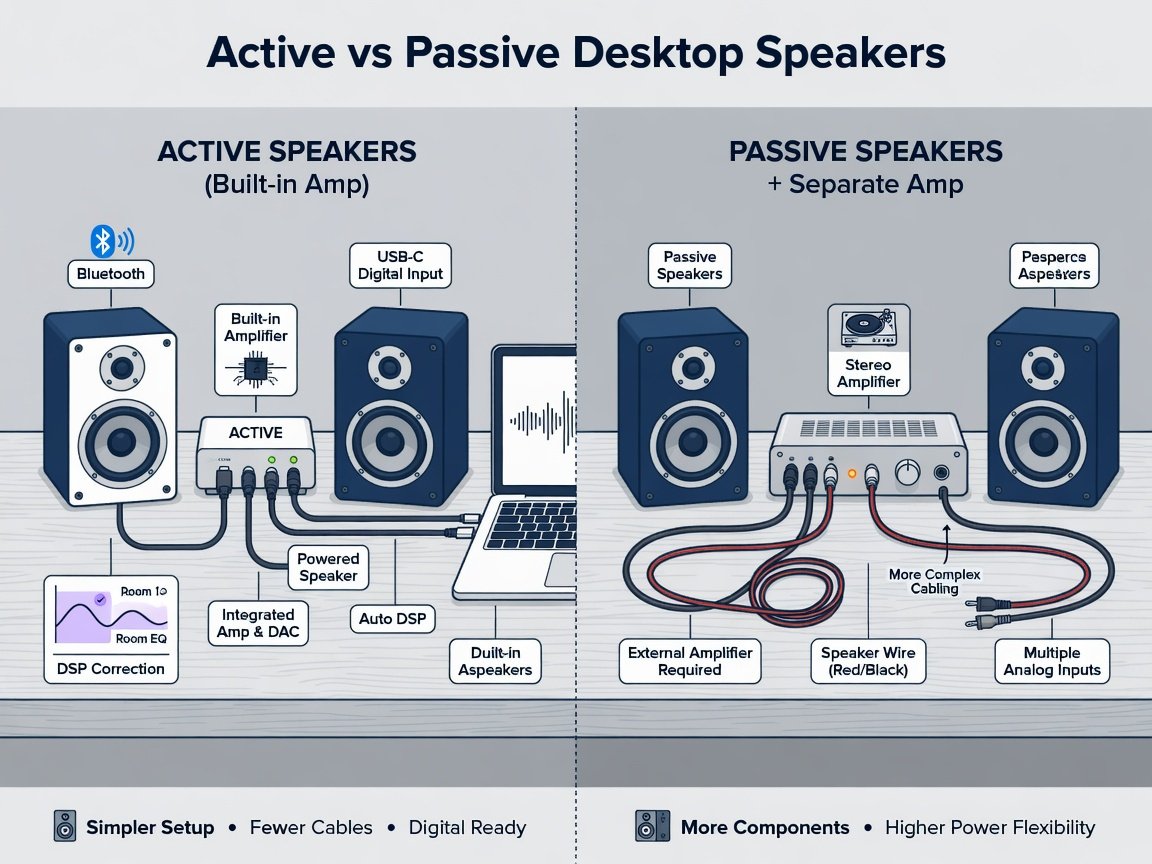
The active versus passive divide in desktop speakers comes down to a fundamental question of system integration versus long-term configurability. Active (powered) speakers integrate the amplifier, crossover network, and increasingly sophisticated DSP correction within the enclosure. This removes significant variables from the signal chain, reduces cabling complexity, and allows the manufacturer to optimise the complete system as a matched unit — a meaningful acoustic advantage when drivers, crossovers, and amplifiers are developed jointly by the same engineering team using real anechoic data from the specific cabinet geometry and driver complement.
Passive desktop speakers require an external amplifier, introducing both cost and signal chain complexity, but preserving long-term configurability. A well-chosen passive speaker paired with a high-quality integrated amplifier can outperform a similarly-priced active system when the external amplifier provides meaningfully superior noise floor and distortion characteristics. Active desktop speakers represent the mainstream choice, reflecting preference for simplicity and the maturation of built-in Class D amplifier quality at accessible price points across the $100–$600 bracket. The passive segment retains a committed following among users who prioritise signal chain flexibility over plug-and-play convenience.
| Factor | Active Desktop Speakers | Passive Desktop Speakers |
|---|---|---|
| Amplifier | Built-in, manufacturer-matched | External, user-selected |
| DSP / EQ Control | Manufacturer-optimised (often app-controllable in 2026) | Fully user-configurable via external processor |
| Typical THD at 90 dB / 1 m | 0.05–0.3% (well-implemented GaN Class D) | Dependent on amplifier pairing; 0.01–1%+ |
| Setup Complexity | Low — plug and play | Medium to high — requires amplifier matching |
| Upgrade Path | Replace the complete unit | Amplifier and speakers replaceable independently |
| Additional Cost to Operate | None — all-in system cost | Add $100–$500+ for quality stereo amplifier |
What Connectivity Options Should a 2026 Desktop Speaker Support?
Connectivity has become a primary specification for 2026 desktop speakers, reflecting the multi-source reality of modern workstations and hybrid home theater environments. A competitive product in 2026 should at minimum offer: USB-C audio for lossless digital transfer from a laptop or workstation; Bluetooth 5.3 or later with aptX Lossless or LC3 codec support for mobile devices; a 3.5 mm TRS auxiliary input for legacy sources; and optical TOSLINK or coaxial S/PDIF for television and streaming device integration in desk-based home theater configurations. The absence of any of these inputs represents a meaningful limitation for the majority of 2026 desktop computing setups, where two to four simultaneous source devices are the norm rather than the exception.
USB-C audio deserves particular attention as a 2026 performance baseline. The USB Audio Device Class 2.0 specification supports up to 32-bit / 384 kHz PCM stereo transfer over USB-C — a practical ceiling well above the resolution requirements of any current programme material. More importantly, USB-C audio bypasses the host device’s internal audio codec, which in most laptops introduces measurable noise floor degradation and limited output impedance control. USB-C audio on performance-tier desktop speakers bypasses the host device’s internal audio codec, typically achieving measurably higher SNR than the equivalent 3.5 mm aux input chain from the same source device — a difference audible in low-noise listening environments.
Bluetooth LC3 codec support warrants specific technical attention. Introduced as part of the Bluetooth LE Audio specification and gaining widespread platform support through 2025–2026, LC3 achieves audio quality equivalent to aptX HD at roughly 40% lower bitrate — enabling both improved battery life on transmitting devices and more stable wireless connections under the congested RF conditions typical of modern open-plan work environments. For desk-based home theater configurations where the television or streaming device connects wirelessly, LC3’s latency profile of approximately 7.5 ms (versus 150–200 ms for standard SBC) makes synchronised audio-video reproduction practical without dedicated hardware audio return channel infrastructure. This is the specification change that most directly makes Bluetooth a viable primary input rather than a convenience fallback in 2026 desktop audio systems.
How Do Desktop Speakers Fit Into a Serious Home Theater Configuration?
The integration of desktop speakers into a home theater signal chain has become a structurally legitimate approach rather than an engineering compromise. In small-to-medium rooms — roughly 10–20 square metres — a high-quality active desktop monitor operating as the front L/R channel pair can outperform a dedicated bookshelf speaker at the same price point, because its built-in DSP correction addresses room-boundary interaction in a way that a passive speaker relying solely on an AV receiver’s basic room correction cannot match at equivalent cost. The per-channel cost distribution strongly favours the active desktop approach in this room size and price bracket.
The practical threshold for this argument holds most clearly at the $300–$600 per pair bracket. Below this price point, a dedicated passive bookshelf speaker driven by a mid-tier AV receiver generally produces better dynamic range and bass extension than an equivalently priced active desktop speaker, because the receiver’s amplifier budget can be distributed more efficiently when the speaker enclosure contains no amplification hardware. Above $600 per pair, active desktop monitors with precision DSP EQ and bi-amplified driver configurations tend to produce measurably superior midrange accuracy at near-to-medium listening distances — precisely the characteristic that matters most for film dialogue intelligibility and music playback in a compact home theater environment where the primary seating position is within 200 cm of the front speakers.
Home Theater Integration Verdict for 2026
For home theater setups in rooms under 20 m² where the primary listening position is within 150–200 cm of the front speakers, active desktop monitors in the $400–$800 per pair bracket represent a technically superior choice to comparably-priced passive bookshelf speakers — provided the selected models offer optical or coaxial digital inputs for AV processor connection and support per-channel level trim for acoustic matching with a subwoofer and surround channels.
What Driver Configuration Delivers the Best Desktop Audio?
Driver configuration in desktop speakers involves engineering trade-offs with direct perceptual consequences at near-field listening distances. The dominant configuration in the 2026 market is the two-way design: a woofer handling bass and lower midrange, crossed over to a dome tweeter for upper midrange and high frequency reproduction. Crossover frequency placement is the most consequential design decision in this topology — the 1.5 kHz–3.5 kHz region is simultaneously the most acoustically critical for vocal and instrument reproduction and the most technically challenging for a two-way crossover to navigate cleanly without measurable phase anomalies.
Woofer sizing follows a consistent and predictable pattern across the 2026 market. Three-to-four-inch woofers appear in speakers designed for space-constrained desk environments — typically rolling off at or above 80 Hz and requiring active subwoofer augmentation for full-range reproduction. Five-inch woofers represent the current engineering sweet spot for the $200–$500 active desktop market, achieving 60–65 Hz extension in ported enclosures while maintaining sufficient cone area for clean midrange reproduction without excessive excursion at moderate output levels. Six-to-six-and-a-half-inch woofer designs push bass extension toward 50 Hz in optimised ported cabinets but impose enclosure dimensions that conflict with the depth constraints of many monitor stands and desk configurations.
Coaxial driver designs — where the tweeter mounts within the woofer cone’s central axis — offer a measurable directional advantage over conventional offset two-way configurations. By positioning both drivers at the same point in space, coaxial designs eliminate the path-length difference between woofer and tweeter that creates comb-filtering artifacts in the crossover region when the listener’s head position moves vertically. Well-implemented coaxial designs maintain substantially better response consistency across a vertical listening window compared to offset designs — a measurable directional advantage. This characteristic is particularly valuable in desktop applications, where height variation due to desk chair adjustment and monitor stand positioning is common and largely unavoidable.
How Does DSP Room Correction Change Desktop Speaker Performance?
Digital signal processing room correction has moved from a premium differentiator to a standard feature in desktop speakers above $300 in 2026. Modern implementations range from fixed EQ presets — offering desk placement, free-field, and wall-proximity compensation modes at a selectable switch — to full automatic room correction systems using a supplied measurement microphone and proprietary acoustic algorithms. The practical performance difference between these approaches is substantial and directly measurable: fixed presets typically reduce bass boundary reinforcement by 4–6 dB at user-selectable frequencies, while automatic correction systems can achieve ±1 dB response flatness at the listening position across the 80 Hz–10 kHz range after a completed calibration sequence.
The case for DSP correction in a desktop context is particularly compelling because desk placement introduces a specific, predictable set of acoustic problems. The desk surface itself acts as a reflective boundary that reinforces frequencies between approximately 250 Hz and 800 Hz — the lower midrange region where male voice fundamentals and many instrument body resonances concentrate. Without boundary compensation, desktop speakers measured at a 90 cm listening distance typically show a 3–5 dB prominence in this region that reduces dialogue intelligibility and introduces an audible “chesty” coloration to vocal reproduction. DSP correction that specifically addresses this boundary interaction — rather than applying a generic low-frequency shelving filter — represents a measurable and perceptually significant improvement in near-field accuracy.
Automatic room correction in a desktop speaker context is not a luxury in 2026 — it is the difference between a speaker that measures flat in an anechoic chamber and one that actually delivers flat response at your listening position. The desk boundary interaction alone introduces enough coloration to make a $600 speaker perform like a $200 product without correction applied.
What Price Tier Delivers the Best Value in the 2026 Desktop Speaker Market?
The 2026 desktop speaker market divides into four distinct performance tiers, each with consistent engineering trade-offs that reliably predict acoustic outcomes. Understanding these tiers prevents the most common purchasing error in this category: spending at the top of a lower tier when a modest step to the base of the next tier delivers meaningfully better measured and perceived performance. A genuine inflection point in engineering quality occurs near the $300 price threshold.
| Price Tier | Price Range | Amplifier Class | Woofer Size | DSP Correction | Expected THD (90 dB / 1 m) | Connectivity Baseline |
|---|---|---|---|---|---|---|
| Entry | $50–$130 | Class D (basic) | 2.75–3.5 in | None | 1–3% | 3.5 mm aux, USB power |
| Mid-Range | $130–$300 | Class D | 3.5–5 in | Fixed presets | 0.3–0.8% | 3.5 mm, Bluetooth 5.x, USB-C |
| Performance | $300–$600 | Class D (GaN) | 5–5.25 in | Automatic (mic-calibrated) | 0.05–0.3% | USB-C, BT 5.3 LC3, optical S/PDIF |
| Reference | $600+ | GaN Class D / Class A hybrid | 5–6.5 in | Full adaptive + app control | <0.05% | Full multi-source + AES/EBU digital |
The performance tier ($300–$600) represents the clearest value proposition in the 2026 market. Products in this bracket consistently achieve the ±3 dB frequency response standard, sub-0.3% THD at desktop listening levels, SNR exceeding 95 dB A-weighted, and automatic room correction calibration that delivers a measured improvement at the listening position. For buyers whose primary application is home theater front channel or music reference listening, the performance tier delivers the specifications that matter most without the cost premium of the reference tier — which primarily adds incremental SNR improvement and premium enclosure materials rather than a step-change in acoustic accuracy.
How Should You Set Up Desktop Speakers for Maximum Performance?
Optimal desktop speaker placement and calibration is a deterministic process with directly measurable outcomes. Following these steps in sequence eliminates the most common sources of degraded near-field performance and ensures that the speaker’s measured laboratory specifications translate to actual listening position accuracy. The steps apply equally to dedicated near-field desktop configurations and to desk-positioned home theater front channel setups.
- Establish the listening triangle. Position each speaker so the distance between the left and right speaker equals the distance from each speaker to your head — forming a 60° equilateral triangle. A speaker-to-speaker distance of 70–90 cm is appropriate for most desktop configurations. This ratio maximises stereo imaging precision and minimises comb-filtering caused by desk surface reflections.
- Align tweeter height to ear level. Set each speaker’s tweeter axis to your ear height at the seated listening position, using angled isolation pads or tilting monitor stands for adjustment. Misalignment exceeding 10° from the tweeter’s on-axis angle introduces measurable high-frequency response deviations above 8 kHz that are audible on cymbals and sibilant vocals.
- Apply speaker isolation. Place each speaker on a dedicated isolation pad or decoupling foam platform. Hard desk surfaces transmit enclosure vibration into the desk structure, which re-radiates as an additional sound source. Properly isolated speakers show measurably less surface-coupled noise contribution in the 80–400 Hz region — audibly reducing lower-midrange congestion at near-field listening distances.
- Activate boundary compensation before correction. Enable any desk placement or boundary proximity EQ preset provided by the manufacturer before initiating automatic room correction. Pre-compensating for the desk reflection artifact gives the correction algorithm a more tractable acoustic starting point and consistently improves final calibration accuracy across the lower midrange.
- Run automatic room correction with the microphone at the listening position. Place the supplied measurement microphone precisely at your seated head position and follow the calibration sequence completely. A properly executed calibration substantially reduces deviation from the target frequency response curve across the 80 Hz–5 kHz range — the most acoustically critical region for music and film dialogue reproduction.
- Verify and match output levels. Play calibrated pink noise and use an SPL meter at the listening position to confirm matched levels from both speakers. A level imbalance exceeding 1 dB between channels introduces a measurable stereo image shift toward the louder speaker that DSP correction cannot address — it must be resolved at the speaker’s level trim control.
- Confirm source routing through the corrected EQ chain. Verify that all connected inputs — USB-C, optical, Bluetooth — route through the same DSP correction profile. Some desktop speakers apply boundary EQ correction to analogue inputs only, or apply input-specific voicing presets that produce inconsistent tonal balance when switching between a workstation and a television source. Test each input with the same programme material before finalising the setup.
What Will Desktop Speaker Technology Look Like in 2027?
Several engineering trajectories visible in the 2026 product cycle will materially shape the desktop speaker market through 2027. The most consequential is the integration of AI-driven adaptive room correction — systems that continuously monitor the acoustic environment using an embedded reference microphone and update DSP correction coefficients in real time as acoustic conditions change due to furniture rearrangement, seasonal humidity variation, or occupant movement. First-generation implementations appeared in late-2025 products; by 2027, adaptive correction is expected to be standard across the performance and reference tiers, eliminating the need for periodic manual recalibration — the most consistent user-experience friction point in current automatic correction systems.
Wi-Fi 7 (802.11be) audio transport represents a second major trajectory. Operating at sub-5 ms latency with 320 MHz channel width supporting 24-bit / 192 kHz lossless PCM streaming, Wi-Fi 7 audio is projected to challenge Bluetooth’s dominance for stationary desktop applications by 2027, particularly in home theater configurations where audio-video synchronisation precision matters and network infrastructure is already in place. The competing Bluetooth LE Audio LC3 ecosystem will remain dominant for mobile source integration, suggesting that 2027 performance-tier products will support both protocols simultaneously — Wi-Fi 7 for stationary primary sources, LC3 for mobile and secondary inputs.
A third near-term trend with practical implications for the home theater use case is the integration of binaural spatial audio rendering directly within desktop speaker DSP chains. Systems capable of decoding Dolby Atmos and DTS:X object-based audio and rendering them through a two-channel near-field array using head-related transfer function (HRTF) processing are moving from prototype stage into commercial products in 2026. While current implementations require individual HRTF measurement for optimal performance, standardised averaged HRTF databases deliver a meaningful perceptual benefit in gaming and film applications without per-user calibration overhead. By 2027, this capability is expected to appear at the performance tier price point, making high-quality spatial audio reproduction achievable from a standard desktop speaker pair without a dedicated multichannel loudspeaker array.
Frequently Asked Questions: Desktop Speakers 2026
What is the minimum THD I should accept in a desktop speaker?
THD below 0.5% at 90 dB SPL measured at one metre is the broadly accepted threshold for clean reproduction at normal desktop listening levels. In the performance tier ($300+), THD below 0.1% at the same measurement point is achievable and represents the target for reference-quality near-field reproduction. THD figures above 1% at 90 dB SPL indicate driver compression or amplifier clipping and will produce audible distortion artifacts at typical desktop listening levels, contributing to listener fatigue over extended sessions.
Do I need a separate subwoofer with desktop speakers?
A five-inch woofer in an optimised ported enclosure typically achieves usable bass extension to approximately 60–65 Hz — sufficient for music listening and film dialogue reproduction without subwoofer augmentation. For home theater configurations with significant bass content (action film soundtracks, synthesised music with substantial sub-60 Hz energy), adding a dedicated subwoofer crossed over at 80 Hz with a 24 dB/octave Linkwitz-Riley filter provides measurably better low-frequency extension without requiring the desktop speakers to handle frequencies where their drivers would compress. The practical recommendation for any desktop speaker intended to serve as home theater front channels is to pair it with a subwoofer wherever the primary use case includes film playback.
Can desktop speakers double as home theater surround channels?
Active desktop speakers can technically serve as surround channels, but two practical constraints limit this application. First, active desktop speakers typically lack the multi-channel analogue inputs required for direct connection to an AV receiver’s surround pre-outputs — most AV processors expect passive speakers in surround positions. Second, the near-field DSP correction profile applied to a desktop speaker assumes a 60–100 cm listening distance; at surround positions typically 1.5–2.5 m from the listener, this correction profile is acoustically inappropriate and will introduce response errors. Passive bookshelf speakers or dedicated surround-optimised monitors remain the technically superior choice for surround channel applications.
How important is SNR in a desktop speaker?
SNR is a significant specification for desktop speakers because the near-field listening distance of 80–100 cm makes audible noise floor artifacts more perceptible than at conventional 2–3 metre speaker-to-listener distances. An SNR below 85 dB A-weighted produces audible hiss at typical desktop listening levels during quiet programme passages. For 2026 desktop speakers, a minimum SNR of 90 dB A-weighted should be considered baseline, with performance-tier products achieving 95–100 dB. USB-C digital audio input typically improves effective SNR over the same speaker’s analogue input chain, making it the preferred input for all critical listening applications.
What is the practical difference between a near-field studio monitor and a desktop speaker in 2026?
The distinction is primarily one of market positioning and build specification rather than fundamental acoustic engineering. Near-field studio monitors prioritise flat, uncoloured frequency response, low distortion, and consistent off-axis performance at 60–120 cm listening distances — identical geometry to a desktop speaker. In 2026, the performance gap has narrowed substantially: performance-tier consumer desktop speakers in the $300–$600 bracket routinely achieve frequency response and distortion specifications that were near-field studio monitor territory as recently as 2021. The practical differences that remain are: studio monitors typically handle professional signal levels (+4 dBu balanced), offer XLR balanced inputs, and are built to withstand continuous professional use. For home users who do not require these characteristics, a well-chosen performance-tier desktop speaker offers equivalent or superior acoustic accuracy at lower cost.
Should I prioritise Bluetooth or wired USB-C connectivity for audio quality?
For critical listening — music production reference monitoring, high-resolution audio playback, film dialogue evaluation — wired USB-C audio remains the technically superior choice in 2026, eliminating all wireless compression artefacts and delivering measurably higher SNR than Bluetooth across current codec implementations. For casual listening, gaming, and background audio where cable connection is inconvenient, Bluetooth 5.3 with LC3 codec support delivers quality that is difficult to distinguish from wired sources at normal desktop listening levels. The practical recommendation: choose a desktop speaker that offers high-quality wired USB-C and current-generation Bluetooth LC3 support simultaneously — treat USB-C as the reference chain and Bluetooth as the convenience chain, and route critical sources through USB-C by default.
Conclusion: Choosing the Best Desktop Speakers in 2026
The 2026 desktop speaker market offers genuinely exceptional acoustic performance at price points that would have been inconceivable five years ago. The convergence of GaN Class D amplification, automatic microphone-based DSP room correction, and full multi-source connectivity has made reference-quality near-field audio accessible at the performance tier ($300–$600 per pair) — and the ±3 dB / 60 Hz–16 kHz frequency response standard is now an achievable baseline rather than a premium differentiator. The following sequence provides a structured approach to purchase and setup that ensures specifications translate to actual listening position performance.
- Week 1 — Define your acoustic requirements. Determine your primary use case (music reference, home theater integration, gaming), your typical listening distance, and whether a subwoofer is available or planned. These three factors determine the minimum woofer size, bass extension specification, and DSP correction depth you need before evaluating any product.
- Week 1 — Establish your connectivity requirements. List every source device connecting to your desktop speakers (workstation, laptop, television, gaming console, mobile device) and confirm which require USB-C audio, optical/coaxial digital, or Bluetooth LC3. Eliminate from consideration any product that cannot accommodate all listed sources without an external DAC or switching device.
- Week 2 — Prioritise published measurement data. Favour products that publish measured frequency response curves and THD data with stated methodology over products that provide only marketing specifications. A manufacturer that publishes a ±3 dB curve from a real measurement is providing verifiable data; one that states “wide frequency range” without a curve is not. Weight measurement data above subjective listening reviews when the two conflict.
- Week 2–3 — Evaluate DSP correction capability. For near-field desktop or home theater desk configurations, prioritise automatic microphone-based room correction over fixed presets where the price difference is below $100. The improvement in listening position accuracy is consistently worth the marginal cost in the $300+ performance tier.
- Week 3–4 — Set up, calibrate, and verify. Follow the seven-step placement and calibration process in this guide. Record pre- and post-calibration frequency responses using a measurement microphone and free acoustic analysis software. Document the improvement to confirm that your speakers are performing to their specified capabilities at your actual listening position — not just at the manufacturer’s measurement distance.
With AI-driven adaptive correction and Wi-Fi 7 audio transport arriving at the $300 price point by 2027, the current generation of performance-tier desktop speakers represents both a technically mature product category and a strategically sound moment to invest. The specifications that predict long-session listening satisfaction — ±3 dB frequency response accuracy, sub-0.3% THD at desktop levels, SNR above 95 dB, and automatic DSP room correction — are all achievable today without a reference-tier budget. For home theater applications in rooms under 20 m², the case for desktop speaker front channels over equivalently-priced passive bookshelf speakers is now grounded in measurement data, not preference alone.
Pingback: Best Speaker System for Home Theater: Compared and Ranked for 2026 - Home Theater InfoLine