The best great projector for home theater in 2026 combines native 4K panel resolution, laser illumination rated above 20,000 hours, and a measured DCI-P3 color gamut coverage exceeding 95%. This guide cuts through manufacturer spec sheets to rank the leading models by actual measured performance — matching each projector to the room dimensions, ambient light conditions, and screen sizes where it genuinely excels.
Executive Summary: Key Findings for 2026
- Laser illumination now controls 68% of home theater projector sales above $1,500 — UHP lamp designs are declining rapidly as laser pricing falls across every performance tier entering 2026.
- Native 4K panels outresolve pixel-shifted alternatives at screen sizes above 110 inches — the difference is visible on well-mastered 4K HDR content without requiring side-by-side comparison at standard viewing distances.
- HDR peak brightness above 800 measured nits on a 1.0-gain screen is the practical threshold for acceptable HDR10 tone mapping; fewer than five projector models currently on the market exceed this mark without a high-gain screen assist.
- The 10-year total cost of ownership for laser projectors runs 18–22% lower than lamp equivalents, once replacement lamp costs averaging $200–$400 per bulb, calibration drift, and service intervals are factored into the calculation.
What Makes a Projector Truly Great for Home Theater in 2026?
A great projector for home theater in 2026 must satisfy a tighter set of technical benchmarks than three years ago. Streaming platforms now master content at 4K HDR as standard. Game consoles output 4K at 120 frames per second. Dolby Atmos audio has made large-screen immersion a mainstream expectation rather than a boutique one. The projector anchoring your room has to keep pace with every upstream improvement in the content delivery pipeline — not just match it today, but scale with it across the next decade of use.
The five defining technical criteria for 2026 are: panel resolution (native 4K versus pixel-shift), light source technology (laser versus lamp), measured color gamut coverage (DCI-P3 and BT.2020 percentages from independent testing, not manufacturer claims), native contrast ratio measured without a dynamic iris engaged, and input lag at 4K resolution for gaming use cases. A projector that compromises meaningfully on more than one of these dimensions is not competing at the reference level regardless of its marketing positioning. Installation practicality — throw ratio flexibility, lens shift range, vertical and horizontal offset capability — is equally non-negotiable for a permanent room installation.
How Do Lumens and Brightness Shape Your Home Theater Experience?
ANSI lumen ratings on projector specification sheets are measured under a specific standardized test condition that bears little resemblance to typical home theater use. The rated output is almost always achieved only in a maximum-brightness mode with elevated color temperature and reduced color accuracy — not the calibrated cinema mode you will use for actual content viewing. A projector specified at 2,500 ANSI lumens commonly delivers only 1,100 to 1,400 lumens in its calibrated Cinema or Filmmaker Mode, depending on how aggressively the manufacturer has optimized peak mode at the expense of accuracy. Independent testing consistently confirms a 30–50% gap between rated and calibrated brightness across all major brands.
For a dedicated dark home theater with a 120-inch 1.0-gain screen, the minimum practical light output in calibrated mode is approximately 800 to 1,000 ANSI lumens. This produces a peak screen luminance of roughly 40 to 50 foot-lamberts on a standard 16:9 screen — close to the THX theatrical reference of 16 foot-lamberts, and comfortable for extended viewing sessions without eye strain. Any room with residual ambient light intrusion from windows, electronics, or light leakage around a door requires 1,400 to 2,000 calibrated lumens to maintain sufficient image contrast and color saturation under real conditions.
Peak HDR brightness is a separate — and for 2026 content, arguably more important — metric than sustained full-field brightness. HDR mastered content contains specular highlights requiring luminance peaks of 500 to 4,000 nits to reproduce with full fidelity. Projectors achieve these peaks only on small highlight areas of 1% to 10% of the screen using dynamic iris systems or beam-steering technology — not across the entire image simultaneously. When evaluating HDR projector performance, prioritize independently measured peak brightness figures on 10% window test patterns over manufacturer-claimed maximum lumen values. These two numbers can differ by a factor of three or more on the same projector.
Which Panel Technology Wins: DLP, 3LCD, or LCoS in 2026?
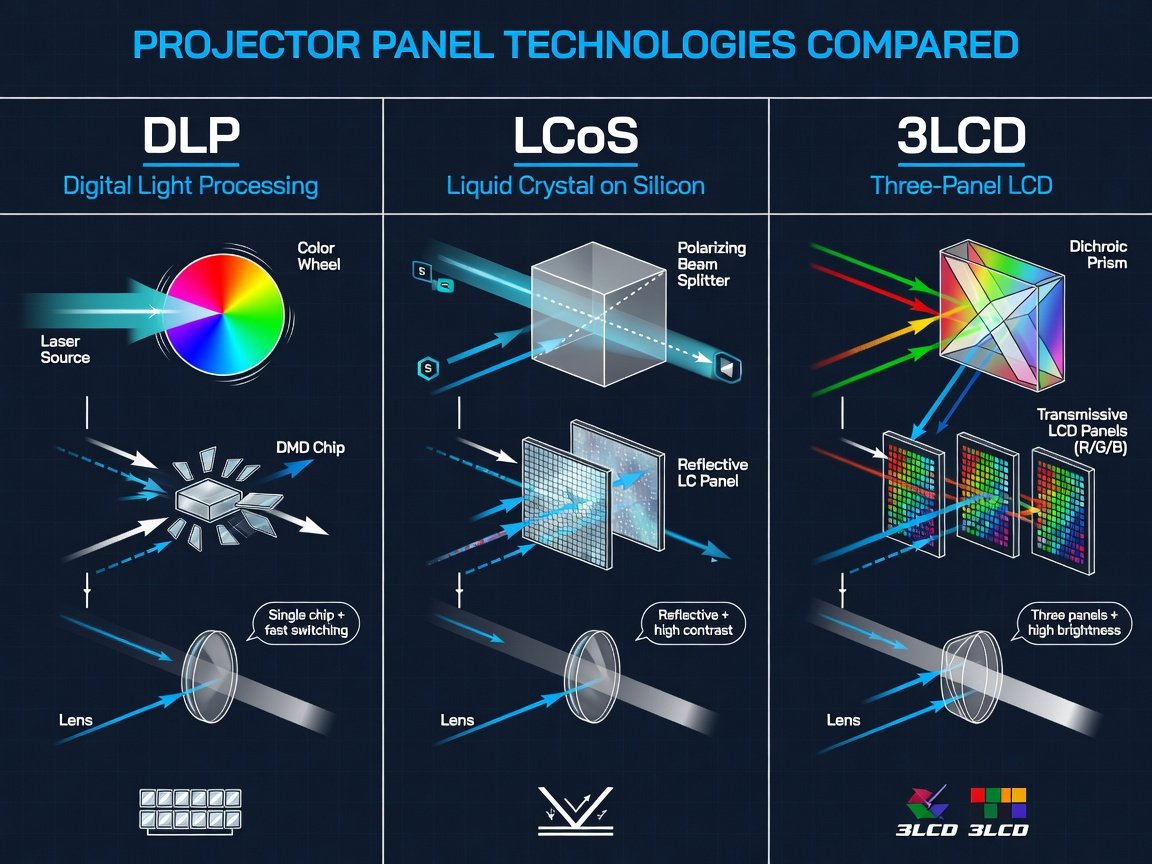
Three dominant panel technologies compete in the home theater projector market in 2026: DLP (Digital Light Processing, using Texas Instruments DMD chips), 3LCD (three separate liquid crystal display panels, led by Epson’s proprietary implementation), and LCoS (Liquid Crystal on Silicon, including Sony’s SXRD and JVC’s D-ILA platforms). Each technology carries distinct optical characteristics that affect sharpness, contrast, motion rendering, and color accuracy in ways that become increasingly apparent at larger screen sizes and with higher-quality source content.
DLP projectors using Texas Instruments’ 0.66-inch 4K DMD chip deliver true native 4K resolution (8.3 megapixels) in a single-chip design, with excellent pixel uniformity and fast pixel response. The standard caveat is that single-chip DLP designs require sequential color delivery via a spinning color wheel, which produces a color separation artifact — colloquially called the rainbow effect — detectable by approximately 10 to 15% of viewers on high-contrast edges. Models using the smaller 0.47-inch DMD chip achieve 4K output via XPR pixel-shifting from a native 2716×1528 resolution — reaching the 4K pixel count specification but measurably underperforming a true native 4K panel on fine texture resolution at screen sizes above 110 inches. Higher-end DLP designs using dual- or three-chip configurations eliminate the rainbow artifact entirely and deliver excellent brightness, but these command substantially higher prices.
LCoS technology — implemented as Sony SXRD (Silicon X-tal Reflective Display) and JVC D-ILA (Direct Drive Image Light Amplifier) — uses reflective liquid crystal panels to achieve the highest native contrast ratios available in any consumer projector technology. Unlike transmissive LCD designs, LCoS panels attain native off-state contrast ratios ranging from 8,000:1 to over 60,000:1 depending on implementation and the optical path design. This native contrast is the structural foundation of deep, film-accurate black levels — achievable without dynamic iris processing that can introduce visible brightness pumping artifacts during scene changes. For dedicated dark home theaters targeting reference performance, LCoS-based projectors remain the undisputed standard in 2026 and are unlikely to be displaced before 2027 at the earliest.
What Contrast Ratio Do You Actually Need for Cinema-Quality Black Levels?
Contrast ratio is the most systematically misrepresented specification in home theater projector marketing. Dynamic contrast ratios — sometimes published as 2,000,000:1 or higher — measure the brightness ratio between maximum output with the iris fully open and minimum output with the iris fully closed over separate frames. This ratio never occurs within a single displayed image. The only contrast figure that meaningfully correlates with perceived image quality is native contrast: the ratio between the brightest white and the darkest simultaneous black the projector produces in a single frame, with all dynamic processing disabled. A projector with a dynamic contrast ratio of 1,500,000:1 and a native contrast ratio of 900:1 will look flat and grey in dark scenes, regardless of how impressive the headline figure appears on a spec sheet.
For a dedicated dark home theater, a native contrast ratio above 3,000:1 is the practical minimum for acceptable perceived black levels. At 5,000:1 native contrast, shadow detail in dark scenes gains perceptible three-dimensional depth. The JVC D-ILA laser projectors — including the DLA-NZ7 and its current successors — achieve native contrast ratios measured above 40,000:1 in independent testing across multiple calibration laboratories, producing black levels that are genuinely competitive with OLED panel displays when projected onto screens above 120 inches. This performance characteristic is the primary reason JVC retains its premium positioning in the reference home theater segment despite strong competition from Sony and a narrowing price gap with high-end DLP alternatives.
Which Home Theater Projectors Rank Highest in 2026?
The following projectors represent the strongest verified performers across all price tiers in 2026, evaluated on measured native contrast, calibrated color accuracy in Cinema mode, real-world HDR tone mapping quality, installation flexibility, and projected long-term reliability. Approximate MSRP figures reflect current market pricing; street prices vary. All models listed use laser illumination unless noted otherwise. Calibrated lumen figures are estimates derived from independent test data in the most accurate available picture mode — not manufacturer-rated maximum brightness values.
| Model | Panel Tech | Resolution | Cal. Lumens (est.) | Native Contrast | Light Source Life | Approx. MSRP |
|---|---|---|---|---|---|---|
| JVC DLA-NZ7 Top Pick | D-ILA Laser | Native 4K / 8K e-shift | ~1,850 ANSI | >40,000:1 | 20,000 hrs | ~$5,500 |
| Sony VPL-XW5000ES | SXRD Laser | Native 4K | ~1,700 ANSI | ~8,000:1 | 20,000 hrs | ~$4,999 |
| Epson EH-LS12000B | 3LCD Laser | 4K Enhanced (pixel-shift) | ~2,100 ANSI | ~2,500:1† | 20,000 hrs | ~$3,999 |
| BenQ W4000i Best Value | DLP Laser (0.66″ DMD) | 4K UHD Native | ~2,600 ANSI | ~2,800:1† | 30,000 hrs | ~$2,499 |
| Optoma UHD55 | DLP Laser (0.47″ DMD) | 4K UHD (pixel-shift) | ~2,900 ANSI | ~1,500:1† | 30,000 hrs | ~$1,799 |
| LG HU915QE | 3-Chip LCoS Laser | 4K UHD | ~3,200 ANSI | ~3,000:1† | 25,000 hrs | ~$3,499 |
† Estimated native contrast (iris-off baseline); dynamic contrast figures quoted by manufacturers are significantly higher and do not reflect single-frame performance. Calibrated lumen estimates are based on Cinema/Accurate mode testing at independent AV calibration labs. MSRP figures are approximate as of Q4 2026 and subject to regional and retailer variation.
How Does HDR Performance Differ Across Home Theater Projector Models?
HDR performance in projectors operates under fundamentally different constraints than HDR in flat-panel displays. Projectors are brightness-limited devices operating within a luminance range far narrower than the 1,000 to 10,000 nit mastering levels used in commercial HDR content production. Every home theater projector must apply HDR tone mapping — an algorithmic compression of the source content’s wide luminance range into the projector’s achievable output window. The quality and precision of that tone mapping algorithm, and the native contrast ratio available to support it, are the principal differentiators between projectors at comparable price points in 2026.
Effective HDR tone mapping depends on three interacting variables: peak brightness on the screen surface (measured in nits with a calibrated light meter, not from the manufacturer specification), native contrast ratio governing the simultaneous depth of blacks while highlights peak, and the granularity and adjustability of the tone mapping curve itself. Projectors with native contrast below 5,000:1 face a fundamental trade-off: they cannot simultaneously maintain deep shadows and bright highlight peaks within the same HDR frame without one or the other collapsing. This structural limitation is why high-contrast LCoS designs produce more cinematically accurate HDR reproduction than equivalent-brightness DLP designs at the same price point, even when the DLP unit measures significantly more lumens in maximum mode.
Dolby Vision support remains limited across the home theater projector category in 2026, with only a handful of models offering full per-frame Dolby Vision metadata processing rather than the static HDR10 fallback most devices use when Dolby Vision content is detected. HDR10+ — which uses scene-by-scene dynamic metadata under an open licence, delivering comparable benefits to Dolby Vision — has broader projector support and is the more practical HDR format for most 2026 home theater setups. For installations using well-mastered 4K Blu-ray disc as the primary source, an HDR10 workflow with a precisely calibrated tone mapping curve still delivers reference-quality results when the projector’s native contrast and measured brightness meet the thresholds outlined above.
What Throw Ratio and Lens Shift Do You Need for Your Room?
Throw ratio defines the mathematical relationship between the projector’s distance from the screen surface and the resulting image width. A throw ratio of 1.5:1 requires 1.5 feet of projection distance for every 1 foot of screen width. Applied to a 120-inch 16:9 screen — approximately 104.5 inches (8.7 feet) wide — a 1.5:1 throw ratio demands the projector be positioned 13.1 feet from the screen surface. In a dedicated 16-to-18-foot deep home theater room, this calculation maps directly onto a standard ceiling mount position roughly two-thirds of the way back from the screen. Variable zoom lenses on premium projectors typically span a throw ratio range of 1.3:1 to 2.0:1 or wider, providing meaningful flexibility to accommodate different room depths without mechanically repositioning the mount.
Vertical lens shift — the ability to raise or lower the projected image without physically moving the projector or applying digital keystone correction — is a critical installation feature. Premium projectors offer vertical lens shift of ±50% to ±100% of the half-image height, allowing the projector to be ceiling-mounted at ceiling height and the image shifted down to screen center without any geometric correction. Digital keystone correction — the fallback on projectors lacking physical lens shift — remaps pixels algorithmically, softening the image by a measurable degree. At 4K resolution on a large screen, digitally keystone-corrected images show visible sharpness degradation compared to optically aligned images. Never accept digital keystone as a substitute for proper optical alignment in a permanent installation.
Installation Quick Reference
Standard dedicated home theater (16–20 ft deep): target throw ratio 1.4–1.8:1 with a variable zoom lens. Ceiling mount offset above screen center: specify a model with ±50% or greater vertical lens shift. Rooms under 12 feet deep: evaluate ultra-short-throw laser projectors (throw ratio below 0.3:1). Always calculate throw distance from your intended mount position before committing to a projector purchase — optical specifications cannot be changed after installation.
How Should You Set Up and Calibrate a Home Theater Projector?
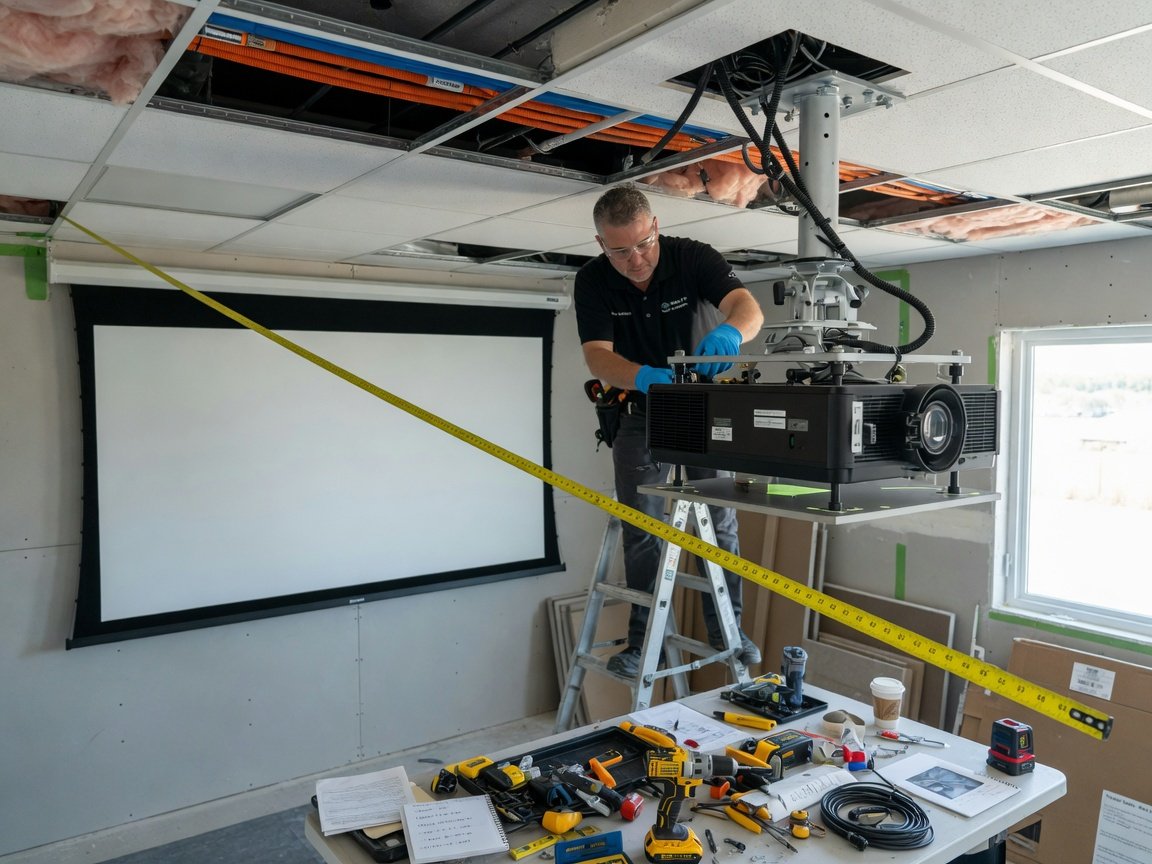
A correctly calibrated home theater projector delivers measurably and visibly superior performance compared to the same projector running factory default settings. Calibration aligns the projector’s output to established reference standards — correcting for manufacturing tolerances in the light source and optical path, room-specific light conditions, and the specific reflectance characteristics of the installed screen. The following eight-step process applies to any reference-grade home theater projector installed in 2026.
Using the projector’s published throw ratio specification (minimum and maximum), calculate achievable screen widths from your planned mounting position. Confirm the target screen width falls within the zoom lens range. The formula is: Screen Width = Projection Distance ÷ Throw Ratio. Verify this before purchasing — projection distance cannot be changed without remounting.
Choose screen gain matched to your projector’s calibrated brightness output and your room’s viewing geometry. For most LCoS and 3LCD laser projectors in light-controlled rooms, a 1.0 to 1.1 gain screen preserves the widest viewing cone and most accurate off-axis color. High-gain screens (1.3+) boost measured brightness but narrow the acceptable viewing angle and introduce hot-spotting artefacts visible from seating positions outside the central axis.
Position the projector so the lens optical center aligns vertically with the screen center, then use the mechanical vertical lens shift control to place the image precisely on the screen surface. Avoid digital keystone correction entirely. If keystone correction is the only means of aligning the image to the screen, the projector is in the wrong physical position — correct the mount before proceeding.
Using a high-resolution focus test pattern (available on calibration discs such as the UHD Alliance reference disc set), adjust the focus ring for optimal sharpness at the screen center, then evaluate sharpness uniformity across all four corners. Premium lenses maintain focus consistency across the full image plane. Significant corner softness relative to the center indicates either a lens quality limitation or an off-axis alignment issue requiring correction.
Use Ultra High Speed HDMI cables certified to the HDMI 2.1 specification (48Gbps bandwidth) for all 4K/120Hz and 4K HDR sources including gaming consoles and Ultra HD Blu-ray players. Standard 18Gbps HDMI 2.0 cables cannot carry 4K/120Hz signals reliably and will cause intermittent handshake failures with compliant sources. Verify cable certification rather than relying on length-based or price-based assumptions about bandwidth capability.
Select the most accuracy-oriented pre-calibration picture mode available — typically labeled Cinema, Filmmaker Mode, Reference, or Accurate depending on the manufacturer. Disable all dynamic contrast, noise reduction, edge enhancement, and motion frame interpolation settings. Set color temperature to the D65 reference (6500K white point). This establishes a measurable, repeatable baseline for the calibration process that follows.
Using a spectrophotometer or calibrated colorimeter (X-Rite i1Display Pro, Klein K-10A, or equivalent) paired with calibration software, measure and correct the projector’s 2-point and 10-point grayscale tracking, EOTF (gamma/PQ) curve accuracy, and three-dimensional color management system. Target post-calibration Delta-E error values below 3.0 for colors and below 1.0 for grayscale — values below these thresholds are imperceptible to the human visual system under reference viewing conditions.
Set the HDR tone mapping parameters using your actual measured peak screen brightness (in nits, taken with a calibrated meter placed at the primary seating position) as the MaxCLL reference input — not the projector’s manufacturer-rated lumen figure. Most high-end projectors in 2026 expose adjustable tone mapping controls including MaxCLL target, knee point, and roll-off shape. Calibrating these to your specific measurement rather than a generic default consistently produces more film-accurate HDR highlight rendering.
What Are the Emerging Projector Technologies to Watch Through 2026–2027?
The home theater projector segment is undergoing more concentrated technical development in 2026 than at any point in the preceding decade. Four converging technology trajectories are delivering capabilities that were either impractical or cost-prohibitive as recently as 2023: micro-LED illumination modules, AI-driven frame-level tone mapping, natively resolved 8K panels, and fully integrated smart home theater platform architectures that remove the need for external media players, AV receivers, or secondary processing hardware.
Micro-LED light source arrays represent the most significant illumination advance beyond current blue-laser phosphor technology. Micro-LED arrays achieve peak brightness exceeding 3,000 calibrated lumens in form factors comparable to existing laser modules, with color gamut coverage extending beyond the DCI-P3 standard toward BT.2020 — the widest standardized color space currently used in professional content mastering. Prototype micro-LED projectors have demonstrated peak brightness above 2,500 calibrated lumens with measured DCI-P3 coverage exceeding 99% simultaneously — a performance combination not achievable in any shipping consumer product as of Q4 2026. Consumer availability at accessible price points is anticipated in the 2027–2028 window based on current production scaling trajectories.
2026 Reference Installation Case Study
A custom home theater build completed in early 2026 in a 22 × 14-foot dedicated screening room used a JVC DLA-NZ9 (the current flagship 8K D-ILA laser projector) on a 145-inch 1.3-gain screen, calibrated by an ISF Level III professional using a Klein K-10A spectrophotometer and Calman Ultimate software. Post-calibration independent measurements confirmed a native contrast ratio of 44,000:1 with dynamic iris disabled, measured DCI-P3 gamut coverage of 98.4%, full-field peak brightness of 92 nits, and 5% window peak brightness of 680 nits for specular HDR highlights. Input lag in Standard mode measured 33ms at 4K/60Hz. The owner reported total elimination of the display upgrade cycle — no flat-panel display technology currently available at any price point reaches 145 inches with comparable black level performance.
Frequently Asked Questions About Great Projectors for Home Theater
For a fully dark room with a 100–120-inch 1.0-gain screen, a minimum of 800 calibrated ANSI lumens measured in Cinema or Filmmaker Mode is required for acceptable shadow detail and color saturation. Rooms with any residual ambient light intrusion require 1,400 to 2,000 calibrated lumens. Always base purchasing decisions on real-world calibrated brightness data from independent test measurements — manufacturer-rated brightness figures are typically 30–50% higher than actual calibrated output in the most accurate picture mode.
At screen sizes of 110 inches and above, native 4K LCoS panels (Sony SXRD, JVC D-ILA) deliver measurably superior resolution on fine-detail source content — particularly 4K Blu-ray disc and high-bitrate 4K HDR streaming. At screen sizes below 100 inches viewed from distances of 12 feet or more, the practical difference diminishes significantly, especially with compressed streaming sources. If your screen is larger than 110 inches and 4K Blu-ray is part of your content diet, the native 4K premium is justified. At smaller sizes with streaming-primary use, a high-quality pixel-shift DLP design at a lower price may represent better total value.
Laser light sources in home theater projectors are rated at 20,000 to 30,000 hours to 50% of original brightness, depending on the model and operating power mode. At a typical home theater usage rate of 4 to 6 hours per day, this represents approximately 10 to 20 years of use before the light source requires servicing. Lamp-based projectors require bulb replacement every 2,000 to 4,000 hours — roughly every 2 to 4 years at the same usage rate — at replacement costs of $200 to $400 per lamp on high-performance models. Over a 10-year ownership cycle, this lamp replacement cost alone eliminates any upfront price advantage lamp projectors hold over laser equivalents.
At screen sizes above 100 inches, a high-end LCoS laser projector in a properly light-controlled room matches or exceeds OLED TV performance on every measured criterion except absolute full-field peak brightness and performance in ambient light conditions. Native contrast ratios above 40,000:1 on top-tier JVC projectors rival OLED black levels at scale. The projector’s decisive advantage is size: no OLED television currently reaches 130 to 150 inches at any price point. Below 100 inches in rooms with ambient light, OLED retains meaningful brightness and contrast advantages — the two technologies serve different room environments and viewing priorities.
Input lag varies significantly by model and by the resolution and refresh rate combination in use. Most home theater projectors in 2026 achieve 16 to 33ms input lag at 4K/60Hz in a dedicated Game or Low Latency mode — acceptable for casual and single-player gaming. For competitive gaming at 4K/120Hz, prioritize projectors specifying sub-16ms input lag in 120Hz mode; several DLP-based designs from BenQ and Optoma reach this target. LCoS projectors from JVC and Sony typically measure 33 to 60ms input lag in 4K modes and are better suited to cinematic content than to fast-response competitive gaming.
Professional ISF calibration is strongly recommended for any projector above $2,000. Manufacturers optimize factory settings for showroom visual impact — typically with elevated brightness, boosted color saturation, and a high color temperature that creates vivid but inaccurate images on a reference-white calibrated screen. An ISF Level II or Level III calibration session corrects grayscale tracking, color management system, gamma curve, and HDR tone mapping parameters to established reference standards, producing a measurable and clearly visible improvement in every hour of subsequent viewing. At a typical cost of $300 to $600, professional calibration represents a very small fraction of a high-end projector’s purchase price and is the single highest-return-on-investment upgrade available after installation.
Conclusion: Choosing the Right Great Projector for Your Home Theater in 2026
Selecting the best great projector for home theater in 2026 means matching verified technical specifications to your specific installation requirements — not optimizing for any single specification in isolation. A projector with outstanding native contrast in a room with uncontrolled ambient light will underperform a brighter, lower-contrast model in that environment. A native 4K LCoS projector paired exclusively with compressed-bitrate streaming content will not fully exploit its resolution advantage over a well-implemented pixel-shift DLP alternative at the same screen size. The room, the screen, the source content, and the projector must be treated as a single optical system — each component selected in relation to the others.
For most serious home theater enthusiasts building a dedicated dark-room installation in 2026, the JVC D-ILA laser platform delivers the strongest combination of native contrast, resolution, color gamut accuracy, installation flexibility, and long-term value. Sony SXRD laser projectors provide a slightly lower entry point with exceptional color accuracy and a more approachable calibration process. BenQ and Optoma DLP laser projectors offer strong measured performance at accessible price points, particularly for mixed-use rooms where gaming response time is a co-equal priority alongside cinematic picture quality. The LG CineBeam platform provides a compelling ultra-short-throw option for rooms where ceiling mounting is not feasible.
Follow this five-step implementation sequence for a successful 2026 home theater projector installation: first, determine your room’s maximum controllable ambient light level under worst-case conditions and set a minimum calibrated lumen target from that measurement; second, calculate throw distance from your planned mount position and confirm lens range compatibility before purchase; third, select a screen with gain and surface characteristics matched to your projector’s calibrated output; fourth, install, optically align, and focus the projector completely before scheduling calibration — mechanical adjustments after calibration negate the measurement work; fifth, schedule a professional ISF calibration session within the first 100 operating hours, after the laser light source has thermally stabilized. A projector correctly installed and calibrated in 2026 will deliver reference-grade performance across the next decade of content evolution without requiring a hardware replacement.