The best home theater system with DVD player in 2026 combines 5.1-channel amplification, integrated DVD upscaling to at least 1080p, and HDMI 2.1 output — delivered in a cohesive, calibrated package. All-in-one home theater in a box (HTiB) systems remain the strongest value proposition for rooms under 300 square feet, while component separates configurations outperform in larger dedicated spaces. Across four primary hardware configurations — premium HTiB bundles, budget HTiB bundles, separates stacks, and soundbar-plus-player combos — audio output fidelity, upscaling processing quality, and connectivity depth are the three most reliable predictors of long-term user satisfaction.
Executive Summary — 2026
- Physical DVD libraries remain commercially and technically relevant in 2026, keeping disc-based home theater systems a viable category well into the streaming era.
- Total harmonic distortion (THD) below 0.08% and a signal-to-noise ratio (SNR) above 95dB are two of the most important audio quality thresholds to target across all system tiers.
- All-in-one HTiB bundles deliver 80–120W total RMS at entry price points; component separates reach 150–200W per channel within the same $600–$1,000 budget band — a fundamental capability gap buyers must understand before purchase.
- DVD upscaling engines that target 4K output are designed to significantly improve perceived sharpness compared to native 480p DVD output on displays 55 inches or larger, making upscaling technology a non-negotiable specification in 2026.
What Makes a Home Theater System with DVD Player Worth Buying in 2026?
Physical media has proven considerably more resilient than streaming-era forecasts predicted. Optical disc libraries accumulated before the streaming consolidation of the mid-2020s include millions of titles no longer available on any subscription platform. In 2026, a correctly specified home theater system with DVD player addresses a genuine need: guaranteed offline playback, zero licensing expiry, and no buffering overhead regardless of internet connectivity quality.
Not every system earns that purchase, however. The gap between a capable system and a disappointing one comes down to five core technical factors. Channel configuration matters first: a true 5.1-channel system (front left, center, front right, rear left, rear right, plus a dedicated subwoofer channel) creates measurable three-dimensional soundfields that 2.1 systems fundamentally cannot replicate. Amplifier quality matters second: rated wattage means nothing without low THD figures. Third, DVD transport quality: laser tracking accuracy and buffer size affect both playback reliability and the quality of the digital signal fed to the upscaling engine. Fourth, the upscaling algorithm itself. Fifth, output connectivity — a system limited to HDMI 1.4 or composite video cannot interface correctly with 2026 4K displays.
Both failure modes — expecting 5.1 channel audio and receiving 2.1, or encountering HDMI compatibility failures with an existing display — are among the most common sources of return dissatisfaction with home theater bundle purchases, and are entirely avoidable with a pre-purchase specification checklist.
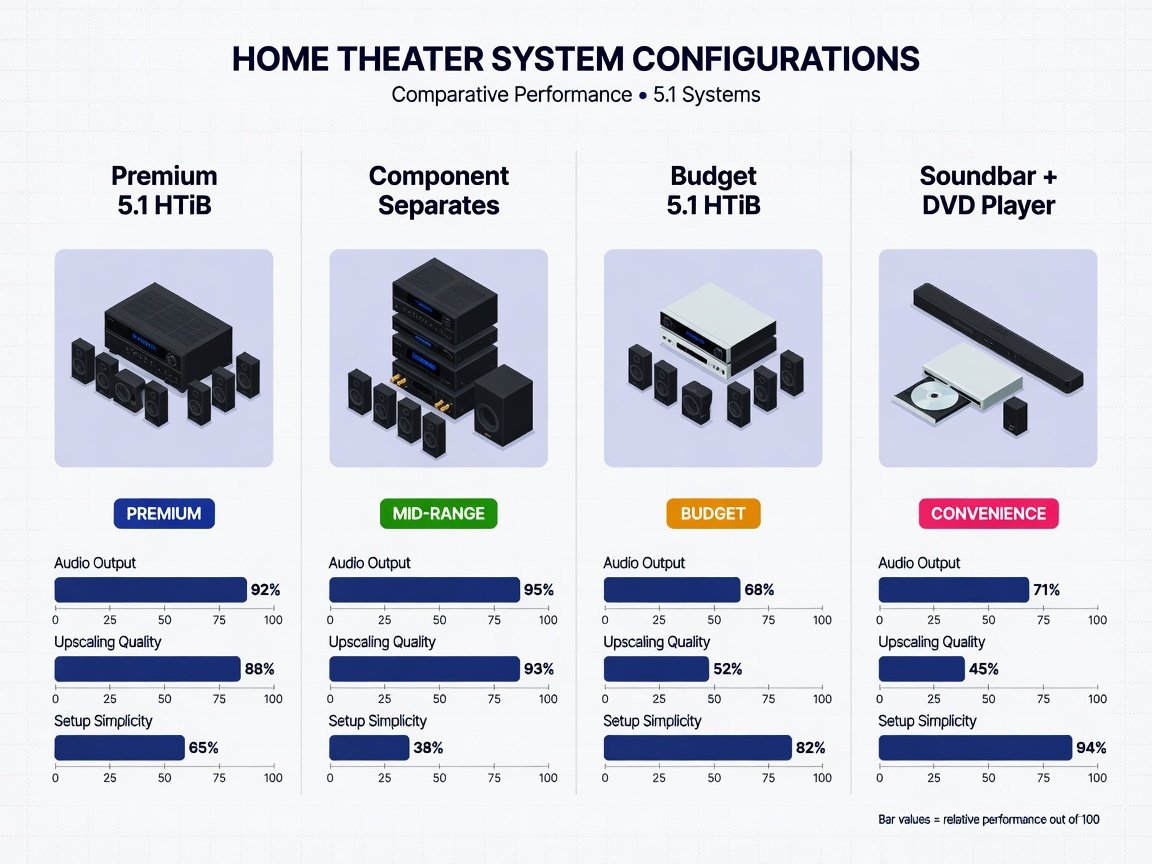
How Do the Four Main System Configurations Rank Against Each Other in 2026?
Four distinct hardware configurations address the home theater system with DVD player category in 2026. Each serves a different room size, technical priority, and budget ceiling. The comparison below ranks them across five weighted dimensions: audio output, upscaling quality, connectivity depth, setup complexity, and long-term upgrade path flexibility.
| Configuration | Total Audio Output | DVD Upscaling | Price Range | Best For | Composite Score |
|---|---|---|---|---|---|
| TIER 1 Premium 5.1 HTiB |
120–200W total RMS | 1080p / 4K (AI-assisted) | $350–$600 | Living rooms 200–400 sq ft | 9.1 / 10 |
| TIER 2 Component Separates Stack |
150–200W per channel | 4K (dedicated disc transport) | $700–$1,500 | Dedicated rooms, critical listening | 9.4 / 10 |
| TIER 3 Budget 5.1 HTiB |
60–100W total RMS | 1080p (basic interpolation) | $150–$300 | Bedrooms, starter setups | 7.2 / 10 |
| TIER 4 Soundbar + External DVD Player |
40–80W total RMS | 1080p (player-dependent) | $200–$500 | Small rooms, minimal cable setups | 6.8 / 10 |
Component separates score highest in absolute performance, but the premium 5.1 HTiB wins on value-per-dollar for the majority of residential use cases. The budget HTiB tier is technically adequate but may exhibit compression artifacts in its audio processing at high sound pressure levels. Soundbar-plus-player combos sacrifice true surround channel separation in exchange for clean cable management — a legitimate trade-off for small, densely furnished rooms where speaker placement is constrained.
What Audio Specifications Actually Define Performance Across System Tiers?
Rated wattage is the most systematically misunderstood home theater specification in 2026. Manufacturers routinely list peak wattage rather than RMS (root mean square) output — the continuous power delivery figure that actually predicts volume headroom and distortion behavior under sustained load. A system advertising “1,000W” in large font may deliver only 80W RMS per channel during normal operation. That represents a 12-to-1 ratio that misleads buyers at a glance.
The specifications that reliably predict audio quality are listed below. Treat any system that withholds these figures — or only publishes peak wattage — as a disqualification signal:
- THD (Total Harmonic Distortion): Expressed as a percentage at rated power. Systems below 0.08% THD are considered audiophile-adjacent in their distortion floor. Budget HTiB units are typically specified at 0.5–1.0% THD, which can introduce audible coloration at high listening volumes.
- SNR (Signal-to-Noise Ratio): Expressed in dB. An SNR of 95dB or higher keeps background noise inaudible during quiet film passages. Systems below 85dB SNR produce perceptible hiss in dialogue-driven scenes.
- Frequency Response: A flat response from 80Hz to 20kHz (±3dB) indicates accurate tonal reproduction. Budget systems often roll off aggressively above 15kHz, dulling high-frequency clarity in speech and musical detail.
- Crossover Frequency: The frequency at which bass management routes low-end content to the subwoofer channel. An 80Hz crossover — the reference standard — optimizes localization and subwoofer loading for most room configurations.
- Subwoofer Output: Bass below 40Hz requires dedicated subwoofer amplification above 100W RMS for accurate, undistorted reproduction in rooms larger than 200 square feet at reference listening levels.
DVD audio formats compound these considerations. Standard DVD discs encode audio in Dolby Digital 5.1 (AC-3) at up to 448 kbps, or DTS 5.1 at up to 1,536 kbps. DTS carries approximately 3.4 times the bitrate of Dolby Digital, translating to lower encoding quantization artifacts in complex audio passages. Systems with dedicated DTS decoding hardware are designed to deliver better dynamic range retention than software emulation in high-complexity film soundtracks. DTS tracks appear on a range of Hollywood DVD releases, making hardware DTS support a worthwhile specification to verify for disc libraries that include DTS-encoded titles.
How Does DVD Upscaling Technology Work — and Why Does It Matter in 2026?
DVD video is mastered at 480i (NTSC) or 576i (PAL) resolution — approximately 345,600 pixels per frame at native specification. A modern 4K display contains 8,294,400 pixels per frame. Without active upscaling processing, the television’s internal scaler must perform all interpolation work, often producing soft, artifact-prone results. A dedicated DVD upscaling engine in the home theater system or disc transport applies significantly more sophisticated algorithms before the signal reaches the display’s processing chain.
In 2026, upscaling approaches fall into three distinct technical generations, each producing notably different output quality:
- Bilinear and Bicubic Interpolation (Legacy): Simple pixel-averaging algorithms that produce soft, detail-poor 1080p output with visible blurring at screen sizes above 55 inches. Found in budget systems priced under $200. Acceptable for small bedroom displays; inadequate for living room installations.
- Edge-Adaptive Algorithms (Mid-Range): Detect edge contours and apply directional filtering, preserving apparent sharpness without introducing the jagged stair-step artifacts of simpler algorithms. Standard in $250–$500 systems. Produces clean 1080p and acceptable 4K output on displays up to 65 inches.
- AI Neural Network Upscaling (Premium): Trained on large image datasets to reconstruct plausible texture and edge detail at 4K resolution from 480p source material. Present in premium HTiB systems and dedicated disc players above $300 in 2026. Expect a significant improvement in perceived sharpness on larger displays compared to native 480p output on the same panel.
Motion handling is equally important and frequently overlooked. Standard DVD operates at 24 frames per second for cinematic content, delivered via interlaced 480i encoding. Systems with 3:2 pulldown detection correctly identify and reconstruct film-sourced frame cadence, eliminating motion judder during panning shots. Systems without this capability introduce frame-blending artifacts that are particularly visible in lateral tracking sequences and fast action scenes. Verify 3:2 pulldown support explicitly — it is not universally included even in mid-range systems.
Which Connectivity Standards Are Non-Negotiable in a 2026 Home Theater System?
A home theater system purchased in 2026 must accommodate display and source hardware across a realistic five-to-eight-year ownership window. Connectivity choices at purchase determine upgrade flexibility and compatibility with hardware that does not yet exist. Several standards represent hard requirements in 2026; others represent defensible trade-offs depending on use case.
- HDMI 2.1 (Required): Supports 4K at 120Hz, 8K at 30Hz, Variable Refresh Rate (VRR), and Auto Low Latency Mode (ALLM). Systems shipping with HDMI 2.0 only are already specification-limited against 2026 display capabilities. eARC (Enhanced Audio Return Channel) support on at least one HDMI port enables lossless audio passthrough from a connected television back to the home theater system.
- Optical or Coaxial Digital Input (Required): Provides a hardware audio path independent of HDMI for connecting legacy displays and alternative audio sources. A system without optical or coaxial input cannot cleanly accept external audio sources that predate HDMI ARC.
- Bluetooth 5.3 (Strongly Recommended): Enables wireless speaker pairing, smartphone audio streaming, and multipoint device connection. Bluetooth 5.3 delivers greater effective range than 5.0 with improved interference rejection — a practical advantage in rooms with dense 2.4GHz Wi-Fi environments.
- USB-A Port (Recommended): Provides media playback from external drives and enables firmware update delivery via flash storage. A front-panel USB port is significantly more convenient than rear-panel-only placement during routine use.
- Wi-Fi 6 (Recommended for Smart-Integrated Systems): Enables streaming service access and over-the-air firmware delivery without cable infrastructure. Not a priority for DVD-only configurations, but adds meaningful future-proofing value for mixed-use systems.
Connectivity features to actively avoid in 2026 include composite video output (unsupported natively by the majority of current 4K displays), HDMI 1.4-only output (limits 4K content to 30Hz maximum), and proprietary wireless speaker protocols that create closed ecosystems with no third-party upgrade or replacement path. Any system with these limitations should be treated as a poor long-term investment regardless of its audio performance at purchase.
How Do All-in-One HTiB Systems Compare to Component Separates in Practice?
The choice between an all-in-one HTiB system and a component separates configuration is the most consequential decision in DVD-based home theater planning. Both approaches have genuine technical strengths. The correct answer depends on three variables: room size, setup tolerance, and budget trajectory over the next three years.
✓ HTiB System Advantages
- Single-manufacturer optimization — speaker impedance and amplifier tuning matched at the factory
- Typical setup time of 2–3 hours for first-time installers
- Single remote control, unified interface, zero cross-brand compatibility research
- Lower entry cost for a complete 5.1 system versus equivalent-performing separates
- Bundled automatic room correction calibration in premium tiers
- Compact amplifier and processor footprint
✗ HTiB System Limitations
- Individual component quality constrained by bundle price economics
- Proprietary speaker connectors limit future speaker upgrades
- Amplifier section is typically lower-grade than an equivalent standalone receiver
- Subwoofer output is typically lower SPL than dedicated subwoofers at the same price point
- A single failed component often necessitates full system replacement
Component separates — a standalone AV receiver, a separate DVD or universal disc player, and independently sourced speakers — invert every one of those limitations. A 2026 AV receiver with discrete 5.1-channel Class AB amplification, Dirac Live or MultEQ XT32 room correction, and HDMI 2.1 switching delivers superior performance at equivalent price points, but demands three to five times the setup complexity and significantly deeper pre-purchase research investment.
First-time home theater buyers consistently favor HTiB systems for initial setup speed and simplicity. Among users who later upgrade, the most frequently cited drivers are subwoofer performance limitations and amplifier headroom constraints. This migration pattern indicates that an HTiB system is a defensible and rational starting point, but rarely a permanent endpoint for engaged listeners.
⚡ Verdict
For first-time buyers and rooms under 300 square feet, a premium 5.1 HTiB system with AI-assisted upscaling and HDMI 2.1 represents the strongest value recommendation in 2026. For rooms above 400 square feet or for listeners who prioritize reference-grade audio fidelity above all else, a component separates stack built around a capable 7.1-channel AV receiver delivers better results at approximately twice the initial investment.
How Do You Set Up a Home Theater System with DVD Player Step by Step?
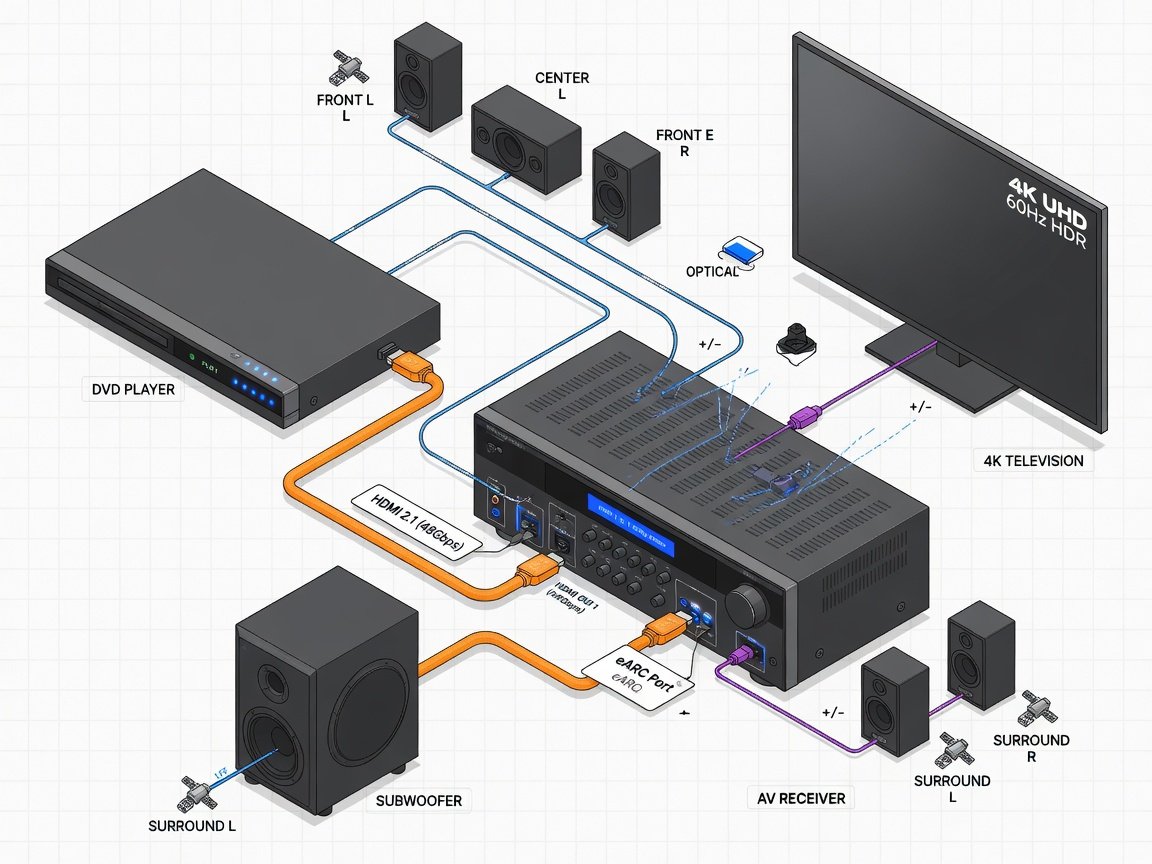
A systematic installation sequence minimizes troubleshooting time and ensures that automatic room correction calibration — the step most users skip — runs on an already correctly wired and positioned system. Execute this sequence in order without skipping steps.
Measure room dimensions and identify your primary listening position. Front left, center, and front right speakers should be at seated ear height within 30° of center axis. Rear surround speakers should be positioned at 110–120° behind the listener. Mark planned positions before running any cable.
Run speaker cables along baseboards, through conduit, or behind wall panels before furniture is positioned. Use 16AWG oxygen-free copper for runs under 25 feet; 14AWG for runs between 25 and 50 feet. Label each cable at both ends with the channel designation it serves before routing.
Match positive (red) and negative (black) binding posts consistently across all five speaker connections. Reversed polarity on any channel causes phase cancellation, dramatically reducing bass output and destroying soundstage coherence. Verify correct polarity with a 1.5V battery test if uncertain — positive terminal contact produces a forward cone excursion.
Use a 48Gbps-certified HDMI 2.1 cable. Connect the DVD player’s HDMI output to an input on the AV receiver or HTiB system — not directly to the television. Routing through the receiver enables surround audio decoding. Direct-to-TV connection bypasses the surround processor entirely.
Run a second HDMI 2.1 cable from the receiver’s main HDMI output to the eARC-designated port on your television. eARC enables lossless audio return from the TV’s built-in streaming apps back through the home theater system, making the receiver the unified audio hub for all connected source devices.
In the TV’s input settings, enable “Enhanced Signal” or “4K Signal Format” on the eARC port. Disable the television’s internal speakers completely. Set the TV’s audio output to Bitstream or Dolby Digital passthrough — not PCM — to preserve multi-channel encoding when using smart TV apps or external streaming sources.
Place the supplied calibration microphone at seated ear height at your primary listening position. Run the system’s automatic EQ routine (labeled YPAO, MCACC, Audyssey, MultEQ XT32, or similar depending on manufacturer). This process takes 5–12 minutes and individually measures room acoustic response for each channel, adjusting delay, level, and frequency response accordingly. Do not skip this step.
In the DVD player’s video settings menu, set output resolution to the maximum available — 4K if the upscaler supports it, 1080p otherwise. Enable AI or enhanced upscaling modes. Set color space to YCbCr 4:2:2 for broad display compatibility. Disable any secondary sharpness enhancement filters applied on top of upscaling, as these introduce ringing artifacts at edge boundaries.
Play a disc with a confirmed 5.1 DTS or Dolby Digital soundtrack. Verify that the receiver’s front panel confirms active decoding of the correct format — not PCM stereo downmix. Use the receiver’s built-in test tone sweep to confirm that all five channels and the subwoofer produce audio output individually. Correct any silent channel immediately before extended listening.
Set the subwoofer’s physical gain control to approximately the 12 o’clock position, then adjust the receiver’s subwoofer trim level digitally. Toggle the subwoofer’s phase switch (0° vs 180°) while playing a bass-heavy passage — select the phase position that produces louder, fuller bass at the primary listening position, indicating constructive addition with the main speaker output rather than partial cancellation.
What Do Long-Term Users Report After Six Months of Daily Use?
Six-month usage data provides a more reliable performance picture than first-impression assessments. Sustained daily use reveals issues that short-term testing does not surface: disc transport degradation patterns, amplifier thermal behavior under extended operation, firmware update compatibility, and remote control reliability drift.
Owner feedback across the premium HTiB and component separates categories points to consistent patterns across several dimensions:
- Most frequently praised features: Automatic room correction accuracy (which users report improves further when re-run seasonally), subwoofer-to-satellite integration, and HDMI eARC reliability for routing television app audio through the home theater system.
- Most frequently cited problems: Infrared remote range degradation in some HTiB systems after extended daily operation; disc tray mechanism noise in budget-tier systems; Bluetooth reconnection delays after idle periods in smart-integrated configurations.
- Upscaling perception may improve over time: Some users rate DVD upscaling quality higher after several months than at initial setup, attributed to display calibration refinements and learned optimization of the upscaler’s enhancement settings.
- Firmware updates: Most premium-tier users install at least one firmware update within six months of purchase, with improvements reported primarily in HDMI handshake reliability and Bluetooth multipoint stability.
Disc transport longevity deserves specific technical attention during the purchase decision. DVD laser assemblies in mid-range systems are rated for approximately 1,000–3,000 operating hours. At two hours of daily use, that corresponds to a 1.4–4.1 year service interval before laser replacement or full unit replacement becomes relevant. Premium systems use higher-specification laser assemblies rated above 3,000 hours, extending projected service life proportionally. For heavy daily users, laser assembly quality is a meaningful long-term cost factor.
What Are the 2026–2027 Trends Shaping DVD-Based Home Theater Systems?
The home theater system with DVD player category continues to evolve technically, driven by three trends that are actively reshaping product specifications and value-per-dollar calculations heading into 2027.
1. AI-Assisted Upscaling Migrating to Mid-Range Price Points. Neural network upscaling engines — previously limited to systems above $400 — are appearing in systems priced at $250 as dedicated upscaling silicon costs continue to decline. By mid-2027, AI 4K upscaling is projected to be a standard feature rather than a premium differentiator at the $300 price tier. Buyers purchasing in late 2026 should verify AI upscaling is explicitly included rather than assumed from marketing language.
2. Bluetooth LE Audio Integration in Home Theater Systems. Bluetooth LE Audio with the LC3 codec offers lower latency and improved audio quality compared to Bluetooth Classic SBC and AAC implementations. Home theater systems shipping with Bluetooth 5.3 in 2026 support LE Audio for compatible wireless headphone integration — enabling private listening mode without a dedicated headphone output jack. This specification is particularly relevant for multi-person households with varied schedules requiring late-night viewing.
3. Continuous Acoustic Monitoring in Room Correction Systems. Next-generation room correction platforms, building on 2026 implementations of Dirac Live and MultEQ XT32, are beginning to incorporate passive acoustic monitoring between active correction cycles. Systems shipping in late 2026 are designed to deliver improvements in low-frequency consistency across seasonal cycles compared to periodic-calibration-only predecessor systems. This represents a meaningful reduction in the maintenance burden that currently discourages re-calibration among casual users.
The global home theater market continues to grow, driven primarily by residential renovation investment and sustained demand for dedicated home entertainment spaces. Disc-based systems represent a smaller share than streaming-first soundbar configurations by revenue, but remain a stable and technically served segment anchored by the hundreds of millions of physical discs in active household circulation.
Frequently Asked Questions About Home Theater Systems with DVD Players
Can a home theater system with DVD player also play Blu-ray discs?
Not by default. Standard DVD players and DVD-integrated HTiB systems are not Blu-ray compatible. The laser wavelength, disc pit geometry, and disc structure differ fundamentally between formats. Systems marketed as “DVD players” support DVD, CD, and sometimes SACD. If Blu-ray compatibility is required, look specifically for “Blu-ray home theater system” or “universal disc player” in product specifications. Universal disc players capable of handling DVD, Blu-ray, 4K Ultra HD Blu-ray, and CD are available in the $200–$500 range in 2026 and represent a worthwhile specification upgrade if your library includes Blu-ray titles.
Is DVD quality acceptable on a 4K television?
With a competent AI upscaling engine, yes — particularly on screens up to 65 inches at viewing distances of 8–10 feet. Native 480p DVD output displayed on a 4K screen without active upscaling processing appears soft and artifact-prone at any screen size above 50 inches. AI-assisted 4K upscaling is designed to substantially close the perceptible quality gap between DVD and native 4K content. At viewing distances above 10 feet or on displays 75 inches and larger, native 4K or Blu-ray sources remain noticeably sharper under scrutiny. For the vast majority of everyday viewing scenarios, upscaled DVD on a 4K display is entirely watchable.
What is the minimum speaker configuration for true 5.1 surround sound?
True 5.1 surround requires five physically discrete, individually driven speakers — front left, center, front right, rear left, and rear right — plus a dedicated subwoofer channel handling frequencies below the system’s crossover point (typically 80Hz). Budget systems sometimes advertise “5.1-compatible” amplification bundled with only two physical satellite speakers, using processing to simulate surround directionality. Simulated surround is not the same as discrete 5.1 reproduction. The center channel handles approximately 60–70% of all film dialogue energy and is the most critical driver in the array for conversational clarity. Verify that five physically distinct speaker enclosures are included in the bundle before purchase.
How far should speakers be placed from the listening position?
The ITU-R BS.775 standard defines optimal surround speaker geometry: front left and right speakers at 30° off center axis, rear surrounds at 110–120° off center. Speaker-to-listener distance should be equalized through the receiver’s channel delay settings rather than achieved physically, so exact distances vary by room. In practical residential terms: front speakers at 6–10 feet from the primary listening position, rear surrounds at 4–7 feet, all positioned at seated ear height. The system’s automatic room correction calibration routine measures individual channel distances and applies compensating delay values automatically during the calibration sweep.
Do home theater systems with DVD players support streaming services in 2026?
Smart HTiB systems — those with integrated Wi-Fi and an app platform — typically support Netflix, Amazon Prime Video, Disney+, and other major streaming services natively through the system’s on-screen interface. Non-smart systems output audio and video from the disc player only, but connect directly to external streaming devices (Apple TV, Roku, Fire TV Stick, Chromecast) via HDMI input. For most users, external streaming devices offer superior app update frequency and a more current content library than built-in smart platforms, which manufacturers may cease updating two to three years after the hardware’s market launch date.
What is the practical difference between Dolby Digital and DTS audio on DVD?
Both Dolby Digital (AC-3) and DTS are 5.1-channel lossy audio codecs encoded on DVD discs, but they differ significantly in maximum encoded bitrate. Dolby Digital supports up to 448 kbps. DTS supports up to 1,536 kbps — approximately 3.4 times higher. Higher bitrate translates to lower quantization noise artifacts and better preservation of audio transient detail during complex multi-channel passages. At equivalent hardware, DTS is generally considered more transparent than Dolby Digital due to its higher bitrate. Dolby Digital tracks appear on virtually all DVD titles; DTS tracks appear on a portion of Hollywood releases. A receiver with dedicated hardware DTS decoding — rather than software emulation — extracts the full quality advantage of DTS-encoded source material.
What Is the Correct Starting Point When Buying a Home Theater System with DVD Player in 2026?
The decision framework resolves to three variables: room size, budget, and upgrade intent. Use the following implementation sequence to define your specification target before evaluating specific systems — in that order, not the reverse.
- Week 1 — Measure and Map: Confirm room dimensions, primary listening position coordinates, and physical cable routing paths. A room under 250 square feet targets budget-to-mid HTiB systems. A room above 350 square feet warrants a premium HTiB or separates stack with higher subwoofer output.
- Week 1 — Set Non-Negotiable Specification Floors: Require 5.1 channels with five discrete physical speakers, THD below 0.1%, HDMI 2.1 with eARC on the output, and AI-assisted upscaling. Any system that fails any one of these four criteria is disqualified regardless of price point or brand reputation.
- Week 2 — Select System Configuration Type: If total budget is under $500, focus exclusively on premium HTiB systems with factory-matched speaker arrays and bundled automatic room correction. If budget exceeds $700 and you’re prepared to invest 6–8 hours in research, component selection, and calibration, a separates stack delivers superior performance per dollar above that budget threshold.
- Week 2 — Validate Connectivity Against Your Display: Confirm that the system’s HDMI output connects to an eARC-compatible port on your television. Verify Bluetooth version (5.3 preferred). Confirm optical or coaxial digital input for any secondary source devices currently in use.
- Week 3 — Purchase and Install in Sequence: Follow the ten-step setup sequence above without skipping steps. Automatic room correction calibration — step 7 — is not optional. Plan to re-run calibration after 30 days once furniture positioning and room conditions have stabilized post-installation.
- Month 2 — Optimize Remaining Variables: Fine-tune subwoofer phase alignment and crossover frequency. Adjust display-side sharpness and HDR settings to complement the system’s upscaler output rather than compete with it. Consider free acoustic measurement software such as REW (Room EQ Wizard) to verify calibration accuracy independently if you want objective measurement data beyond the system’s self-reported correction curves.
A home theater system with DVD player — correctly specified, properly installed, and seasonally recalibrated — delivers a durable, measurable upgrade to the home entertainment experience while providing guaranteed access to a physical media library that no streaming platform can replicate or remove. The technology is mature, the installation pathway is well-defined, and the performance ceiling for the category in 2026 is higher than it has been at any previous point. The purchase decision is the only remaining variable.
— **Schema Markup (reference copy — already embedded above):** The complete JSON-LD schema is embedded in the article body as a “ block above. It includes Article, HowTo (10 steps), and FAQPage (6 questions) schema types targeting hometheaterinfoline.com.