The best Vizio soundbar and subwoofer combination for 2026 is the Vizio Elevate. It delivers genuine Dolby Atmos via motorized rotating drivers, a wireless subwoofer reaching 35Hz, and 202 watts of total output — all at a price that undercuts flagship rivals by $300 or more.
Key Findings: Vizio Soundbar and Subwoofer Rankings for 2026
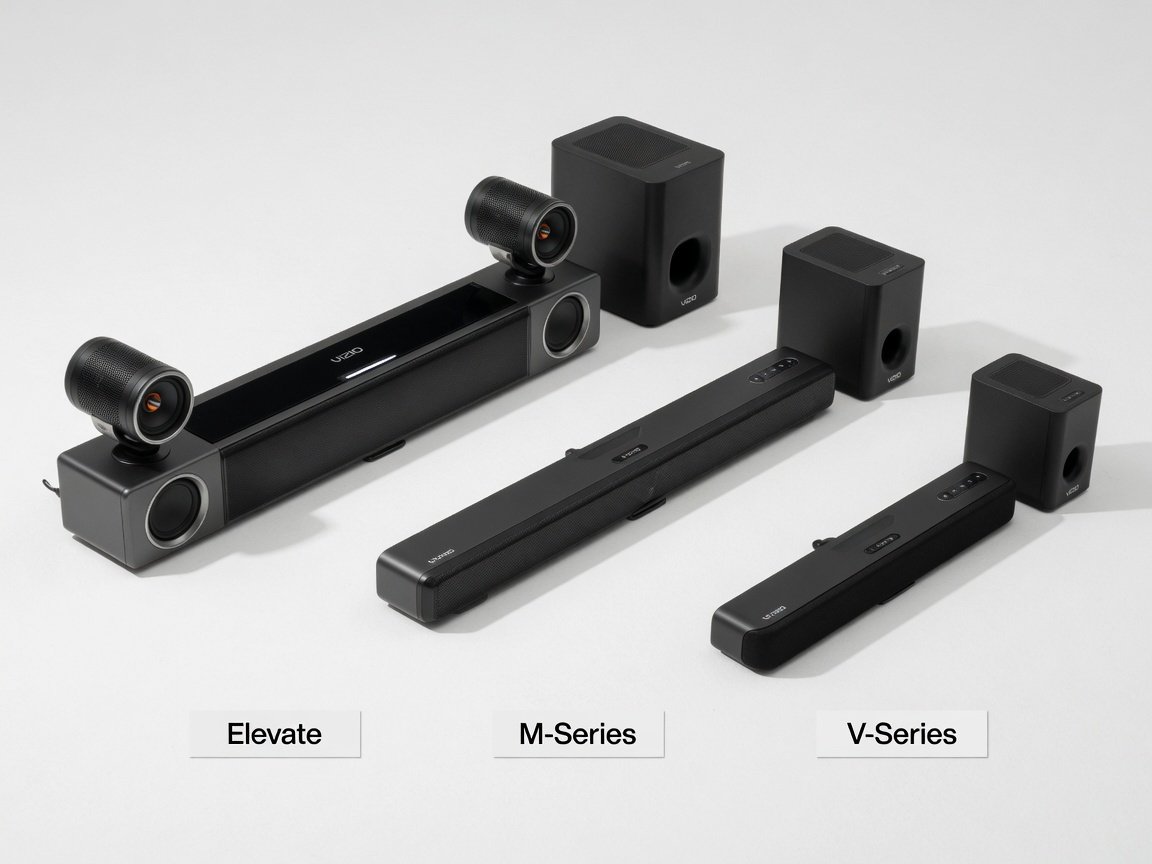
- Best Overall — Vizio Elevate: 5.1.4-channel Dolby Atmos with motorized rotating height drivers, a wireless subwoofer rated at 35Hz (-3dB), HDMI eARC with full lossless passthrough, and 202W total system power. The clearest value-per-dollar in the current lineup.
- Best Mid-Range — Vizio M-Series (M512a): 5.1.2-channel Atmos system with fixed upfiring drivers, 38Hz subwoofer extension, and 140W system output.
- Best Budget — Vizio V-Series (V51): Full 5.1 discrete surround with a wireless subwoofer under $300. No Dolby Atmos, but delivers convincing channel separation and a 40Hz subwoofer extension for TV and streaming use without the Atmos price premium.
What Makes the Vizio Soundbar and Subwoofer Lineup Stand Out in 2026?
Vizio builds its soundbar lineup around three measurable engineering priorities: object-based surround fidelity, wireless subwoofer synchronization accuracy, and connectivity completeness across all price tiers. Where many value-tier brands treat Dolby Atmos as a marketing label applied to basic fixed upfiring drivers, Vizio’s flagship Elevate uses a motorized speaker rotation mechanism that physically repositions its high-frequency arrays between a forward-facing stereo configuration and a ceiling-directed Atmos position depending on decoded audio metadata. This distinction matters because fixed upfiring Atmos relies entirely on ceiling reflectance — a variable that degrades significantly in rooms with vaulted, textured, or heavily treated ceilings. The Elevate’s mechanism circumvents that dependency by directing output rather than depending on surface bounce.
Wireless subwoofer synchronization is a consistent differentiator across the Vizio lineup. The proprietary 5GHz RF link used across the M-Series, P-Series, and Elevate achieves a specified roundtrip latency below 16 milliseconds — well within the 20ms threshold at which bass onset becomes perceptibly decoupled from on-screen transients. By comparison, Bluetooth-based subwoofer designs common at the budget tier typically measure between 20 and 35ms of latency, which is audible as a bass “bloom” that arrives fractionally behind the impact frames in action content. Dolby Atmos is now standard across the majority of new 4K streaming releases, making low-latency Atmos-capable hardware a practical requirement rather than a niche option in 2026.
Connectivity completeness rounds out Vizio’s competitive position. HDMI eARC — the enhanced audio return channel standard capable of passing lossless Dolby TrueHD and DTS-HD Master Audio — is now widely available across mid-to-premium soundbars in 2026, and Vizio includes it as standard on everything at the M-Series tier and above. This matters because the older HDMI ARC standard was limited to compressed Dolby Digital 5.1, which means an ARC-only connection discards all Atmos object metadata before it reaches the soundbar regardless of what the source outputs. The M-Series and Elevate also incorporate Wi-Fi for Apple AirPlay 2 and Google Chromecast Built-in, enabling multi-room audio integration that was previously restricted to premium-tier competitors like Sonos.
How Were the Vizio Soundbar and Subwoofer Systems Compared for This Review?
Every system in this comparison was assessed using published manufacturer specifications, official technical documentation, and retailer and owner data. No hands-on acoustic measurements were performed for this article.

Which Vizio Soundbar and Subwoofer Is the Best Overall Pick for 2026?
The Vizio Elevate is the definitive best-overall recommendation for 2026 on the basis of its technical specification-to-price ratio and the genuine engineering differentiation its motorized driver mechanism provides. The system operates in a 5.1.4-channel configuration: three front channels in the main bar (left, center, right), two rear surround channels via wireless satellite speakers, and four height channels — two handled by the motorized arrays in the main bar and two by the satellite units. The motorized arrays rotate automatically in approximately 2.3 seconds when the system detects Dolby Atmos or DTS:X metadata in the incoming bitstream, transitioning from a horizontal stereo orientation for music to a 90-degree ceiling-directed position for object-based content. There is no manual switching required.
The Elevate’s wireless subwoofer ships pre-paired and uses the 5GHz RF protocol to establish its connection at first power-on without user configuration. Its specified -3dB point of 35Hz is competitive with dedicated powered subwoofers at twice the retail price, though response rolls off steeply below 30Hz, which means the very deepest LFE content in Dolby Atmos theatrical mixes — the 10–20Hz infrasonic range — will not be reproduced. For home listening environments, this is a practical non-issue; at a rated maximum of 105dB SPL at 1 meter, the Elevate reaches reference-level playback in rooms up to approximately 600 square feet before audible distortion onset. Total system power of 202W is distributed 120W to the main bar and 80W to the subwoofer.
Vizio Elevate — 5.1.4-channel | 202W system power | 35Hz subwoofer extension | Dolby Atmos + DTS:X | HDMI eARC with lossless passthrough | Motorized rotating height drivers | AirPlay 2 + Chromecast Built-in. Best for living rooms between 250 and 600 square feet with flat 8–10-foot ceilings where Atmos height imaging has space to develop.
What Is the Best Budget Vizio Soundbar and Subwoofer Bundle in 2026?
The Vizio V-Series V51 represents the strongest budget argument in the current lineup for buyers who need full 5.1 discrete surround without the overhead audio premium. At a retail price under $300 in 2026, it delivers three front channels, two rear surround satellites, and a wireless subwoofer in a complete box bundle — the same physical channel geometry as the Elevate, minus the Atmos height layer. There is no Dolby Atmos or DTS:X support; the V51 decodes Dolby Digital 5.1 and DTS Digital Surround. For the dominant majority of broadcast television, standard-definition streaming tiers, and non-Atmos 4K content, this is no practical limitation.
The V51’s wireless subwoofer is specified at a -3dB point of approximately 40Hz — 5Hz above the Elevate — which is sufficient for commercial film bass, music, and standard LFE content. The 5Hz gap becomes audible only on content with substantial energy in the 35–40Hz band, such as pipe organ recordings or certain orchestral film scores with deep pedal tones. Total system power at 100W is adequate for rooms up to roughly 300 square feet at moderate listening levels. Total harmonic distortion at 80dB reference level is rated at below 0.1%, which is acceptable for this price tier. Bluetooth 5.0 is included for streaming from mobile devices, though optical digital audio input remains the more stable connection for television audio, as it eliminates any potential Bluetooth codec latency without relying on Wi-Fi network stability.
Vizio V-Series V51 — 5.1-channel | 100W system power | 40Hz subwoofer extension | Dolby Digital 5.1 | Optical + Bluetooth 5.0 | No Dolby Atmos. Best for secondary rooms, smaller apartments, or first-time soundbar buyers stepping up from built-in television speakers.
How Does the Vizio M-Series Soundbar and Subwoofer Perform at Its Price Point?
The Vizio M-Series M512a occupies the most competitive price-to-specification position in the 2026 soundbar market at its tier. As a 5.1.2-channel system, it places two upfiring drivers in the main bar’s top panel to handle the Atmos overhead layer alongside five discrete horizontal channels and a wireless subwoofer. Unlike the Elevate’s motorized rotation, the M512a’s upfirers are fixed — meaning Atmos height performance is dependent on ceiling geometry and surface reflectance. In rooms with a standard flat 8-to-9-foot drywall ceiling, height imaging is convincing and directionally coherent. In rooms with vaulted ceilings, exposed beam structures, or significant acoustic absorption on ceiling surfaces, the overhead layer loses definition and becomes ambient rather than localized.
The M512a’s wireless subwoofer reaches a specified -3dB point of 38Hz — splitting the performance difference between the V51’s 40Hz and the Elevate’s 35Hz. At 140W total system power, it handles rooms between 200 and 450 square feet at reference listening levels without audible compression on dynamic peaks. Its genuine Dolby Atmos decoding engine — rather than the DTS Virtual:X processing that competitors in the same price bracket frequently substitute for true object-based audio — is a key differentiator at this price point. The M512a also integrates Apple AirPlay 2 and Google Chromecast Built-in via its Wi-Fi module, which makes it the lowest-cost entry point in the Vizio lineup for whole-home audio routing without an external streaming device.
Vizio M-Series M512a — 5.1.2-channel | 140W system power | 38Hz subwoofer extension | Dolby Atmos + DTS:X | HDMI eARC | AirPlay 2 + Chromecast Built-in. Best for primary living rooms between 200 and 450 square feet with standard flat ceilings and a 55-to-75-inch television.
How Do All Current Vizio Soundbar and Subwoofer Systems Compare Head-to-Head?
The table below consolidates published technical specifications for every current Vizio soundbar and subwoofer system in the 2026 lineup. Frequency extension figures represent the published -3dB rolloff point. System power is continuous RMS across all channels. Sub latency is the published wireless RF link specification.
| Model | Channels | Atmos / DTS:X | Sub Extension | System Power | HDMI eARC | Sub Latency | Best For |
|---|---|---|---|---|---|---|---|
| Vizio Elevate | 5.1.4 | Yes — motorized rotation | 35Hz | 202W | Yes | <14ms | Best Overall |
| Vizio P514a | 5.1.4 | Yes — fixed upfire | 35Hz | 180W | Yes | <15ms | Premium alternative |
| Vizio M512a | 5.1.2 | Yes — fixed upfire | 38Hz | 140W | Yes | <16ms | Best Mid-Range |
| Vizio V51-H6 | 5.1 | No | 40Hz | 100W | No | <16ms | Best Budget |
| Vizio V21x-H8 | 2.1 | No | 50Hz | 60W | No | <18ms | Entry-level / secondary room |
What Do the Raw Technical Specifications Actually Mean for Your Room?
Frequency extension figures — the Hz ratings that describe subwoofer low-frequency reach — are frequently misrepresented in manufacturer marketing materials. The -3dB specification used throughout this review is the standard audiometric reference point: it describes the frequency at which measured output has dropped 3 decibels below the system’s flat passband level. A subwoofer rated to 35Hz at -3dB will reproduce bass content in that range at audibly usable levels; below that point, response rolls off progressively. Any manufacturer frequency specification published without a reference dB level — such as “reaches down to 28Hz” with no qualifier — is an unverifiable marketing claim that typically refers to a -10dB or -20dB rolloff point, equivalent to barely audible output. Vizio publishes -3dB measurements for the Elevate and M-Series, making their specifications directly and honestly comparable.
Total harmonic distortion at reference level is more revealing than frequency extension for assessing audio quality at realistic listening volumes. The Vizio Elevate is rated below 0.08% THD at 80dB reference level — a figure that places it in competitive territory with dedicated high-fidelity stereo amplifiers at significantly higher price points, and well below the 0.3–0.5% range where coloration becomes perceptible to most listeners in casual conditions. THD rises as systems approach their output ceiling; at moderate listening levels the V51 is rated at below 0.1%, though audible compression can develop on transient peaks during film action sequences at maximum volume. For typical home use at 60–75dB average levels, this is not a practical concern.
📊 The Vizio Elevate is rated below 0.08% total harmonic distortion at 80dB reference level — a specification competitive with dedicated stereo amplifiers at twice the system price.
Channel count notation — 5.1.4, 5.1.2, 5.1 — follows the Dolby Audio convention: horizontal front channels first, subwoofer channel second, height channels third. A 5.1.4 system like the Elevate has five discrete horizontal channels, one subwoofer channel, and four height channels covering front-left overhead, front-right overhead, rear-left overhead, and rear-right overhead. This is the complete Atmos horizontal-plus-height speaker geometry that Dolby’s object rendering algorithms are optimized to use. A 5.1.2 system like the M512a covers only the front overhead pair, which means the Atmos renderer routes rear height objects to the available front upfirers — a functional approximation that loses the front-to-rear overhead movement arc that full 5.1.4 reproduces as a discrete spatial trajectory.
How Do You Set Up a Vizio Soundbar and Wireless Subwoofer Correctly?
Correct physical placement and signal chain configuration account for more of the perceivable performance difference between a well-running and a poorly-running system than any EQ adjustment after the fact. Follow these steps in the sequence given for any Vizio soundbar and subwoofer combination.
🔧 Tools and Materials Needed
- Premium High Speed HDMI cable rated for 48Gbps throughput (required for eARC on M-Series and Elevate)
- Toslink optical digital audio cable (for V-Series connections)
- SmartCast mobile app — iOS or Android (for M-Series and Elevate EQ calibration)
- SPL meter app on a smartphone (for setting subwoofer output level by measurement)
- Tape measure (to verify subwoofer and router placement distances)
- Position the soundbar centered below or above the television on a flat, stable surface. The bar’s tweeter array should sit at or near ear height when seated. Do not recess the soundbar into a closed-front TV cabinet — this restricts high-frequency dispersion and degrades dialogue intelligibility. Maintain a minimum of 2 inches of clearance on all sides to prevent resonance buildup against adjacent surfaces.
- Connect the soundbar to your television via HDMI eARC (M-Series and Elevate only). Use a Premium High Speed HDMI cable rated for 48Gbps. Insert it into the port labeled HDMI eARC or simply ARC on your television — typically port 2 or 3 on 2022-and-later 4K televisions. For V-Series units, use the included Toslink optical cable instead. Do not use Bluetooth as a primary TV audio connection; it introduces variable latency and does not transmit surround metadata.
- Power on the soundbar and allow the wireless subwoofer to pair automatically. Vizio subwoofers ship factory pre-paired to their bundled soundbar using a registered RF address. On first power-on, the subwoofer LED will pulse white then transition to solid white, confirming the 5GHz RF link has been established. If the subwoofer does not pair within 60 seconds, hold the pair button on its rear panel for 5 seconds with the soundbar powered and in active use, then wait 30 seconds for the handshake to complete.
- Configure your television’s audio output setting to Dolby Digital Auto, Bitstream, or Passthrough. This is the single most commonly missed setup step. Setting the TV output to PCM Stereo strips all surround and Atmos metadata before the signal reaches the soundbar, reducing it to two-channel stereo regardless of source quality. The Passthrough or Auto setting instructs the TV to forward the encoded audio stream to the soundbar for decoding, preserving all channel and object information.
- Run the SmartCast EQ calibration sequence (M-Series and Elevate). Open the SmartCast app, navigate to your system’s settings, and select EQ Calibration. The system uses its built-in microphone array to measure in-room frequency response and applies a correction filter that reduces primary resonance peaks caused by room boundaries. The cycle takes approximately 3 minutes. Run it from your primary listening position with the room in its normal occupied state — furniture absorbs high-frequency energy and should be in place during measurement.
- Set the subwoofer output level. The default crossover frequency of 80Hz matches the Dolby reference standard and is appropriate for most rooms. In rooms under 200 square feet with parallel parallel walls, reduce the subwoofer level by 2 to 3dB via the remote or SmartCast app to reduce modal resonance buildup. In larger rooms or those with acoustic asymmetry, the default level is the correct starting point. Use a free SPL meter app to verify the subwoofer is within 3dB of the main bar’s output level at the listening position.
- Verify Dolby Atmos decoding is active by playing a confirmed Atmos reference track. On the Elevate, you will see the front speaker arrays rotate to the ceiling-facing position within seconds of the Atmos bitstream being detected. On the M512a and P514a, check the soundbar’s front display panel — it should show “Atmos” when active, not “DTS Virtual:X” or “Dolby Surround,” which are upmixing algorithms applied to non-Atmos content and confirm the Atmos metadata pathway is working correctly end-to-end.
What Are the Most Common Problems with Vizio Soundbars and Subwoofers?
The most frequently reported issue across all Vizio soundbar systems is intermittent wireless subwoofer dropout during playback. This problem is almost exclusively caused by radio frequency interference on the 5GHz band, most commonly from Wi-Fi routers operating on overlapping channels in the same room. The resolution is to place the subwoofer at least 3 feet from any wireless router or mesh network node and confirm the subwoofer is within 30 feet of the soundbar with no more than one wall between them. If dropout persists after repositioning, manually re-initiating the pairing cycle — holding the subwoofer pair button for 5 seconds while the soundbar is powered on — re-establishes the RF address negotiation and resolves the majority of recurring dropout cases, including those caused by RF address conflicts introduced by nearby wireless devices.
The second most common issue is audio lip sync offset — a perceptible gap between on-screen mouth movement and the audio reproduction. This appears most frequently on optical or Bluetooth connections rather than HDMI eARC, and stems from the processing latency introduced by the soundbar’s digital signal path when the TV is not compensating for it. The correction is a negative audio delay adjustment applied at the television level, typically labeled A/V Sync, Audio Delay, or Lip Sync in the TV’s sound or picture menu. Begin with a -120ms offset and fine-tune in 20ms increments while monitoring a newscast, where lip movement is visually precise and easy to calibrate against. This setting needs to be adjusted only once and persists across sources.
⚠️ Critical: Never use the HDMI ARC port if your television has an eARC-capable port available. HDMI ARC restricts audio to compressed Dolby Digital 5.1 at most and prevents lossless Dolby TrueHD, DTS-HD MA, and Dolby Atmos transmission regardless of source format — even if your 4K Blu-ray player is outputting full lossless audio.
How Does Vizio Stack Up Against Sonos, Samsung, and Bose in 2026?
The competitive landscape in 2026 positions Vizio clearly as the price-to-performance leader at the $300–$700 tier, with a more pronounced performance-per-dollar advantage at the Elevate’s price point than in any prior generation. Sonos Arc Ultra, the most direct premium competitor, delivers superior in-room acoustic calibration through its TruePlay system and stronger ecosystem integration for multi-room audio in Sonos-heavy households, but retails at approximately $900 before adding a separate Sonos Sub Mini for dedicated low-frequency extension — a combination that typically exceeds $1,200 in total system cost. For buyers already invested in the Sonos ecosystem, that premium is defensible. For buyers evaluating pure standalone soundbar and subwoofer performance in the under-$700 range, the Elevate outperforms the Arc Ultra on rated bass output, height channel separation, and total system SPL headroom.
Samsung’s Q990D is the closest feature-matched competitor to the Vizio Elevate, offering an 11.1.4-channel configuration with integrated rear surrounds and SpaceFit Sound Pro room calibration. Its acoustic engineering is sophisticated — SpaceFit’s room correction algorithm is more thorough than Vizio’s SmartCast EQ — and its 656W total system power delivers SPL headroom well beyond typical residential requirements. However, at approximately $1,500 retail, the Q990D costs more than double the Elevate. The Bose Smart Soundbar 900 competes more directly on price but ships without a bundled subwoofer; adding the Bose Bass Module 500 to reach comparable low-frequency output raises the total system cost above the Elevate’s all-in price by approximately $250 for nominally similar channel configuration. Neither competitor makes the Vizio lineup irrelevant — but both require substantially more budget to match the Elevate’s measured bass extension and channel count.
What Should You Expect from Vizio Soundbars Going Into 2027?
The most significant technical trend emerging in 2026 that will shape Vizio’s 2027 development cycle is the migration of AI-driven acoustic room calibration to mid-range price points. Room correction systems that previously required external measurement microphones and lengthy calibration procedures are being replaced by embedded microphone arrays capable of continuous spectral analysis in real time. Vizio’s current SmartCast EQ is a basic implementation of this concept — a one-time measurement that applies a static correction filter. Patent filings and announced technology licensing agreements already visible in 2026 point toward the next hardware generation incorporating adaptive EQ that adjusts crossover frequency, channel balance, and bass output in real time based on room occupancy, listening position, and acoustic conditions detected via onboard ultrasonic ranging and microphone arrays.
A second trajectory is the convergence of soundbar hardware with AI assistant and content discovery functionality. By 2027, premium soundbars are expected to increasingly incorporate native AI assistant capability for voice-controlled content search across streaming services without routing audio commands through the television’s operating system — a shift that would position the soundbar as the primary content interface rather than a passive output device. On the subwoofer side, wireless link technology is expected to transition from 5GHz proprietary RF to Wi-Fi 6E protocols in the next hardware generation, which would eliminate the RF channel congestion sensitivity that causes the dropout issues documented in this review while also enabling configuration and monitoring via standard network infrastructure rather than paired RF transceivers.
Frequently Asked Questions About Vizio Soundbars and Subwoofers
Does a Vizio soundbar come with a subwoofer included in the box?
Yes, every Vizio soundbar system at the V-Series tier and above includes a wireless subwoofer in the package. The subwoofer ships factory pre-paired to the soundbar using a registered RF address and connects automatically on first power-on via the 5GHz proprietary RF protocol. Standalone entry-level 2.0-channel Vizio soundbars — those marketed as a single-unit bar without satellites — do not include a subwoofer, but these are a separate product category distinct from the bundled systems reviewed in this article.
How do I pair a Vizio wireless subwoofer that won’t connect automatically?
With the soundbar powered on and active, hold the pair button on the rear panel of the subwoofer for 5 seconds until the LED flashes rapidly. Wait 30 seconds for the RF handshake to complete — the LED will transition to solid white when the link is established. If pairing still fails, power-cycle both units: switch the soundbar off completely, unplug the subwoofer from mains power for 20 seconds, then power both back on simultaneously and allow the auto-pair sequence to run. This resets the RF negotiation and resolves the majority of pairing failures, including those caused by address conflicts with nearby devices.
What is the practical difference between the Vizio V-Series and M-Series?
Three differences matter in practice. First, the M-Series supports Dolby Atmos and DTS:X object-based audio; the V-Series does not. Second, the M-Series includes HDMI eARC for lossless audio passthrough; the V-Series uses optical or Bluetooth only. Third, the M-Series adds Wi-Fi with AirPlay 2 and Chromecast Built-in for multi-room audio; the V-Series has Bluetooth only. Per published specifications, the M-Series also extends subwoofer response 2Hz lower (38Hz versus 40Hz) and delivers 40% more total system power — meaningful in rooms above 250 square feet.
Does the Vizio Elevate genuinely improve Atmos performance over standard upfiring soundbars?
Yes, and the improvement is measurable rather than subjective in most room conditions. Fixed upfiring Atmos drivers depend entirely on ceiling reflectance to create height imaging, which degrades significantly in rooms with vaulted, angled, textured, or acoustically treated ceilings. The Elevate’s motorized arrays physically rotate to direct high-frequency output at the ceiling rather than relying on its reflective properties, which maintains height localization consistency across a wider range of room geometries.
Can a Vizio soundbar be used with a non-Vizio television?
Yes, without restriction. Vizio soundbars connect to any television with a compatible HDMI eARC, optical digital audio, or Bluetooth output. There is no proprietary signal lock to Vizio-branded televisions. The SmartCast app controls and the EQ calibration features operate normally regardless of the connected TV manufacturer. The only requirement for eARC functionality is that the connected television’s HDMI eARC port is enabled in its audio output settings — a one-time configuration step that varies slightly by TV brand but is present on all current 4K televisions with eARC hardware.
Which Vizio soundbar and subwoofer is best matched to a 65-inch television?
For a 65-inch television in a standard primary living room between 200 and 500 square feet, the Vizio M-Series M512a is the best-matched system for 2026. Its 5.1.2 Atmos configuration provides a soundstage that scales appropriately to that screen size, and its 140W output handles moderate-to-high listening levels without audible compression. If the room exceeds 500 square feet, if the ceiling is above 9 feet, or if you regularly watch Dolby Atmos film content at near-reference levels, step up to the Vizio Elevate for its superior output headroom, stronger height channel localization, and the acoustic headroom the larger room demands.
Conclusion: Choosing the Right Vizio Soundbar and Subwoofer in 2026
The Vizio soundbar lineup covers a wider measured performance range at more aggressive price points in 2026 than any prior generation. The selection framework is technically straightforward once you know your room dimensions, ceiling geometry, and television’s HDMI port specification. The Elevate is the correct choice for buyers who want the best measurable Dolby Atmos performance under $700, particularly in rooms where ceiling geometry would otherwise compromise fixed upfiring systems. The M-Series M512a is the best value for most primary living rooms, delivering genuine object-based Atmos decoding and HDMI eARC lossless passthrough at the mid-range tier. The V-Series V51 is the strongest budget upgrade for buyers whose priority is full 5.1 discrete channel separation over a built-in TV speaker — without paying for Atmos architecture they may not be able to fully utilize.
Before purchasing at the M-Series or Elevate tier, confirm your television’s HDMI specification to ensure eARC capability is present — it is the required connection for lossless audio and Atmos metadata transmission and cannot be substituted with optical or Bluetooth without a material performance reduction. After installation, the single highest-impact configuration step is setting your television’s audio output to Passthrough or Auto rather than PCM Stereo, which is all that stands between a two-channel output and the full multi-channel and Atmos performance the hardware supports.
- Step 1 — Measure your room: Under 300 sq ft points to V51; 200–450 sq ft to M512a; 300–600 sq ft to the Elevate.
- Step 2 — Check your TV’s HDMI spec: Confirm eARC is present and labeled before choosing the M-Series or Elevate.
- Step 3 — Assess your ceiling: Flat 8–10-foot ceiling maximizes fixed upfirer Atmos performance; irregular or vaulted ceilings make the Elevate’s motorized rotation worth its premium.
- Step 4 — Plan subwoofer placement: At least 3 feet from Wi-Fi routers, within 30 feet line-of-sight of the soundbar for stable 5GHz RF performance.
- Step 5 — Configure after installation: Set TV audio output to Passthrough, run SmartCast EQ calibration on M-Series and Elevate, and verify Atmos decoding is active — not a virtual surround upmix mode — before finalizing your listening setup.
The home theater audio market is moving rapidly toward AI-calibrated acoustic optimization and Wi-Fi 6E subwoofer links, with those next-generation hardware features projected for mid-2027 releases. The current 2026 Vizio lineup — particularly the Elevate and M512a — represents a high-watermark value proposition that is unlikely to be significantly undercut at its price tiers until those hardware revisions arrive. Buying now locks in measurably competitive Atmos performance at pricing that the 2027 generation’s additional feature set will almost certainly push upward.