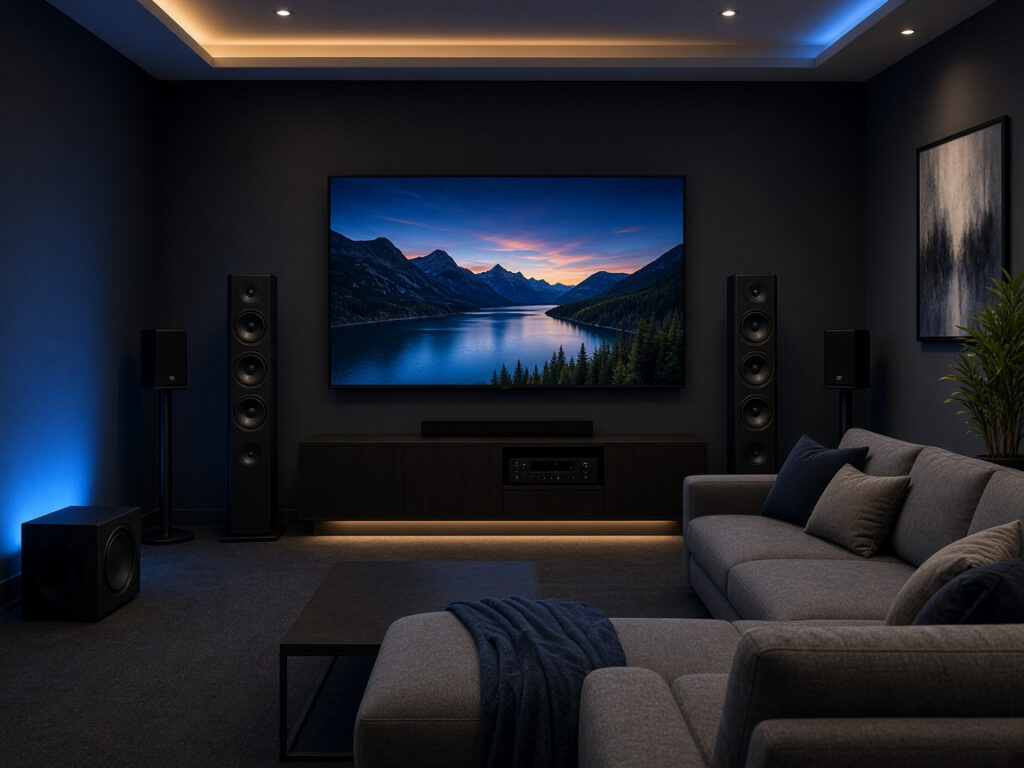
Best Buy stocks surround sound systems across three main categories — soundbars, pre-packaged bundles, and component separates — with configurations from 2.1 stereo to full Dolby Atmos 7.1.4. For buyers comparing retailers, resources on walmart home theater installation add useful context, but this guide covers the Best Buy range end to end: system categories, speaker configurations, brand positioning, budget tiers, specification reading, and Geek Squad installation services.
Executive Summary
- Three product tiers at Best Buy: all-in-one soundbars, pre-packaged home theater systems, and component separates — each with distinct installation complexity and upgrade potential
- Configuration range: 2.1 through 7.1.4 Dolby Atmos; channel count, ceiling height, and room size determine the practical ceiling for complexity in any given installation
- Brand breadth: Sonos, Bose, Sony, Samsung, Klipsch, Polk Audio, Yamaha, and Denon each occupy distinct price and performance segments, with different technical priorities around wireless integration, codec support, and amplifier topology
- Installation services: Geek Squad offers in-home setup and basic calibration; clarifying service scope and what room correction steps are included prevents post-installation surprises
What categories of surround sound systems does Best Buy carry?
Best Buy’s surround sound inventory separates into three distinct categories differentiated by system architecture and installation complexity. The first is soundbars with virtual or discrete surround. These units consolidate front, center, and virtual surround channels into a single horizontal enclosure, often paired with a wireless subwoofer. The range spans from basic 2.0 stereo bars to multi-driver Dolby Atmos bars with upward-firing tweeters and optional satellite surround speakers. They suit rooms where visible cable runs are undesirable and where aesthetic simplicity takes priority over maximum acoustic separation between channels.
The second category is pre-packaged home theater systems: boxed bundles combining a receiver or amplifier with a matched set of front, center, and surround speakers plus a subwoofer. The components are spec-matched at the factory, which simplifies purchasing but limits long-term upgrade paths. The included receiver may carry fewer HDMI inputs, a lower channel count, or no support for Dolby Atmos depending on price tier — checking the receiver specification sheet rather than relying on bundle marketing descriptions is essential. The third category is component separates: a standalone AV receiver selected independently from a speaker system. This requires more research and configuration effort but allows precise matching of amplifier power output to speaker sensitivity, and scales naturally as room requirements or content standards evolve. For a structured pre-shopping comparison of full surround system options, the best home theater surround sound systems ranked for 2026 provide a detailed reference across current product tiers before visiting Best Buy’s floor.
What speaker configurations are available, and which should you choose?
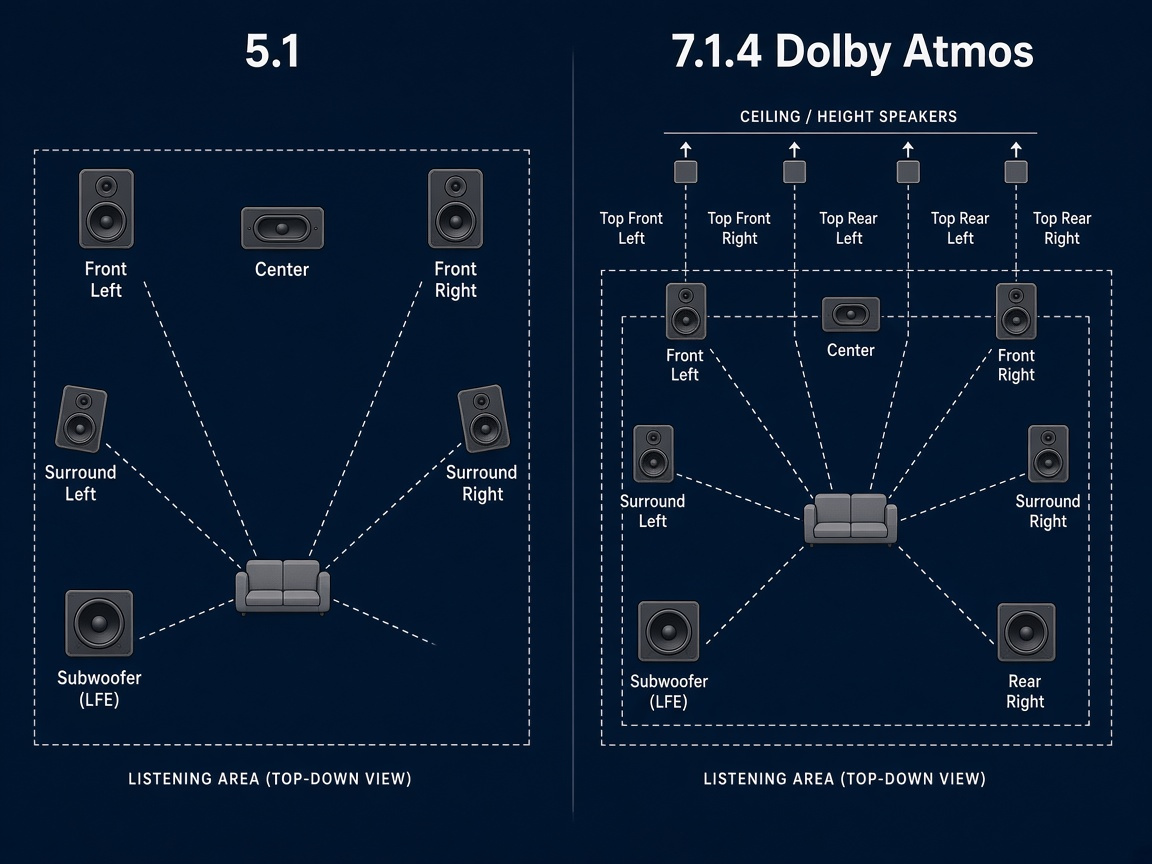
Best Buy product listings use a standardised dot-notation to describe channel count. The first digit is full-range speakers; the second is subwoofers; a third digit indicates height or overhead channels. A 5.1 system — the entry point for discrete surround decoding — comprises a front-left, front-right, center channel, two surround satellites, and one subwoofer. Dolby and DTS both specify 5.1 as the minimum configuration for their core surround formats. It suits most living-room installations and is the reference layout used by mixing engineers producing Dolby Digital and DTS content.
A 7.1 layout extends 5.1 by adding two rear-surround drivers positioned behind the listening position. This format benefits larger rooms where the seating is well clear of the rear wall, allowing the rear speakers to operate at meaningful acoustic separation from the side surrounds. Object-based Dolby Atmos and DTS:X systems append height channels: 5.1.2 adds two upward-firing or ceiling-mounted height units; 7.1.4 adds four. Upward-firing height drivers are designed to reflect sound off a flat ceiling. Dolby’s published installation guidelines specify flat ceilings between 2.4 m and 3.0 m for effective reflection performance. Vaulted, coffered, or highly absorbent ceiling surfaces reduce the precision of that bounce; in-ceiling speaker installations are acoustically preferable in those environments, though they require more invasive installation work. For a full comparison of 7.1 options across current product offerings, the best 7.1 surround sound systems evaluated for 2026 extend this analysis in depth.
| Configuration | Speaker Count | Object-Based Audio | Typical Use Case |
|---|---|---|---|
| 2.1 | 2 full-range + 1 subwoofer | No | Bedroom, secondary display, music-primary setup |
| 5.1 | 5 full-range + 1 subwoofer | No (Dolby Digital / DTS 5.1) | Standard living-room home theater |
| 7.1 | 7 full-range + 1 subwoofer | No (Dolby Digital / DTS) | Larger dedicated media rooms |
| 5.1.2 | 5 full-range + 1 sub + 2 height | Yes (Dolby Atmos / DTS:X) | Standard home theater with Atmos content |
| 7.1.4 | 7 full-range + 1 sub + 4 height | Yes — full object audio spec | Dedicated theater rooms, full Atmos installation |
Which brands does Best Buy stock for surround sound?
Best Buy carries a broad brand roster spanning distinct technical philosophies. Sonos anchors the wireless ecosystem segment: the Arc Ultra, Arc, Beam, and Era 300 form the soundbar range, expandable with the Sub, Sub Mini, and Era 100 surrounds into multi-room wireless systems. Sonos products operate within a proprietary wireless mesh and do not connect to passive speaker terminals on traditional AV receivers. Bose occupies the premium soundbar tier, with its Smart Soundbar range engineered for dialogue clarity and controlled bass through Bose’s ported cabinet designs, supporting Dolby Atmos decoding alongside Apple AirPlay 2 and voice assistant integration. For a model-level evaluation of Bose’s current lineup across retail channels, the best Bose surround sound systems reviewed for 2026 cover each model’s specifications and suitability in full.
Sony covers both the soundbar and passive speaker markets. Its HT-A series soundbars support Dolby Atmos alongside Sony’s proprietary 360 Spatial Sound Mapping, which uses a calibration microphone measurement to distribute audio objects within the detected room geometry. Sony’s passive speaker lines are designed to pair with Sony’s own AV receivers, creating an integrated ecosystem approach using wired connections. Samsung focuses on the soundbar segment with its HW-Q series, integrating Q-Symphony — a feature that allows compatible Samsung displays to contribute their built-in drivers as an extension of the soundbar’s speaker array. Klipsch and Polk Audio represent the traditional passive speaker segment; Klipsch’s Reference Premiere series uses horn-loaded tweeter designs that the manufacturer specifies at high sensitivity — 95–100 dB/W/m across the Reference Premiere line — which suits lower-wattage receivers. Yamaha and Denon provide the AV receiver infrastructure at Best Buy, covering entry through premium separates pairings.
What do surround sound systems at Best Buy cost?
Best Buy’s surround sound range spans a wide price band that broadly corresponds to system architecture and brand tier. Entry-level soundbars — 2.1 or 3.1 units from Samsung, LG, Vizio, and similar brands — are typically available from around $150 to $400. These use digital signal processing to widen the perceived sound stage and add virtual surround without discrete rear channels. Performance varies considerably by room geometry and listening distance, and DSP effectiveness diminishes in acoustically lively rooms with parallel hard reflective surfaces.
Mid-tier systems, roughly $400–$1,000, include premium soundbars from Bose, Sony, and Samsung’s higher HW-Q lines, as well as entry separates configurations pairing a Denon or Yamaha AV receiver with Polk Audio or Klipsch satellite speakers. Systems in this tier support discrete 5.1 decoding and, toward the upper end, Dolby Atmos. Premium systems above $1,000 — extending well past $3,000 for flagship soundbars and high-performance component separates — deliver Klipsch Reference Premiere floor-standers, Sony HT-A7000 or Sonos Arc Ultra soundbars, and Denon or Yamaha AV receivers in the mid-to-upper AVR-X series. These base prices do not include mounting hardware, acoustic treatment, cable management, or Geek Squad installation services, all of which must be factored into the total project budget.
What is the technical difference between a soundbar and a full surround sound system?
The fundamental difference is channel discreteness. A full surround sound system places physically separate speakers at precisely specified positions. ITU-R BS.775 — the reference standard for multichannel audio loudspeaker placement — specifies front speaker angles of ±30° from the listening axis for a 5.1 layout, with surround speakers at ±100° to ±120°. Each speaker receives its own independent audio channel from the receiver, maintaining genuine spatial separation between audio elements assigned to that channel. This physical discreteness produces the most accurate reproduction of a sound mixer’s spatial intent and the clearest imaging between individual sound objects in an Atmos mix.
A soundbar, by contrast, houses all drivers within a single horizontal enclosure — or in a bar-plus-satellite configuration where surrounds are compact wireless units placed at the sides or rear. Its “surround” performance for configurations without physical satellites depends on digital signal processing: time-delay and phase-manipulation algorithms that create phantom images beyond the bar’s physical boundaries. The soundbars in Best Buy’s range that include add-on wireless surrounds — such as the Sonos Arc with Era 100 satellites or select Samsung HW-Q systems with satellite kits — approach a true 5.1 system’s spatial separation more closely than DSP-only bars, but their rear-speaker placement is still constrained by whatever flat surface is available in the room. The practical trade-off is unambiguous: soundbars reduce cable runs and hardware count significantly; full surround systems produce superior spatial accuracy that no DSP algorithm fully replicates.
How do you match a surround sound system to your room?
Three variables dominate room-system matching: volume, acoustics, and speaker placement geometry. Room volume and speaker sensitivity interact directly. High-sensitivity passive speakers — 90 dB/W/m or above — reach reference listening levels from modest amplifier power; a receiver in the 60–80 W/ch range is adequate for most passive packages in rooms under 400 square feet. Lower-sensitivity speakers (84–87 dB/W/m) require substantially more amplifier headroom for equivalent output levels. Pairing a low-sensitivity speaker with an entry-tier receiver undersizes the system acoustically even if the nominal channel count matches perfectly on paper.
Room acoustics determine how much of the speaker’s output reaches the listening position cleanly. Parallel hard surfaces — bare concrete or plaster walls, hardwood floors, large glass areas — increase early reflections and reverberation that smear imaging and can make a technically capable system sound harsh. Soft furnishings, carpets, bookshelves, and acoustic panel installations absorb and diffuse these reflections. This matters especially for Dolby Atmos systems relying on ceiling reflections, where a clean early reflection window is a prerequisite for accurate height imaging. For rooms with constrained dimensions or challenging geometry, the home theater small room ideas guide covers practical layout and acoustic strategies for achieving strong performance within tight spatial constraints. Speaker placement geometry is the third variable: manufacturers publish recommended speaker angles for each format, and significant deviation from those angles degrades the accuracy of the sound field. Geek Squad’s pre-installation consultation provides the most room-specific placement guidance available through Best Buy’s service ecosystem.
What AV receiver specifications matter most when buying at Best Buy?
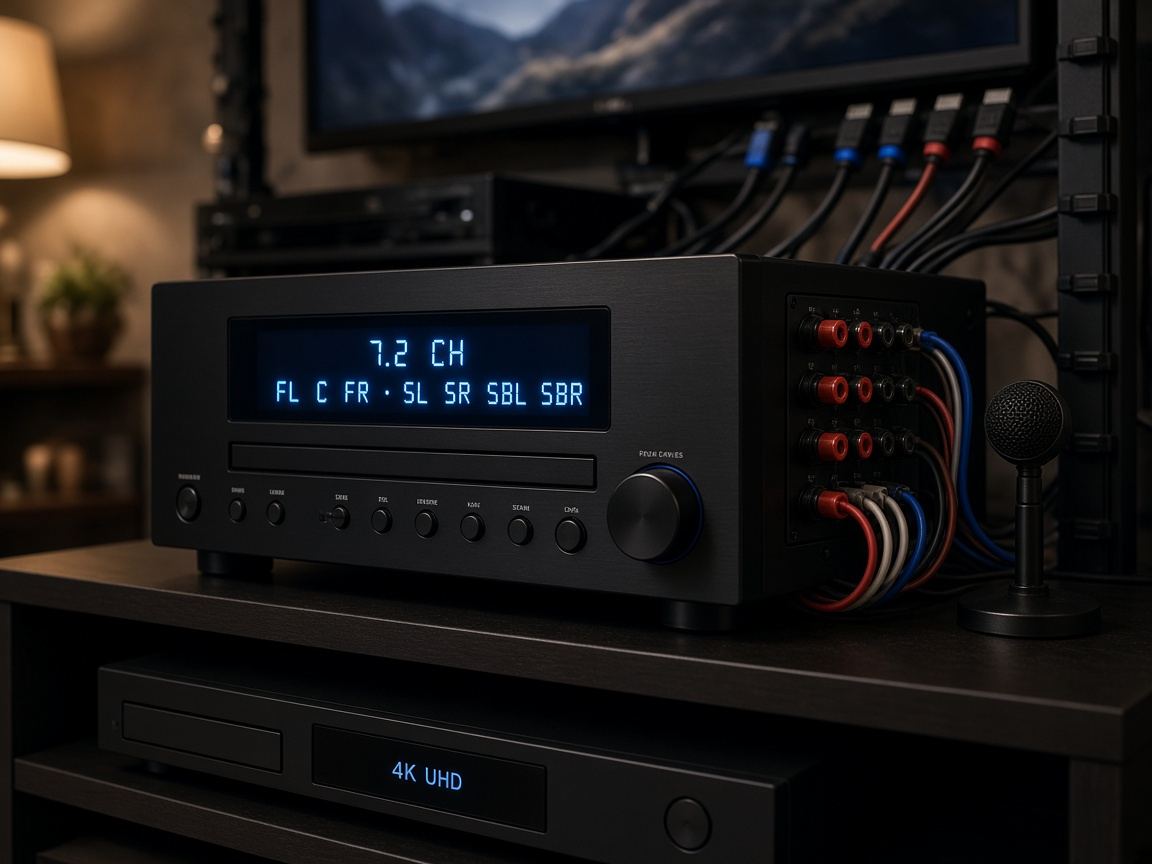
The AV receiver is the technical hub of any component surround sound system. Best Buy carries receivers primarily from Denon, Yamaha, and Marantz, with the entry tier starting around $300 and extending past $2,000 for flagship models. For a purchase in 2026, the following specifications carry the most weight in determining long-term system capability.
HDMI 2.1 and eARC: HDMI 2.1 supports 4K at 120 Hz with HDR passthrough, which is required for current-generation gaming consoles. Enhanced Audio Return Channel (eARC) over HDMI allows lossless Dolby TrueHD and DTS-HD Master Audio to pass from the display to the receiver without compression — the standard HDMI ARC port that preceded eARC compresses those formats down to Dolby Digital 5.1. Any receiver purchased now for a modern display should include at least one HDMI 2.1 input and one eARC-capable output. Some entry-tier receivers include HDMI 2.0 on most inputs with a single HDMI 2.1 passthrough; confirm that the HDMI 2.1 port count matches your source device count before purchasing.
Amplifier channel count and power: A 7.2.4-channel receiver can drive four height channels internally without an external amplifier; a 5.2.2-channel model requires external amplification to run a full 7.1.4 Atmos layout. Power ratings in AV receivers are conventionally quoted at a single channel driven into 8 Ω, which produces a higher figure than all-channels-driven conditions; the most useful comparison is total rated power, internal channel count, and the minimum speaker impedance the receiver supports. Room correction software is the third critical variable: Denon and Marantz receivers include Audyssey MultEQ; Yamaha uses YPAO (Yamaha Parametric room Acoustic Optimizer). Both use a supplied calibration microphone to measure speaker output at multiple positions and apply EQ corrections for room anomalies. Audyssey MultEQ XT32, available on mid-tier and above Denon and Marantz receivers, applies correction at higher resolution than base MultEQ and is worth prioritising in any performance-focused installation. Dirac Live, available on a smaller number of premium receivers, applies a more comprehensive transfer function measurement and is considered the most precise room correction available in the consumer receiver category.
What does Geek Squad offer for surround sound installation?
Best Buy’s Geek Squad offers tiered in-home installation services for home theater and surround sound systems. Standard installation services typically cover connecting the AV receiver or soundbar to the display and source devices, running and concealing cables within standard routing paths, and performing an initial system test. More complex work — wall-mounted speaker installation, in-wall cable routing, multi-room audio integration, or rack buildout — is available as a separately priced add-on. Installation pricing varies by complexity and location; Best Buy’s website lists indicative service prices, but final quotes for in-wall or custom work require an in-home assessment.
Geek Squad also offers a pre-installation consultation — a site visit before purchase to assess cable routing feasibility, wall construction type (wood-stud drywall is straightforward; masonry affects both tool requirements and time), and system placement constraints. For component separates installations, booking this consultation before purchase prevents the common situation of selecting hardware that doesn’t fit the actual room constraints. One important clarification: Geek Squad’s standard installation service typically includes connecting and testing equipment at stated positions, but it does not automatically include running the receiver’s room correction calibration routine. Confirm explicitly whether the technician will perform the full Audyssey or YPAO calibration sequence during setup, as this significantly affects the out-of-box acoustic performance of the system. For a comprehensive step-by-step guide to home theater setup that complements any professional installation, the home theater system set-up guide covers the full process from initial rack assembly through room correction calibration.
How do you evaluate surround sound specifications before buying?
Specification sheets at Best Buy follow a loosely standardised format, but several figures require careful reading rather than surface-level comparison. Frequency response is quoted as a range with a tolerance — for example, 40 Hz–20 kHz ±3 dB. The tolerance is as important as the range: a specification without a stated tolerance (or one with ±6 dB) means the stated range is less informative as a performance metric. The low-end figure indicates how deep a speaker extends before significant roll-off; a full-range tower speaker rated to 40 Hz at ±3 dB is fundamentally more capable in the bass register than a satellite rated to 100 Hz, regardless of brand positioning.
Sensitivity is quoted in dB/W/m: the output level measured at one watt of input, one metre distance. Higher sensitivity (90–100 dB/W/m) means the speaker produces more output per watt of amplifier power. A speaker rated at 95 dB/W/m will produce the same volume as an 88 dB/W/m speaker on approximately five times the amplifier power — a critical pairing consideration. Impedance (commonly 4 Ω, 6 Ω, or 8 Ω nominal) affects how much current the receiver’s amplifier section must supply. A receiver specified for a minimum 6 Ω load should not be paired with 4 Ω speakers under sustained high-volume conditions; the receiver’s protection circuits will engage, reducing output or triggering a shutdown. Total harmonic distortion (THD) in AV receivers is quoted as a percentage at a specified power output and load. Figures at or below 0.08% at rated power are standard across mid-tier receivers and indicate a clean amplification stage. For soundbars, THD specifications are less commonly published, but manufacturers who include them at a defined output level provide more transparent performance data than those relying solely on narrative marketing language.
What do owner reviews indicate about Best Buy surround sound purchases?
Verified purchaser reviews on Best Buy’s product pages provide useful signal on real-world performance gaps that specification sheets don’t capture. Across the Dolby Atmos soundbar category, owners consistently report that height channel effects are perceptible on content specifically mixed for Atmos — Atmos-tier streaming services, 4K Blu-ray — but significantly less pronounced on standard 5.1 or stereo sources. The practical implication for buyers is straightforward: a purchaser whose primary content is stereo music, standard cable broadcasts, or older 5.1 mixes gains relatively little from paying the premium for Atmos-capable hardware. The upgrade from a quality non-Atmos soundbar to an Atmos one is most justifiable when the buyer regularly uses Atmos-mixed streaming tiers and 4K physical media.
For component separates packages in the mid-tier, owners frequently identify the bundled subwoofer as the first candidate for upgrade after initial use. Subwoofers included in pre-packaged home theater systems are often sized to meet the bundle’s price point rather than to maximally complement the included satellite speakers’ low-frequency performance. Owners of select mid-tier bundles also note that the included receiver may lack HDMI 2.1 passthrough, creating compatibility friction with current gaming consoles and future display upgrades — verifying the HDMI version on any bundled receiver before purchase prevents this. On the wireless surround segment, owners of Sonos-based systems frequently highlight easy initial setup and consistent wireless stability as primary strengths, while some note that late-night low-volume listening reveals the limits of DSP-based virtual surround relative to discrete physical rear speakers, since the stereo localisation cues that identify rear-sourced sound are less convincing at low playback levels.
What surround sound developments should Best Buy shoppers watch in 2026 and beyond?
Several technical trajectories are shaping the surround sound market through 2026 and into 2027, and they affect which specifications to prioritise in a purchase today. HDMI 2.1 proliferation: HDMI 2.1 is now standard on mid-tier and above receivers at Best Buy, but entry-tier models continue shipping with HDMI 2.0 on most ports. As source devices — streaming boxes, gaming consoles, next-generation optical disc players — increasingly require HDMI 2.1 for their full feature sets, entry-tier receivers purchased now may become bottlenecks within two to three years. Prioritising a receiver with HDMI 2.1 across all inputs rather than a single dedicated gaming port extends the investment horizon meaningfully.
Wireless rear channels are moving from a differentiating feature to a standard expectation at mid-tier price points. Sony, Samsung, Denon, and Yamaha have each introduced or expanded wireless surround connectivity using proprietary low-latency wireless links rather than conventional speaker wire. The latency and stability of these implementations varies by manufacturer; those who publish quantified latency figures in their specifications are providing more useful data than those relying on “virtually lag-free” descriptions. For buyers evaluating wireless configurations, the best wireless surround sound systems reviewed for 2026 provide a detailed comparison across key brands and implementations. AI-assisted room correction is expanding beyond the existing Audyssey and YPAO frameworks: next-generation room correction implementations are incorporating machine-learning-assisted EQ that adjusts correction filters more dynamically than fixed-curve approaches. Purchasing a receiver with a Dirac Live licence or a confirmed software upgrade path future-proofs the calibration capability beyond what current fixed-filter correction delivers.
Frequently Asked Questions
Can I return a surround sound system to Best Buy after opening it?
Best Buy’s standard return window for most electronics is 15 days from purchase. My Best Buy Elite and Elite Plus members receive extended windows of 30 or 45 days. Opened items are eligible for return but may be subject to restocking fees — conditions vary by product category and have changed over time, so confirm the current policy at checkout. Items that have been physically installed — speakers wall-mounted, receivers rack-cabled with custom runs — are more complex to return, as the installation itself is not part of the product return.
Does Best Buy price-match surround sound systems?
Best Buy maintains a price match guarantee covering identical items sold by qualifying competitors, applicable both in-store and online. The guarantee also applies within the return window on a post-purchase basis if the price drops. Best Buy does not match third-party marketplace sellers, open-box prices at other retailers, or prices during certain promotional events. Confirm eligibility with store staff for specific products and timeframes.
What is the technical difference between Dolby Atmos and DTS:X?
Both Dolby Atmos and DTS:X are object-based audio formats that encode audio as individual sound objects with positional metadata rather than as a fixed channel matrix. The receiver decodes the objects and renders them through the available speaker layout in real time. The principal practical difference is content availability: Dolby Atmos is more widely deployed across major streaming services, 4K Blu-ray titles, and gaming platforms, so it is the more reliably encountered format in day-to-day use. Both formats are supported by all current mid-tier and above AV receivers at Best Buy.
Do Best Buy soundbars include a subwoofer?
It varies by model. Best Buy product listings state channel configuration numerically: a “2.0” soundbar includes no subwoofer; a “2.1” or “3.1” listing confirms one is included, typically as a wireless unit. Some models incorporate a ported bass cabinet within the bar’s own enclosure rather than providing a separate subwoofer cabinet. This reduces setup complexity but limits low-frequency extension compared to a dedicated active subwoofer with a full-sized driver.
Can Geek Squad run in-wall cable for a surround sound installation?
Yes. In-wall cable routing is available as a separately priced Geek Squad add-on service. Feasibility and cost depend on wall construction (wood-stud drywall is straightforward; masonry requires different tools and significantly more time), routing path distance, and the presence of fire-blocking or insulation between floors. Best Buy recommends booking a pre-installation consultation before purchase specifically to assess in-wall routing feasibility, as the results may affect which system or speaker model you choose.
What is the minimum recommended room size for a 7.1 surround sound system?
There is no single published industry minimum, but most home theater installation guidelines — including Dolby’s speaker placement recommendations — indicate that 7.1 benefits rooms where the listening position is at least 1.5 m from the rear wall, allowing rear-surround speakers to be positioned behind the seating area rather than beside it. In practice, this typically corresponds to rooms larger than roughly 300–350 square feet with seating positioned away from the rear wall. In smaller rooms, the rear and back surround speakers are often too close to the listening position to produce distinct rear imaging, making a well-implemented 5.1 layout a better technical choice.
Does Best Buy sell AV receivers separately from speaker packages?
Yes. Best Buy carries standalone AV receivers from Denon, Yamaha, and Marantz across a full price range, sold independently from speaker packages. Individual speakers from Klipsch, Polk Audio, and other brands are available as single units or matched pairs without an included receiver. This allows buyers to select a preferred receiver and match it to a preferred speaker brand, though it places the burden of impedance, sensitivity, and power matching on the buyer rather than on a bundle manufacturer.
What to Do Next: A Practical Buying Sequence
Approaching a Best Buy surround sound purchase in a defined sequence prevents the most common sources of post-purchase friction — specification mismatches, return-window complications, and installation cost surprises.
- Define your room parameters first. Measure the room, note ceiling height and construction type, assess surface materials, and confirm whether cable runs to rear speaker positions are physically feasible. This determines the maximum useful speaker configuration before you spend a minute on product research.
- Choose a system category. Soundbar, pre-packaged system, or separates — based on your installation tolerance, long-term upgrade intent, and whether cable runs to surround positions are practical in your room.
- Set a total budget including installation. Add estimated Geek Squad fees, mounting hardware, speaker cable, and any acoustic panel cost before anchoring to a system price point. Installation and hardware additions frequently represent a material portion of the total project cost.
- Verify AV receiver HDMI and codec specifications. Confirm HDMI 2.1 port count, eARC support, Dolby Atmos and DTS:X decoding, and room correction software version for any separates purchase or bundled receiver. Do not rely on marketing descriptions — read the specification sheet.
- Check verified owner reviews on Best Buy’s listing pages. Filter by verified purchases and prioritise reviewers who describe a room size and content use case similar to your own. Owner feedback on subwoofer performance and HDMI compatibility is particularly reliable signal.
- Book a Geek Squad consultation if running cable. Do this before finalising your purchase — in-wall routing assessment may affect which speaker or receiver you select. Post-purchase surprises on routing complexity add unplanned cost and delay.
- Cross-reference your shortlist against independent system comparisons. Validate that you haven’t missed a better-matched option at the same price point before the final purchase decision.
The hometheaterinfoline.com editorial team maintains regularly updated comparisons for each major system category and configuration tier. Following this sequence and cross-referencing category-specific rankings before purchase reduces the likelihood of a costly spec mismatch or a premature upgrade cycle driven by a system that doesn’t match the room it was bought for.