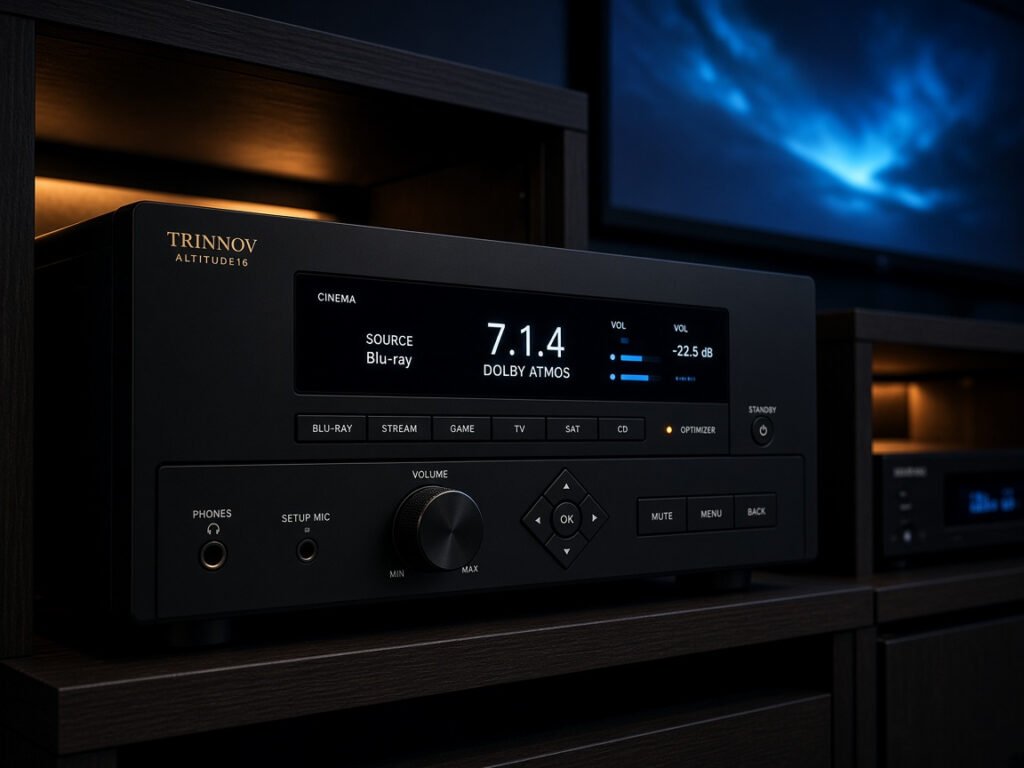
The best AV receiver for home theater decodes multi-channel audio formats, amplifies power to every speaker in your layout, and routes video signals from all source devices to your display. For most rooms, a 7.2-channel model with HDMI 2.1 support, Dolby Atmos decoding, and onboard room correction delivers a complete, upgrade-ready foundation at a sensible price.
- Channel count drives layout flexibility: a 5.1 receiver handles most living rooms; 7.2 adds surround-back channels and a second subwoofer output; 9.2.4 supports a full Dolby Atmos height array with dedicated ceiling speakers.
- HDMI 2.1 is the 2026 baseline: it carries 4K/120Hz, 8K/60Hz, Variable Refresh Rate (VRR), Auto Low Latency Mode (ALLM), and enhanced Audio Return Channel (eARC) within the same port standard.
- Room correction separates good installs from great ones: Audyssey MultEQ XT32, Yamaha YPAO with Parametric EQ, and Dirac Live each take different approaches to correcting what your room does to the sound — and the differences are audible.
- Budget tiers differ most in pre-out availability and correction quality — not necessarily in raw watts per channel, where the gap between tiers is narrower than spec sheets often imply.
What Makes an AV Receiver the Right Choice for Home Theater?
An AV receiver is the central nervous system of a home theater. It simultaneously manages three functions: decoding compressed and lossless audio formats from disc and streaming sources, amplifying that decoded signal across multiple independent speaker channels, and switching video signals from multiple source devices — a streaming player, a gaming console, an Ultra HD Blu-ray player — to a single display output. That combination of decoding, amplification, and switching in one chassis is what distinguishes a receiver from every simpler alternative.
Before committing to a full receiver system, it is worth acknowledging that great sound bars offer a genuinely simpler setup path — one HDMI eARC connection, no speaker wires, and decent virtualized surround sound. But a receiver gives you discrete amplifier channels for each speaker, independent level and distance calibration per driver, and the ability to upgrade individual components without replacing the whole system. For anyone planning more than a 2.1 setup, the receiver architecture is the more capable and scalable choice over any multi-year horizon.
The key specifications to evaluate before purchase are channel count, HDMI version and port quantity, supported audio decoding formats, room correction platform, power output rating and measurement conditions, and connectivity options (streaming protocols, Bluetooth, Zone 2 output). Each of those dimensions is covered in the sections that follow, with enough technical detail to interpret manufacturer spec sheets accurately.
How Many Channels Does Your Home Theater Actually Need?
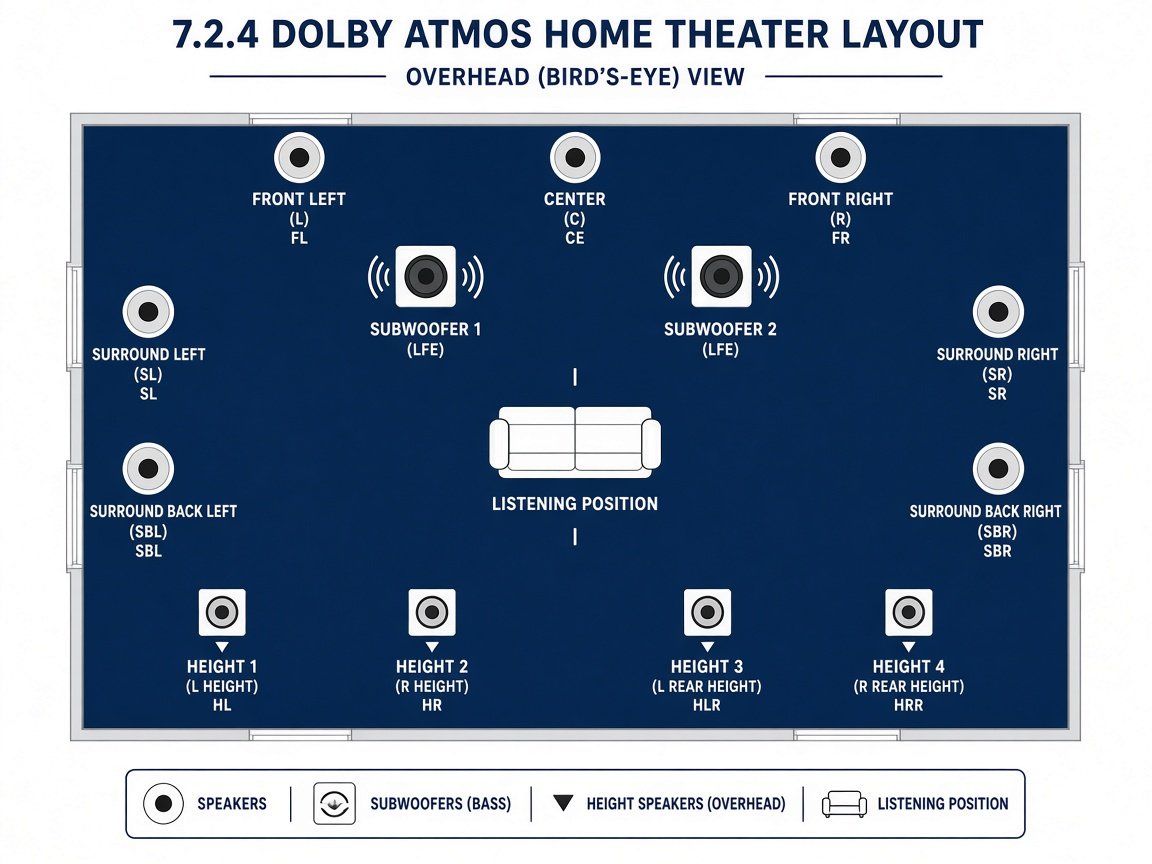
Channel count determines how many independent speaker positions a receiver can drive and calibrate. The numbering convention follows a consistent pattern: the first digit counts full-range speaker channels, the second counts subwoofer outputs, and a third digit — where present — counts height channels for object-based surround formats like Dolby Atmos and DTS:X.
A 5.1 configuration — front left, centre, front right, surround left, surround right, one subwoofer — remains the most practical starting point for living rooms where furniture placement limits rear speaker positioning. It delivers full Dolby Digital and DTS decoding and handles Dolby Atmos via the receiver’s built-in upmixer even without dedicated height speakers. If a 5.1 layout is your target, the dedicated comparison of 5.1-channel home theater receivers covers everything from budget-friendly models to capable mid-range designs built specifically around this configuration.
A 7.2 receiver adds surround-back channels directly behind the listening position and a second subwoofer output — a meaningful improvement in both envelopment and low-frequency management. The jump to 9.2 or 9.4 adds the front-height or wide channels that enable proper Dolby Atmos and DTS:X height rendering without virtualization. Full 7.2.4 or 9.2.4 configurations, with four dedicated ceiling or up-firing Atmos speakers, represent the ceiling of what most domestic rooms can accommodate before diminishing returns set in on both cost and acoustic complexity.
- 5.1 — living rooms, apartments, budget-focused builds; full surround decoding, no native height
- 7.2 — medium rooms with space for surround-back speakers; adds depth and a second sub output
- 9.2 / 9.4 — dedicated rooms or larger living spaces; supports native Atmos height rendering
- 11.4+ — large dedicated home theater rooms; maximum immersion, requires significant acoustic treatment to perform properly
Which Surround Sound Formats Should Your Receiver Decode?
The most important audio formats to verify on any receiver are Dolby TrueHD (the lossless container for Dolby Atmos content on Blu-ray disc), DTS-HD Master Audio (the lossless DTS equivalent), Dolby Atmos (object-based height audio), and DTS:X (the DTS object-based counterpart). Every mid-range and high-end receiver in 2026 decodes all four. Where receivers diverge is in how they handle these formats when the installed speaker layout does not perfectly match the encoded channel count — and in how effectively their upmixers infer height information from non-Atmos sources.
Dolby Atmos is the dominant object-based format on both Blu-ray disc and streaming services including Netflix, Apple TV+, Disney+, and Amazon Prime Video. According to Dolby’s published specifications, the format supports up to 128 simultaneous audio objects rendered to as many as 34 speaker positions. This is the same format standard that underpins the full Dolby Theater experience in commercial cinemas; home playback from a Dolby TrueHD track on disc delivers audio mastered to that same specification, decoded natively by your receiver.
DTS:X, Auro-3D, and IMAX Enhanced represent alternative or complementary formats worth noting. Auro-3D uses a layered height approach — a “voice of God” elevation layer above a 5.1 or 7.1 base — rather than the per-object rendering method of Atmos. IMAX Enhanced content is mixed by IMAX-certified engineers to a DTS:X Pro codec with specific speaker angle guidelines. Availability of native Auro-3D decoding is limited to higher-end models from certain manufacturers. For a complete picture of how the right speaker system pairs with these formats, our guide to the best home theater surround sound systems addresses the speaker side of the equation in detail.
What HDMI 2.1 Specifications Should You Prioritize in 2026?
HDMI 2.1 raises the interconnect bandwidth ceiling from 18 Gbps (HDMI 2.0) to 48 Gbps, according to the published HDMI specification standard. That additional headroom enables 4K resolution at 120Hz refresh rates, 8K resolution at 60Hz, Dynamic HDR frame-by-frame tone mapping, Variable Refresh Rate (VRR) for gaming, and Auto Low Latency Mode (ALLM) for automatic latency switching. HDMI 2.1 also introduced eARC — enhanced Audio Return Channel — which carries full-bandwidth lossless audio including Dolby TrueHD and DTS-HD Master Audio from a television back to the receiver over the same HDMI cable used for the receiver’s video output.
Not all HDMI ports labelled “2.1” on a given receiver implement the full specification. Some manufacturers fit only a subset of inputs with full-bandwidth 2.1 capability, while remaining inputs carry a partial 2.1 implementation that may omit VRR support or cap out at a lower bandwidth figure. Verifying which specific ports carry complete HDMI 2.1 feature support is essential before purchase — particularly in gaming setups where multiple consoles may each require 4K/120Hz and VRR simultaneously on separate inputs.
| Feature | HDMI 2.0 | HDMI 2.1 |
|---|---|---|
| Maximum bandwidth | 18 Gbps | 48 Gbps |
| Maximum resolution / refresh rate | 4K / 60Hz | 8K / 60Hz; 4K / 120Hz |
| Variable Refresh Rate (VRR) | No | Yes |
| Auto Low Latency Mode (ALLM) | No | Yes |
| Audio Return Channel | ARC (compressed formats only) | eARC (full lossless bandwidth) |
| Dynamic HDR (frame-by-frame) | No | Yes |
Bandwidth and feature data sourced from the published HDMI 2.1 specification (HDMI Licensing Administrator, Inc.).
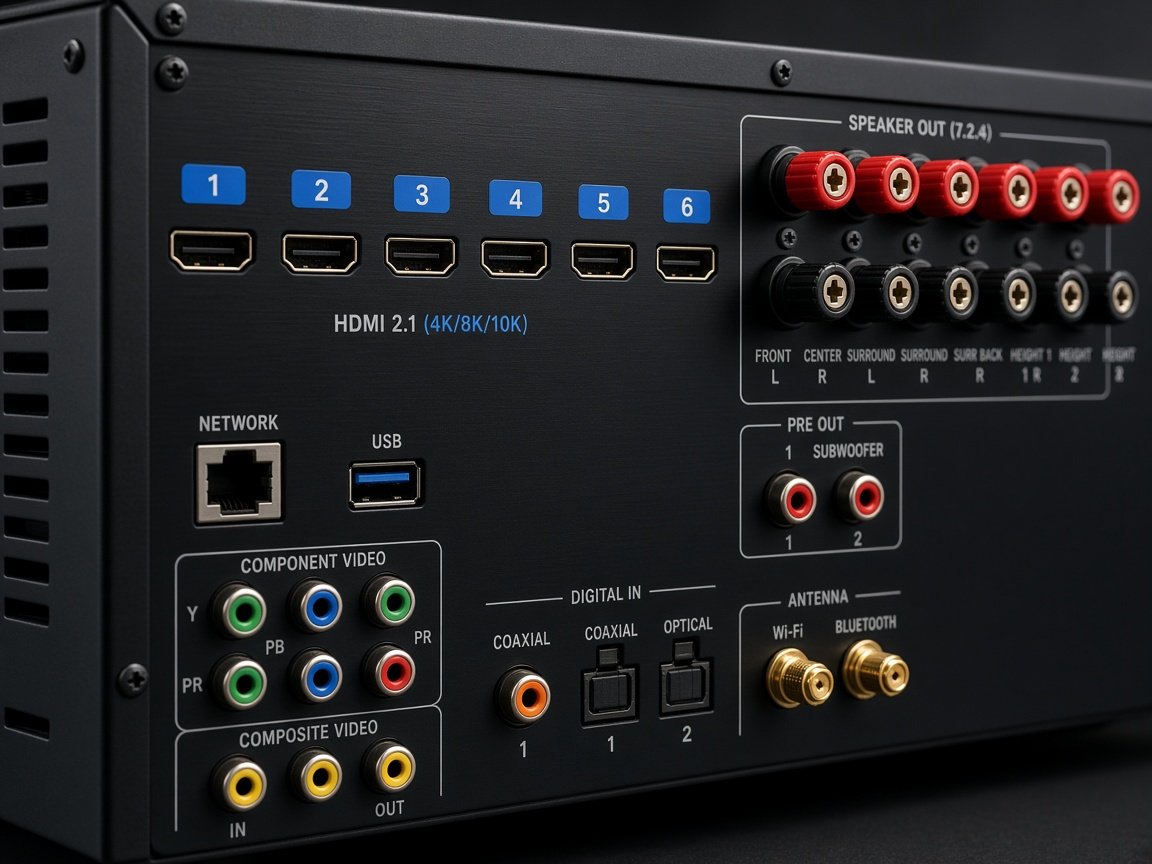
A receiver may advertise “HDMI 2.1” while implementing only a subset of the standard’s features on select ports. Always confirm, using the manufacturer’s port-by-port specification sheet, that the specific inputs you need support 4K/120Hz, VRR, and ALLM simultaneously — before purchase, not after.
How Does Room Correction Software Improve Performance?
Room correction is the most underrated specification in AV receiver selection. No matter how accurate your speakers perform in a controlled environment, once they operate inside a typical domestic room, boundary reflections, low-frequency standing waves, and early-reflection patterns alter the frequency response at the listening position significantly. Room correction software measures these anomalies using a calibration microphone placed at the listening seat, then generates digital filters that compensate for the room’s acoustic signature before the signal reaches the speaker terminals.
The three platforms that dominate the market each take a different technical approach. Audyssey MultEQ XT32 — standard on mid-range and high-end Denon and Marantz receivers — uses up to eight measurement positions (depending on the model) to build a spatially averaged response, then applies time-domain and frequency-domain corrections at high filter resolution. Yamaha’s YPAO with Parametric EQ, found in the Aventage series, uses a rotating microphone to capture multi-directional data and applies parametric filters the user can inspect and adjust manually post-calibration. Dirac Live, a third-party platform licensed by Anthem, NAD, and select Denon and Marantz models, corrects both the magnitude response and the impulse response (time domain) of each speaker simultaneously — a capability that sets it apart from most factory-integrated alternatives.
| Platform | Developed by | Correction type | Typically found in |
|---|---|---|---|
| Audyssey MultEQ XT32 | Audyssey Laboratories | Magnitude + time, up to 8 positions | Denon AVR-X3000-series and above, Marantz Cinema series |
| YPAO with Parametric EQ | Yamaha | Magnitude + directional multi-point | Yamaha Aventage (RX-A) series |
| Dirac Live (bass control only) | Dirac Research | Magnitude + impulse (bass range) | Select mid-range models via firmware |
| Dirac Live Full | Dirac Research | Magnitude + impulse (full 20Hz–20kHz) | Anthem MRX series, NAD T-series, premium tier |
| MCACC Pro | Pioneer | Magnitude + time, 6 positions | Pioneer Elite series |
Dirac Live’s separation of bass control (available as a free add-on on compatible models) from full-range correction (a paid upgrade) is worth understanding before purchase. The bass-only version addresses the most problematic frequency region, but the full-range version delivers perceptible improvements in midrange clarity and high-frequency speaker imaging that are consistently noted by owners of models where both have been compared.
How Much Power Does a Home Theater Receiver Actually Need?
Receiver power ratings require careful interpretation. Manufacturers commonly publish wattage figures measured at 1kHz with one or two channels driven at high total harmonic distortion (THD) values — conditions that bear little resemblance to demanding multi-channel listening. The more demanding measurement standard — 20Hz to 20kHz, all channels driven simultaneously, at 0.08% THD or less — produces significantly lower numbers and is the figure most relevant to real-world home theater use. When comparing models across brands, always check which measurement conditions the published power figure uses before drawing conclusions.
Speaker sensitivity is the other side of this equation. Every 3 dB increase in speaker sensitivity halves the amplifier power required to reach the same output level — a fixed acoustic relationship defined by the decibel scale. A speaker rated at 92 dB/W/m (output per watt at one metre) therefore needs half the amplifier power of an 89 dB/W/m model to achieve the same listening level. For typical home theater use with speakers in the 86–92 dB sensitivity range and rooms up to roughly 400 square feet, 80 to 120 watts per channel (at 8 ohms, two channels driven, 20Hz–20kHz) is more than adequate for reference-level playback. For the low-frequency side of the equation, the choice of subwoofer matters as much as the receiver’s rated sub pre-out voltage — our guide to the best bass speakers for home theater covers how to match subwoofer performance to your receiver’s pre-out specifications.
Every 3 dB increase in speaker sensitivity halves the amplifier power required to reach the same volume level — a fixed acoustic relationship, not a marketing claim. A speaker rated 6 dB more sensitive than another needs only one-quarter the wattage to reach equal output. Prioritise speaker sensitivity data alongside receiver power ratings — not instead of them, but equally.
How Do Budget, Mid-Range, and High-End Receivers Compare?
The AV receiver market segments into three broadly consistent tiers in 2026. Each tier trades off differently across the features that matter most: channel capability, room correction quality, HDMI 2.1 port count, and pre-amplifier outputs for external amplifier connections. For a broader view of which specific models lead each tier this year, the best home theater receivers ranked for 2026 provides a comprehensive cross-brand comparison to complement the feature analysis below.
| Feature | Budget ($300–$600) | Mid-Range ($600–$1,200) | High-End ($1,200+) |
|---|---|---|---|
| Channel capability | 5.2 to 7.2 | 7.2 to 9.4 | 9.4 to 11.4+ |
| Room correction platform | Basic EQ / MultEQ XT | MultEQ XT32 / Dirac Live Bass Control | Dirac Live Full / MultEQ XT32 + Sub EQ HT |
| HDMI 2.1 inputs | 1–3 (often partial feature set) | 4–6 (full feature set on most ports) | 6–8 (full feature set across all inputs) |
| Pre-amplifier outputs | None or subwoofer only | Sub ×2, often front L/R | All channels + multi-zone |
| Typical power range (8Ω, 2ch, 20Hz–20kHz) | 60–90W/ch | 90–120W/ch | 120–150W/ch |
| Build quality indicators | Plastic chassis, shared transformer | Reinforced chassis, improved DACs | Anti-resonance bracing, discrete output stages |
Power figures represent representative market ranges based on published manufacturer specifications across the tier; individual models will vary. Build quality descriptors reflect common design patterns, not universal standards.
The practically most important differentiator between budget and mid-range is the step from Audyssey MultEQ XT to XT32. The XT32 version applies corrections at a substantially higher filter resolution — 8,192 FIR filter taps versus 512 — and separately processes each subwoofer output (Sub EQ HT on Denon and Marantz models) for more precise bass integration. That improvement in calibration quality, rather than the incremental wattage increase, is what makes the mid-range tier sound meaningfully better in a treated room.
Which AV Receiver Brands Lead the Market?
Several brands have consistently defined the AV receiver category, each bringing a distinct technical philosophy to their lineup. Denon occupies the widest price range, with the entry-level S-series delivering reliable Dolby Atmos decoding and Audyssey room correction, while the AVR-X line steps up to XT32 and 9.4-channel capability at the mid-range tier and 11-channel designs at the top of the range. Marantz, part of the same Sound United / Masimo Sound United parent company as Denon, shares the underlying platform architecture but applies a warmer tuning philosophy and more audiophile-focused presentation across its Cinema series.
Yamaha differentiates its Aventage lineup through its anti-resonance technology — a central cross brace within the chassis designed to minimize vibration-induced noise — and through YPAO with Parametric EQ, which allows more granular manual adjustment of correction filters than Audyssey’s automated approach. If you are evaluating Yamaha-based setups, the guide to the best Yamaha home theater systems addresses the full Yamaha ecosystem including speaker pairings recommended for the Aventage series.
Anthem and NAD occupy the premium end of the market with a focus on audiophile build quality and Dirac Live Full as a standard — not add-on — feature. Anthem’s MRX series and NAD’s T-series are frequently cited in professional AV system design circles as the strongest-performing room correction implementations available without moving to outboard processors. Sony’s STR receivers compete strongly on video processing, with their current generation incorporating calibration technology drawn from Sony’s Bravia TV engineering. Pioneer’s Elite line continues to offer MCACC Pro room correction and high-current output stages designed for demanding low-impedance speaker loads.
How Do You Set Up an AV Receiver Step by Step?
Proper setup and calibration determine whether the hardware you have chosen performs to its specification. The following sequence applies regardless of brand or receiver tier. If you would prefer to leave the physical installation to professionals, services such as Walmart home theater installation can handle mounting, cabling, and initial calibration during a single scheduled visit — a practical option for complex multi-room or ceiling-speaker installations.
What Gaming Features Should You Look For in a Home Theater Receiver?
The PlayStation 5, Xbox Series X, and current-generation gaming PCs all output via HDMI 2.1 at up to 4K/120Hz with Variable Refresh Rate enabled. For a home theater that doubles as a gaming display, the receiver is the critical link in this signal chain: if the receiver’s HDMI 2.1 implementation is partial or its full-bandwidth port count is insufficient, it will bottleneck performance that the display and console are both capable of handling natively.
Key gaming-specific features to verify: the number of full-bandwidth HDMI 2.1 inputs (two is the minimum for simultaneous PS5 and Xbox Series X use; three if a gaming PC is also connected), confirmed VRR pass-through beyond just ALLM, and a dedicated gaming or low-latency mode that bypasses video processing to minimize added signal delay. Some receivers also support NVIDIA G-Sync and AMD FreeSync VRR protocols in addition to the HDMI-native VRR specification — worth confirming with manufacturer documentation if your gaming PC uses either of those platforms.
Audio latency deserves equal attention. When a receiver decodes Dolby Atmos or DTS:X from a game title, the processing pipeline adds a small amount of latency that can desynchronize audio from fast-moving on-screen events. Well-implemented gaming modes in 2026 receivers apply decoding without upsampling or additional DSP that would introduce measurable delay beyond the decoding process itself. Always consult the manufacturer’s gaming mode documentation for latency figures on the specific unit under evaluation.
What Streaming and Multi-Room Connectivity Should You Expect?
Modern AV receivers are network-connected devices that function as streaming endpoints as well as amplification hubs. Wi-Fi (commonly dual-band 802.11ac, with Wi-Fi 6 appearing across mid-range and high-end designs in 2026), Bluetooth 5.0 or later, AirPlay 2, Chromecast built-in, and Spotify Connect are the connectivity features that appear across the mid-range and above. AirPlay 2 enables lossless audio streaming from Apple devices and multi-room synchronization with other AirPlay 2 speakers. Chromecast provides the equivalent function for the Google ecosystem. Spotify Connect runs directly on the receiver without requiring a phone or tablet to remain active during playback.
Multi-zone audio output — commonly Zone 2 and Zone 3 — allows the receiver to route a separate audio source to speakers in another room while the main system plays a different source independently. Zone 2 audio is delivered via either dedicated amplifier channels (reducing the available channel count for the main zone) or dedicated Zone 2 pre-outs for connection to a separate amplifier. This distinction matters for setups that require both a full-channel main zone and an independent secondary zone operating simultaneously — confirm which approach a given model uses before assuming both zones can run at full capacity at the same time.
What Should You Expect from AV Receivers Through 2027?
The AV receiver category is in a consolidation phase for HDMI capability following the broad rollout of HDMI 2.1 across the mid-range and above. Through 2027, the most significant developments are expected in three areas rather than in fundamental changes to the HDMI interconnect specification itself.
First, Dirac Live is on a consistent migration path down the price curve. As licensing costs decrease with wider manufacturer adoption, the correction technology that currently distinguishes Anthem and NAD is appearing in mid-range Denon and Marantz options as paid firmware activations — a trend that is likely to continue and potentially extend to the upper budget tier. Second, AI-assisted calibration — moving beyond fixed impulse-response measurement to adaptive continuous correction that responds to changes in room occupancy and furniture configuration — is an active development area for multiple manufacturers. Third, lossless audio delivery from streaming services is expanding: Apple Music’s spatial audio (Dolby Atmos) and Amazon Music Unlimited’s HD tier already push high-resolution content to receivers, and broader adoption of Dolby Atmos Music by mainstream streaming platforms is an expected progression through the two-year horizon.
HDMI 2.2, which promises higher bandwidth for resolutions beyond 8K and additional gaming features, is in active development and standardization as of 2026, though consumer display and source device adoption at scale falls outside the near-term window covered here. For 2026 and 2027 purchases, full-feature HDMI 2.1 across an adequate number of inputs remains the correct specification to insist on — the technology is stable, well-supported, and sufficient for every consumer display standard currently on the market.
Frequently Asked Questions
What is the difference between a 5.1 and a 7.2 AV receiver?
A 5.1 receiver drives five speaker channels (front left, centre, front right, surround left, surround right) and one subwoofer output. A 7.2 adds two surround-back channels for the positions directly behind the listening seat and a second subwoofer output — enabling independent level and crossover control of two subwoofers for more even bass distribution across the room. The 7.2 configuration is preferable whenever the room layout can accommodate rear speaker placement.
Do I need HDMI 2.1 on a home theater receiver in 2026?
Yes, for any setup involving a PlayStation 5, Xbox Series X, Apple TV 4K (2022 generation or later), or a gaming PC. All of these devices output via HDMI 2.1 for 4K/120Hz, Variable Refresh Rate, or both. Without a full-bandwidth HDMI 2.1 path through the receiver, those capabilities are either unavailable or require bypassing the receiver entirely — which defeats the audio routing purpose. For a 4K/60Hz-only setup HDMI 2.0 is technically sufficient today, but HDMI 2.1 future-proofs the installation against the next generation of source devices.
What does eARC do, and why does it matter for a home theater receiver?
eARC (enhanced Audio Return Channel) allows a television to send full-bandwidth lossless audio — including Dolby TrueHD and DTS-HD Master Audio — to the receiver over the same HDMI cable used for the receiver’s video output to the display. The older ARC standard was limited to compressed formats only. eARC makes it practical to route streaming service audio (Netflix Dolby Atmos, Disney+ Dolby Atmos) through the receiver’s full decoding and amplification chain without requiring a separate direct HDMI connection from the streaming device to the receiver.
How important is room correction software compared to other specifications?
Room correction is arguably more impactful than any equivalent increment in speaker quality or amplifier power at comparable cost. Domestic rooms introduce significant bass irregularity at the listening position from standing waves and boundary reinforcement, plus timing anomalies from early reflections. A well-executed Dirac Live Full or Audyssey MultEQ XT32 calibration corrects both frequency and time-domain anomalies across the full speaker array, delivering measurably flatter in-room response. Upgrading from a receiver with no correction to one with high-quality correction produces a larger audible improvement than the same budget spent on wattage increases.
Can I use an AV receiver with just two speakers?
Yes. All AV receivers operate in stereo mode and are entirely compatible with 2.0 or 2.1 configurations while leaving channel expansion headroom for later. Most receivers include a Stereo Direct or Pure Direct mode that bypasses tone controls, room correction filters, and unnecessary signal processing stages — a preferred listening path for high-resolution two-channel music playback, where the cleaner signal path is audible on transparent speaker systems.
What is the difference between Dolby Atmos and DTS:X?
Both are object-based surround sound formats that add height information above a traditional channel-based surround mix. Dolby Atmos is more prevalent on streaming platforms and Blu-ray discs. DTS:X uses a similar height-rendering approach and is compatible with the same speaker layouts as Atmos — no dedicated DTS:X speaker configuration is required. Most 2026 AV receivers decode both formats natively. The practical difference in day-to-day listening is minor; content availability and the quality of the original mix matter more than the format designation.
How many watts per channel do I actually need for home theater?
For most domestic home theater applications with speakers in the 86–92 dB/W/m sensitivity range and rooms up to approximately 400 square feet, 80–120 watts per channel (measured at 8 ohms with two channels driven at 20Hz–20kHz and 0.08% THD or less) is more than sufficient for reference-level playback. Speaker sensitivity has an exponential relationship with required amplifier power: a 92 dB/W/m speaker requires half the amplifier power of an 89 dB/W/m model to achieve the same volume level, by virtue of the fixed 3 dB = double power relationship of the decibel scale.
Choosing the Best AV Receiver for Your Home Theater: Next Steps
Selecting the best AV receiver for home theater comes down to matching hardware to three variables: your speaker layout (current and planned), your source device mix, and your room’s acoustic profile. Channel count determines your speaker configuration ceiling; HDMI 2.1 port count determines your source device bandwidth ceiling; room correction quality determines how close the installation comes to the hardware’s potential performance in your actual listening environment.
The practical purchasing sequence for 2026 follows this order. First, determine your required channel count based on your speaker layout and room dimensions — 7.2 covers the majority of domestic rooms with meaningful upgrade headroom. Second, verify that the specific receiver model provides full HDMI 2.1 feature support — including VRR, ALLM, and eARC — on the number of ports your source devices require. Third, select the highest room correction tier your budget allows: prioritise the step from MultEQ XT to XT32, or from no correction to Dirac Live Bass Control, before allocating additional budget toward raw wattage increases. Finally, confirm that the streaming and connectivity features — AirPlay 2, Chromecast, Zone 2 output — match your household’s usage pattern.
At the budget tier, Denon’s S-series and Yamaha’s RX-V line are the most consistently recommended starting points by owners and system integrators. At the mid-range, the Denon AVR-X3000-series receivers and Yamaha’s Aventage designs deliver the full Audyssey XT32 or YPAO parametric correction step-up that makes the most meaningful difference to in-room sound quality. At the premium tier, Anthem and NAD set the benchmark for Dirac Live Full implementation in a consumer receiver form factor. The hometheaterinfoline.com editorial team maintains an active comparison of top-ranked models across all three tiers, updated as new products enter the market through 2026 and into 2027.