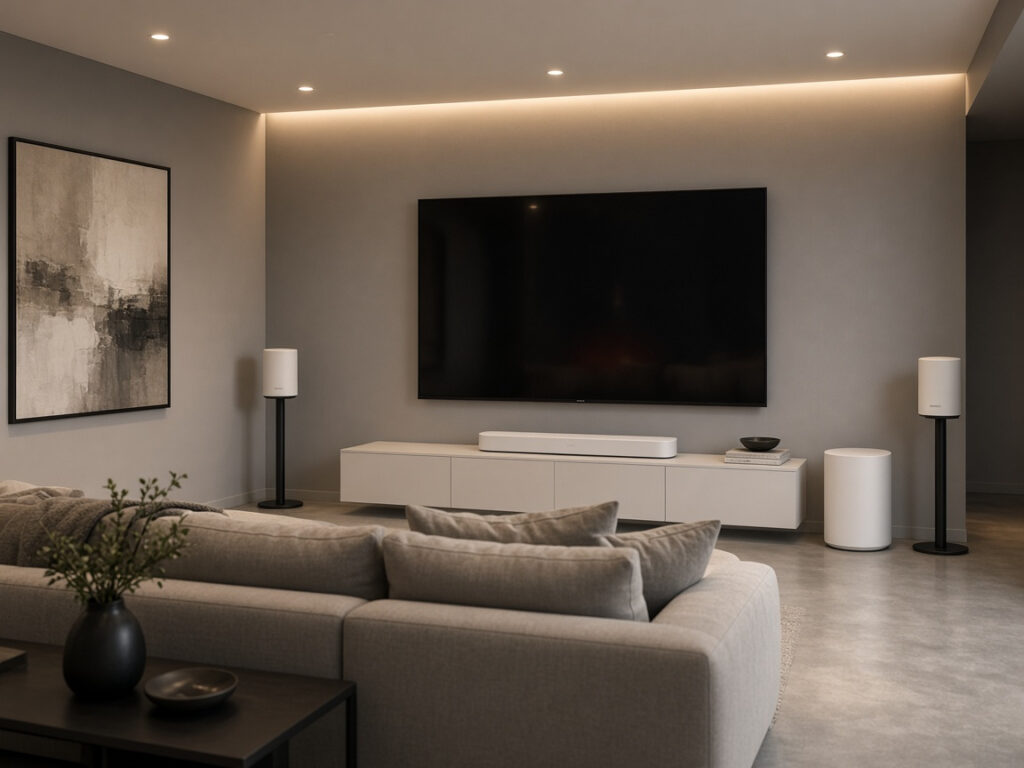
Sonos speakers can form a complete home theater audio system — soundbar, wireless subwoofer, and surround speakers all controlled through one app, with no traditional AV receiver required. The platform scales from a compact 2.1 configuration to a full 5.1.2 Dolby Atmos system, and it natively extends to whole home audio systems that push music and movies to every room simultaneously.
Executive Summary
- The Sonos Arc Ultra (released October 2024) is Sonos’s current flagship soundbar, connecting via HDMI eARC and supporting lossless Dolby Atmos TrueHD; the original Arc uses the same connection standard and remains in the lineup.
- Adding a Sonos Sub Gen 3 and a matched pair of Era 300 speakers builds a 5.1.2 system with discrete height-layer rendering — entirely over Wi-Fi, with no speaker cable runs required for the rear channels.
- Trueplay, Sonos’s built-in room calibration tool, applies automatic EQ corrections derived from multiple room-position measurements; full calibration sweep requires an iOS device.
- Sonos lacks HDMI input switching, manual crossover control, and third-party calibration integration — trade-offs that matter most in dedicated cinema rooms rather than living room installations.
What Makes Sonos a Viable Home Theater Platform?
Sonos is built on a self-amplified, Wi-Fi-centric architecture. Every speaker in the ecosystem contains its own Class-D amplification stage, so there is no passive speaker wiring or external power amplifier to manage. The soundbar acts as the system’s processing core: it decodes incoming audio from the TV, then distributes the correct signal to each wireless speaker over the same network it uses for music streaming.
This design has practical implications for home theater installations. Surround and height channels run entirely wirelessly, eliminating the cable runs that make traditional surround sound layouts difficult in living rooms or open-plan spaces. The Sonos app handles grouping, volume, EQ, and calibration in a single interface. Source switching happens at the TV rather than a dedicated receiver, which simplifies the signal chain but removes some of the routing flexibility a full AV receiver provides.
The platform also supports simultaneous group playback. The same system serving a home theater role can be extended to fill adjacent rooms during parties or casual listening — a capability that is architecturally native to Sonos and that requires additional hardware to replicate in traditional receiver-based setups. For listeners who already use or plan to use Sonos throughout the house, integrating the home theater into the same ecosystem simplifies long-term management considerably.
Which Sonos Soundbar Fits Your Room and Use Case?
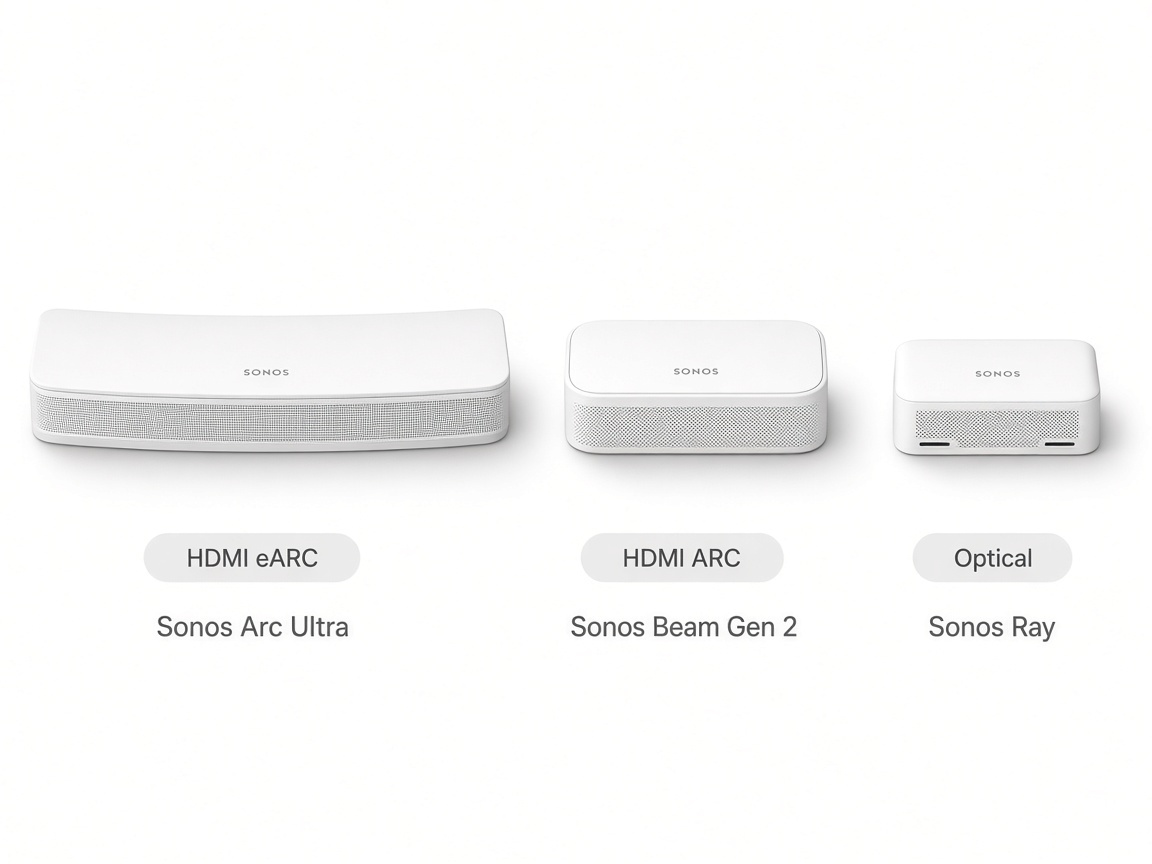
Three Sonos soundbars cover the current lineup — the Arc Ultra (flagship), the Beam Gen 2 (mid-range), and the Ray (entry-level). Each targets a different room size and connectivity requirement. Choosing the wrong model for your TV connection type is the most common setup error. The Arc Ultra and original Arc both require HDMI eARC; the Beam Gen 2 uses HDMI ARC; the Ray uses an optical input. None of them accept HDMI connections from source devices directly.
| Model | Connection | Dolby Atmos | Drivers | Best Fit |
|---|---|---|---|---|
| Sonos Arc Ultra | HDMI eARC | TrueHD lossless | 14 transducers; Sound Motion woofer design | Flagship performance; rooms over 4 m wide |
| Sonos Arc | HDMI eARC | TrueHD lossless | 11 Class-D amps; 8 elliptical woofers, 3 tweeters (up-firing and side-firing) | Large open-plan rooms; full Atmos setups |
| Sonos Beam Gen 2 | HDMI ARC | Dolby Digital Plus Atmos (lossy) | 5 Class-D amps; 1 tweeter, 4 midwoofers, 2 passive radiators | Medium rooms; TVs without eARC |
| Sonos Ray | Optical | None | 4 Class-D amps; 2 tweeters, 2 woofers | Bedrooms; TVs with no HDMI ARC port |
The Arc Ultra’s Sound Motion woofer technology — described by Sonos in its product documentation as a novel transducer design that produces deeper bass within the same cabinet profile as its predecessor — differentiates it from the original Arc’s conventional driver array. The Beam Gen 2 delivers Atmos via Dolby Digital Plus, a compressed container that carries object metadata but not the lossless audio payload available through eARC. For rooms where the TV lacks an eARC port, the Beam Gen 2 is the realistic Atmos-capable alternative. Owner feedback documented across retail review platforms describes the Arc and Arc Ultra as producing noticeably broader horizontal dispersion in open-plan spaces than comparably priced soundbars.
How Do the Sonos Sub and Sub Mini Add Low-Frequency Performance?
Both Sonos subwoofers use a force-cancelling driver configuration: two woofers face each other from opposite ends of the cabinet so their mechanical vibrations cancel each other out rather than transferring to floors or furniture. Sonos’s published engineering documentation describes this as the design intent behind both models — it allows high output levels without audible resonance from the cabinet or vibration coupling to surfaces beneath it.
The Sub Gen 3 houses its two woofers inside a vertical cabinet with an open slot that doubles as a port. The Sub Mini uses a compact cylindrical enclosure with the same opposing-driver geometry. Both connect wirelessly to the system’s soundbar and appear in the Sonos app as a paired device. The app provides a Sub Level slider and a Sub Crossover control, though the crossover adjustment range is narrower than what an AV receiver’s manual bass management section typically provides.
Standard acoustic placement principles apply to both models: positioning against a wall or in a corner reinforces bass output, while placement in the center of a room reduces it. The Sub Mini suits rooms where the full Sub’s footprint is impractical; both models are paired via the same in-app process and both bond exclusively to the soundbar rather than acting as standalone speakers.
Which Sonos Speakers Function as Wireless Surround Channels?
Sonos designates specific speaker models as home theater surround-compatible within its pairing system. As of 2026, the Era 300, Era 100, Sonos One, and Sonos One SL can all be assigned as dedicated left and right surround channels. Each surround speaker pair must be a matched set — an Era 300 and an Era 100 cannot be paired together, and the app rejects mismatched pairs during the surround setup process.
The Era 300 is the most capable surround option in the current lineup. Its driver array includes front-firing, side-firing, and up-firing transducers — six Class-D amplifiers in total — which Sonos designed specifically to decode and render the height and width object channels in Dolby Atmos content. When a matched pair of Era 300 speakers is used as surrounds alongside the Arc or Arc Ultra, the system delivers discrete spatial audio information to side and overhead positions at the rear of the room, rather than relying entirely on the front soundbar’s virtualized height processing.
The Era 100 and legacy One speakers deliver standard left and right rear-channel audio without height-layer information. They are a cost-effective choice for listeners whose priority is 5.1 surround coverage rather than full Atmos object rendering. Owner reports for all three current surround-capable models note stable wireless connection at standard home theater listening distances when the speakers fall within solid Wi-Fi coverage of the network.
What Audio Formats Does Sonos Support Across Its Soundbar Lineup?
Format support in the Sonos ecosystem is determined by two factors: which soundbar model you have, and which physical connection it uses to the TV. The connection type is the more important variable, because HDMI eARC carries fundamentally different audio payloads than HDMI ARC or optical. Even the Arc or Arc Ultra — when connected via their optical adapter rather than eARC — will receive substantially downgraded audio and lose all Atmos support silently.
| Format | Arc / Arc Ultra (eARC) | Beam Gen 2 (ARC) | Ray (Optical) |
|---|---|---|---|
| Dolby TrueHD Atmos | ✓ Lossless | ✗ | ✗ |
| Dolby Digital Plus Atmos | ✓ | ✓ | ✗ |
| Dolby Digital 5.1 | ✓ | ✓ | ✓ |
| DTS-HD Master Audio | ✓ Lossless (eARC only) | ✗ | ✗ |
| DTS 5.1 | ✓ | ✓ | TV-dependent |
| PCM Stereo | ✓ | ✓ | ✓ |
An important caveat: even when connecting the Arc or Arc Ultra via HDMI eARC, lossless formats only reach the soundbar if the TV is configured to pass them through rather than decoding them internally. Most TVs default to outputting compressed Dolby Digital rather than forwarding the raw TrueHD Atmos bitstream. Setting the TV’s audio output to “Pass-through” or “Bitstream” is a required configuration step — without it, the soundbar receives a Dolby Digital 5.1 signal regardless of the source content’s native format.
For a detailed breakdown of how Atmos encoding, object metadata, and height-layer rendering work across both physical and virtualized speaker implementations, the guide on Dolby Atmos for home theater owners covers the full signal path from disc to driver.
How Do You Configure a Sonos Home Theater System Step by Step?
Setup follows a consistent sequence regardless of which Sonos soundbar you are using. The app drives each stage; there is no web interface or hardware-level configuration required outside of the physical cable connection and speaker placement. The entire process from box-open to a calibrated system typically takes under two hours.
- Connect the soundbar to the TV. Use the HDMI eARC port for the Arc Ultra or Arc — usually labeled “eARC” or “ARC/eARC” on the TV panel. Use any HDMI ARC port for the Beam Gen 2. Use the TV’s optical output for the Ray. Confirm the cable is fully seated at both ends.
- Enable eARC or ARC in the TV’s settings menu. Navigate to the TV’s audio or connection settings and confirm that HDMI-CEC and eARC/ARC output are both enabled. Labeling varies by manufacturer: LG uses “SIMPLINK,” Samsung uses “Anynet+,” Sony uses “Bravia Sync.”
- Set the TV’s audio output mode to Pass-through. This tells the TV to forward the original audio bitstream to the soundbar rather than decoding it internally. Without this step, the soundbar receives compressed audio regardless of the source content’s native format.
- Open the Sonos app and add the soundbar. Select “Set up a new system” or “Add a product.” The app will prompt you to scan the QR code on the soundbar or enter its serial number, then walk through connecting to your Wi-Fi network.
- Add the Sonos Sub (if using one). Navigate to the soundbar’s settings in the app, select “Add Sub,” and follow the pairing prompts. The Sub bonds to the soundbar and handles all LFE and redirected bass content automatically once paired.
- Add surround speakers. From the soundbar’s settings, select “Add Surrounds.” Place the Era 300, Era 100, or One speakers at rear-left and rear-right positions before confirming placement in the app. Both speakers in the pair must be the same model.
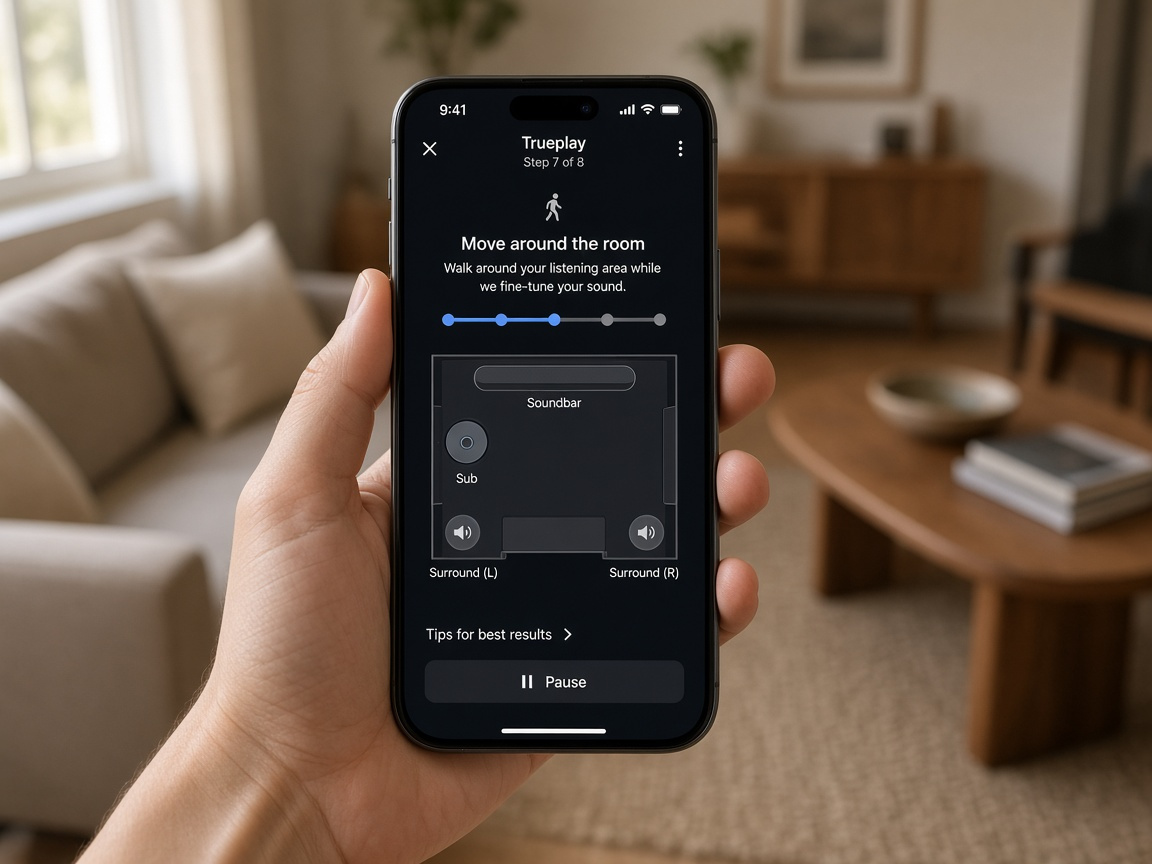
- Run Trueplay calibration. On iOS, the app prompts you to walk slowly around the listening area while holding the phone upright at varying heights. The microphone captures the room’s frequency response at multiple positions, then applies per-speaker EQ correction automatically. Android users can use Quick Tune for a faster single-position calibration.
- Adjust Sub Level, Surround Volume, and EQ to preference. In the system settings, fine-tune the sub level and surround volume relative to the main soundbar, then test with both multichannel movie content and stereo music before finalizing.
For a broader look at wiring, source connection sequencing, and display calibration across a complete home theater build, the complete home theater setup guide for 2026 covers every component category in sequence from initial planning through final calibration.
What Is Trueplay and How Does It Adjust for Room Acoustics?
Trueplay is Sonos’s proprietary room calibration system. It uses the microphone in an iOS device to capture how sound from each speaker interacts with the listening room’s surfaces and geometry, then calculates a custom EQ curve applied to each speaker in the system. The goal is to compensate for acoustic issues — bass buildup near walls, high-frequency absorption from soft furnishings, reflection peaks from parallel hard surfaces — that standard factory EQ settings cannot address.
The full Trueplay sweep requires walking through the room at different heights and positions with the iPhone held vertically. The process takes approximately one to two minutes depending on room size. The resulting correction is applied automatically and persists until you retune. Sonos recommends rerunning Trueplay whenever you move furniture, add room treatment, or change speaker placement.
Android users can access Quick Tune, which uses the phone’s microphone at a fixed position for a single-point measurement. Quick Tune produces usable results but does not capture the multi-position frequency variation that the full iOS sweep addresses. Neither version of Trueplay allows manual inspection or override of the generated EQ curve — the correction is applied automatically and cannot be compared to a reference target, exported, or tuned further. If that level of control is a requirement, an AV receiver with Dirac Live or Audyssey MultEQ XT32 provides it; Trueplay does not.
Trueplay compensates for the room’s acoustic signature but does not substitute for physical room treatment. Spaces with significant flutter echo, parallel reflective surfaces, or severe bass modes will improve with Trueplay applied, but the underlying acoustic problems remain. Our guide on home theater sound panels explains what physical absorption and diffusion panels contribute at the room level, independent of DSP correction.
How Does Sonos Deliver Dolby Atmos Height-Channel Information?
Sonos handles Atmos height rendering through two mechanisms, depending on which speakers are in the system. The Arc and Arc Ultra both include up-firing and side-firing driver elements that project audio toward the ceiling and walls. These reflections create the psychoacoustic impression of height and width — the approach Dolby describes as height virtualization in its technical documentation. No discrete ceiling speaker is required, though the accuracy of the effect depends on ceiling height, surface reflectivity, and listener position relative to the soundbar.
When a matched pair of Era 300 speakers is added as surrounds, the system gains a second height-rendering mechanism at the rear of the room. Each Era 300 includes its own up-firing driver element, designed to carry the rear-height object channels in Dolby Atmos content. Combined with the Arc’s front-height processing, this creates a system where height information is generated at both the front and rear of the room — a closer approximation of a traditional in-ceiling Atmos layout than the front soundbar alone provides.
The constraint is that Sonos has not integrated physical in-ceiling speaker support into its ecosystem as of 2026. All height rendering relies on driver placement within floor-standing or furniture-top enclosures. For rooms where ceiling height above 3 m, heavily absorptive ceiling panels, or specific seating geometry makes psychoacoustic height simulation less convincing, this represents a meaningful limitation compared to a traditional Atmos layout with dedicated overhead speakers.
What Are the Known Limitations of Sonos for Dedicated Home Theater Use?
Several architectural constraints become meaningful when Sonos is deployed in a purpose-built home theater rather than a living room conversion. Understanding them before purchase prevents the most common regrets.
- No HDMI source switching. Sonos soundbars have no HDMI inputs for source devices. All sources — game consoles, Blu-ray players, streaming boxes — must connect to the TV first. If your TV has limited HDMI ports, an external HDMI switch adds a step to the signal path.
- No third-party calibration support. Trueplay is a closed system. You cannot use Dirac Live, Audyssey, REW, or any other measurement platform to calibrate a Sonos speaker. The EQ curve Trueplay generates cannot be viewed, edited, or exported.
- Limited bass management resolution. The Sub Crossover slider adjusts the system-wide handoff point between soundbar and subwoofer, but the adjustment range and resolution are narrower than what an AV receiver’s bass management section provides. Individual channel crossover points cannot be set independently.
- No physical ceiling speaker support. As of 2026, there are no Sonos-native in-ceiling or in-wall speaker models. All Atmos height rendering relies on driver geometry within the Arc family and the Era 300.
- Standard configuration tops at 5.1.2. A single Sonos home theater group supports one soundbar, one Sub, and one matched surround pair. Configurations beyond 5.1.2 are not achievable within the standard home theater group setup.
- Silent optical downgrade for the Arc family. Connecting the Arc or Arc Ultra via optical adapter rather than HDMI eARC silently removes Atmos and lossless format support. The soundbar falls back to Dolby Digital 5.1 — a significant performance downgrade that the app does not explicitly warn about during setup.
Many of these constraints are less significant in an open-plan living room than in a dedicated cinema space. For listeners building in compact rooms where routing wireless surrounds is a clear advantage over running speaker cables, the trade-offs read differently. Our guide on home theater ideas for small rooms examines how the Sonos wireless architecture performs specifically in compact and acoustically complex spaces.
How Does a Sonos System Compare to a Traditional AV Receiver Architecture?
An AV receiver-based system and a Sonos system solve the same problem — multichannel home theater audio — through fundamentally different architectures. The right choice depends on priorities rather than on absolute audio performance, since both approaches can produce excellent results in appropriate rooms.
| Factor | Sonos System | AV Receiver + Passive Speakers |
|---|---|---|
| Speaker cabling | Wireless surrounds; only soundbar needs power | Dedicated speaker wire runs required to every channel |
| Calibration | Trueplay (automatic, iOS-dependent, closed system) | Audyssey, YPAO, MCACC, Dirac Live — inspectable and editable |
| Format support ceiling | Dolby TrueHD Atmos, DTS-HD MA via eARC | All formats including Auro-3D, DTS:X Pro, IMAX Enhanced on compatible receivers |
| HDMI source switching | None — all sources connect to the TV | Multiple HDMI inputs on the receiver; sources connect directly to the receiver |
| Multi-room audio | Native; built into the platform architecture | Requires separate hardware (Sonos Port, Chromecast Audio, matrix amplifier) |
| Ceiling speaker support | Not available (2026) | Full in-ceiling and in-wall support with compatible receivers |
| Setup complexity | Low — app-driven, minimal manual configuration | Higher — manual speaker configuration, wire runs, measurement microphone calibration |
For a living room where speaker cables would be difficult to route and multi-room audio extends across several zones, the Sonos architecture is better suited by design. For a dedicated cinema room where every format must be supported, manual calibration is desirable, and in-ceiling speakers are part of the acoustic plan, an AV receiver with passive speakers offers more control. If you’re evaluating the receiver side of that comparison, our roundup of the best receivers for home theater covers current models across budget and performance tiers.
Frequently Asked Questions About Sonos Speakers for Home Theater
Can you use Sonos speakers with a traditional AV receiver?
Not in the conventional passive-speaker sense. Sonos speakers are self-amplified and do not accept speaker-level inputs from an AV receiver’s amplifier outputs. The Sonos Port is a streaming adapter that connects to an AV receiver’s analog line input, bringing Sonos streaming into a traditional system. Sonos speakers themselves cannot be wired into an AV receiver as standard passive surround channels.
Does the Sonos Beam Gen 2 support true Dolby Atmos?
The Beam Gen 2 supports Dolby Atmos via Dolby Digital Plus — a compressed container that carries Atmos object metadata and delivers height-layer processing. It does not support lossless TrueHD Atmos, which requires HDMI eARC and is available only on the Arc and Arc Ultra. For streaming services that deliver Atmos via Dolby Digital Plus (Netflix, Disney+, Apple TV+), the distinction is minimal in practice. For 4K Blu-ray discs, which carry TrueHD Atmos, the Beam Gen 2 cannot access the lossless audio layer.
Can you mix Sonos speaker generations in a home theater setup?
Sonos allows mixing generations within the broader multi-room system — for example, an Arc Ultra paired with legacy One SL surrounds — but the surround speaker pair must be a matched set. Both rear speakers must be the same model. Pairing an Era 300 on the left with an Era 100 on the right is not supported; the app rejects mismatched pairs during the surround setup process.
Does the Sonos system work without an internet connection?
TV audio passthrough — the core home theater function — operates locally over the home network and does not require internet access. Music streaming and voice control require an active internet connection. If the connection drops, the system continues to decode and play TV audio, but streaming services, remote app control via the cloud, and Alexa or Google Assistant voice control will be unavailable until connectivity is restored.
How many speakers can a Sonos home theater system include?
A single Sonos home theater group supports one soundbar, one Sub (or Sub Mini), and one matched surround pair — giving a maximum of 5.1 with Era 100 or One surrounds, or 5.1.2 with Era 300 surrounds providing the height layer. There is no native pathway to 7.1 or 7.1.4 within a standard Sonos home theater group as of 2026. Additional Sonos speakers can be assigned to the broader multi-room system but cannot function as discrete home theater channels beyond the supported configuration.
Is Trueplay worth running on every Sonos home theater installation?
Yes — owner reports across retail review platforms consistently describe audible improvement after Trueplay in rooms with hard floors, exposed brick, large glass surfaces, or high ceilings. Rooms with heavy soft furnishings and acoustic paneling show smaller but still measurable changes. The full multi-position calibration sweep takes under two minutes on iOS and can be undone at any time. Android Quick Tune is faster but less comprehensive. There is no practical reason to skip calibration on any Sonos home theater installation.
Where to Start: A Practical Implementation Sequence
Building a Sonos home theater is most effective when it follows a staged sequence that matches purchases to actual requirements rather than buying every component at once. The platform is designed for incremental expansion — a soundbar alone is a fully functional starting point.
- Confirm your TV’s connection type before purchasing a soundbar. Check whether the TV has an HDMI eARC port (required for the Arc Ultra and Arc), an HDMI ARC port (required for the Beam Gen 2), or only optical (limits the choice to the Ray). This one decision determines which soundbars are compatible.
- Start with the soundbar alone and run Trueplay before adding anything else. A calibrated baseline from the soundbar gives you an accurate reference. It also reveals whether the room acoustics require treatment before adding more speakers.
- Add a Sub as the second purchase, then recalibrate. Run Trueplay again after pairing. Set the Sub Level slider by listening at typical program levels rather than at the loudest position.
- Evaluate whether surround speakers are needed for your content mix. A soundbar and Sub deliver strong stereo and virtual surround performance. Physical surrounds add discrete rear-channel directionality to encoded content. If the room geometry makes rear speaker placement awkward, the soundbar-and-sub configuration is often the better long-term decision.
- Choose Era 300 surrounds if Dolby Atmos is a primary use case. With the Arc or Arc Ultra as the soundbar, Era 300 surrounds add genuine rear-height rendering rather than relying entirely on the soundbar’s virtualized processing. Era 100 or One surrounds are the right choice if the priority is 5.1 coverage at a lower cost.
- Retune Trueplay after every component addition. Each new speaker changes the system’s acoustic contribution to the room. Full recalibration after adding the Sub and again after adding the surrounds ensures the EQ correction reflects the complete system.
The full Sonos home theater sequence — from initial soundbar placement through calibrated multi-speaker configuration — typically takes under two hours. Looking ahead over the next 12 to 24 months, the two most significant developments to watch in the Sonos ecosystem are ceiling speaker integration, which would address the platform’s most cited limitation in dedicated rooms, and further evolution of Trueplay toward multi-device measurement rather than iOS-only full sweeps. Both would close the gap with traditional AV receiver setups in precisely the areas where that gap is currently widest. For a comprehensive approach to room-by-room design that incorporates speaker selection, screen sizing, and acoustic treatment into a single planning workflow, the practical home theater design guide covers the full process from initial measurements to final calibration.