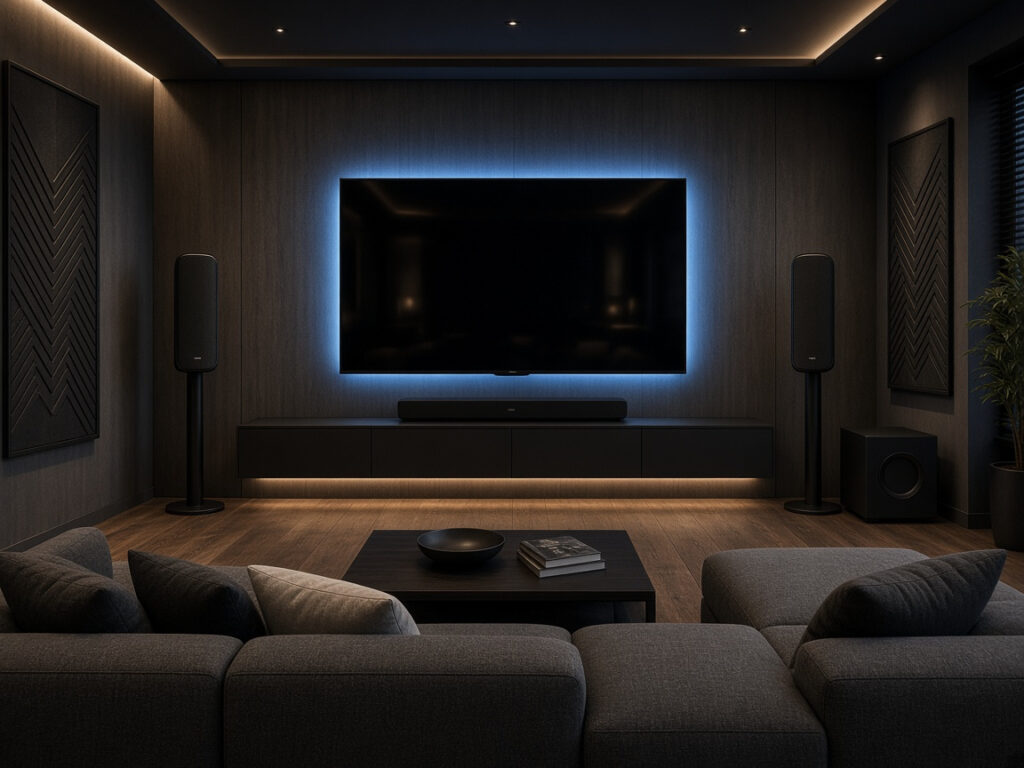
Sonos works as a complete home theater audio system when configured correctly. A compatible soundbar, paired Era 300 surrounds, and a Sonos Sub produce wireless Dolby Atmos without a traditional AV receiver. For households already building out whole home audio systems, Sonos adds home theater capability without introducing a separate hardware ecosystem. This guide covers every component decision, format limitation, and configuration step in precise technical detail.
- Arc Ultra (14 drivers, eARC) and Arc (11 drivers, eARC) deliver lossless Dolby TrueHD + Atmos; Beam Gen 2 (5 drivers, ARC) handles Dolby Digital Plus + Atmos only — a meaningful difference in signal path
- Era 300 surrounds include up-firing and side-firing drivers for spatial audio height channels; Era 100s deliver stereo surround without height effects
- Sonos does not support DTS decoding in any current product — a confirmed limitation in Sonos product documentation that affects physical Blu-ray disc playback
- Trueplay room calibration, available in the S2 app, automatically adapts each speaker’s EQ profile to the listening environment — via built-in microphones on the Arc Ultra, or via iOS walk-around on Arc and Beam Gen 2
What Makes Sonos a Viable Home Theater Platform?
Sonos is a self-contained audio ecosystem. Each speaker integrates amplification, digital signal processing, and Wi-Fi networking internally. When a soundbar connects to a TV via HDMI eARC, it becomes the system’s audio hub. Surrounds and subwoofer join wirelessly, eliminating speaker wire runs and the passive speaker impedance matching that receiver-based systems require.
The practical upside is installation simplicity. A complete Sonos 5.1.2 configuration — soundbar, Sub, two Era 300 surrounds — can be physically placed in a few hours. Configuration happens inside the Sonos S2 app, which guides through TV connection, speaker pairing, and room calibration without navigating the signal routing menus typical of a mid-range AV receiver.
The architecture also enables genuine multi-room integration. The same speakers that produce surround sound during a film can be re-routed to play music as part of a whole-home group. This is a capability passive speaker systems cannot replicate without additional dedicated hardware layers.
The tradeoff is format flexibility. Sonos supports Dolby Atmos, Dolby TrueHD, Dolby Digital Plus, Dolby Digital, and PCM audio. It does not support DTS in any form. For households whose media diet is primarily streaming services — Netflix, Apple TV+, Disney+, Hulu — this restriction rarely surfaces in practice. For users with physical Blu-ray disc libraries encoded in DTS-HD Master Audio, it requires a TV-side downconversion workaround that strips the original multichannel encoding.
Which Sonos Soundbar Is Right for Your Room?
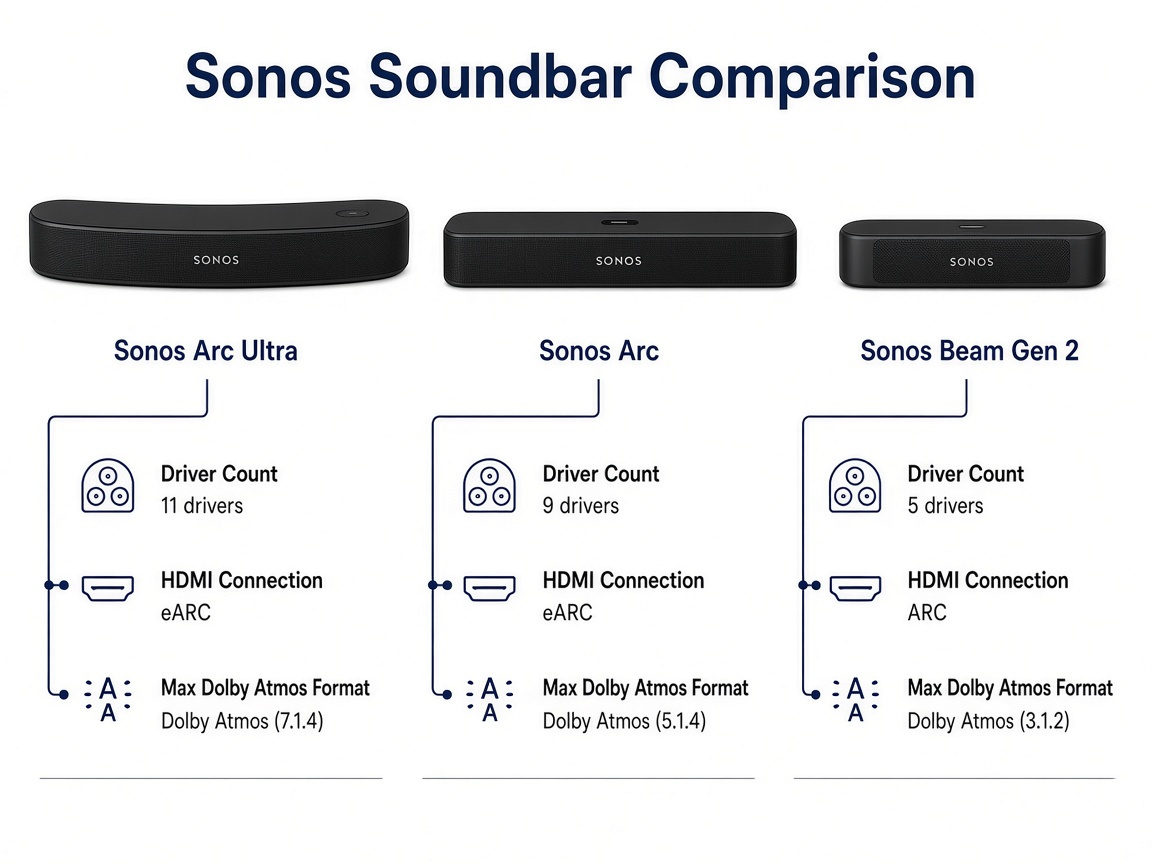
Three soundbars are currently in the Sonos lineup: the Arc Ultra, the Arc, and the Beam Gen 2. The selection decision turns on HDMI connection type, driver configuration, and whether lossless Dolby Atmos is a hard requirement for your use case.
The Arc Ultra is the flagship. Per Sonos’s product specifications, it uses 14 drivers and incorporates the brand’s Sound Motion woofer technology, designed to produce greater bass output from a physically shallow cabinet. It connects via HDMI eARC, supports lossless Dolby TrueHD + Atmos, and includes built-in microphones for automatic Trueplay calibration without requiring a smartphone walk-around of the room.
The Arc is the previous flagship, still sold and fully supported. Sonos specifies 11 drivers — eight elliptical woofers and three tweeters — amplified across five acoustic channels. It uses HDMI eARC and supports lossless Dolby TrueHD + Atmos. Room calibration requires walking through the space with an iPhone running the S2 app; there are no built-in auto-Trueplay microphones.
The Beam Gen 2 is the compact option. Its critical limitation is HDMI ARC — not eARC. ARC does not carry the Dolby TrueHD bitstream, so the Beam decodes Dolby Atmos only via Dolby Digital Plus, a lossy-compressed format. For a primary dedicated home theater, the Arc or Arc Ultra is the technically appropriate foundation. For a secondary room or space where cabinet size and cost are the primary constraints, the Beam Gen 2 delivers meaningful spatial audio at a lower price point.
| Model | Driver Count | HDMI Connection | Max Dolby Atmos Format | Auto-Trueplay |
|---|---|---|---|---|
| Arc Ultra | 14 | eARC | Dolby TrueHD + Atmos (lossless) | Yes — built-in microphones |
| Arc | 11 | eARC | Dolby TrueHD + Atmos (lossless) | No — iOS walk-around required |
| Beam Gen 2 | 5 | ARC | Dolby Digital Plus + Atmos (lossy) | No — iOS walk-around required |
Source: Sonos product specifications
How Do Era 300 and Era 100 Surrounds Extend the System?
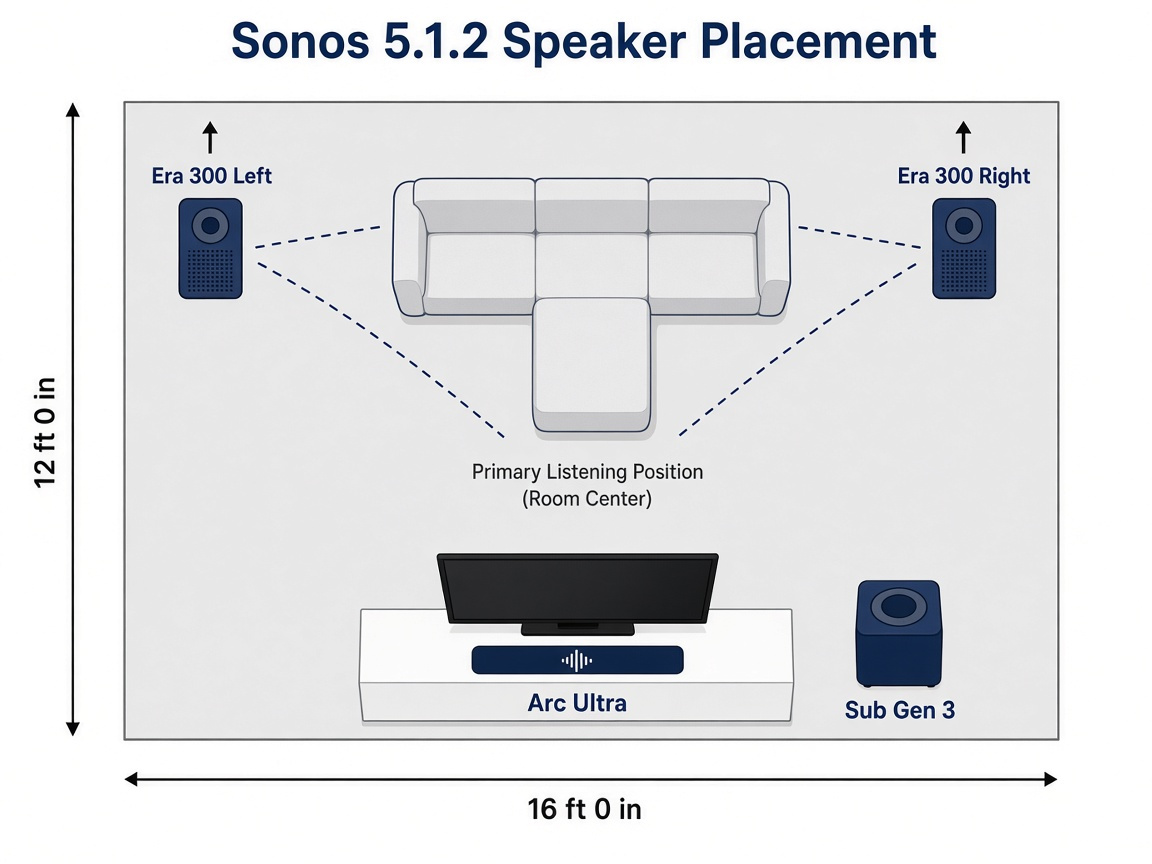
The Era 300 is Sonos’s spatial audio surround speaker. Its driver array — which per Sonos specifications includes up-firing and side-firing drivers alongside front-facing drivers — reflects sound off walls and ceiling to simulate height channels. When positioned at ear height to the sides of the listening position, Era 300s create the overhead dimension that defines Dolby Atmos spatial audio without requiring in-ceiling speaker installation.
Sonos recommends placing Era 300s to the left and right of the main listening seat, slightly behind it, at roughly ear height when seated. The up-firing drivers then interact with the ceiling to produce height effects. This positioning is geometrically sensitive: low ceilings — below approximately 8 feet — can reduce the perceived spatial effect because the vertical distance between the driver and the reflection surface is insufficient for convincing height channel localization.
As an illustrative example of how room geometry affects the choice: a room with 9-foot ceilings, Era 300 surrounds positioned at ear height roughly 2 feet behind the primary listening seat, and a flat drywall ceiling presents favorable conditions for the ceiling-bounce effect. A room with vaulted ceilings above 12 feet and significant distance between the surrounds and listening position is a harder case — the reflection path becomes longer and height localization becomes less precise. In the latter scenario, Era 100 surrounds may deliver more consistent results.
The Era 100 has two tweeters (one angled at 30 degrees for wider dispersion) and a woofer, delivering full-range stereo surround without height channels. For many living room configurations, the practical difference in perceived overhead audio between Era 100 and Era 300 depends heavily on ceiling height and room geometry. Smaller home theater spaces with low ceilings may find that the ceiling-bounce spatial effect does not fully develop, making Era 100 a pragmatic alternative at a lower cost.
Sonos offers two subwoofers. The Sub Gen 3 uses dual force-canceling woofers in a sealed cabinet, suited to primary listening rooms. The Sub Mini uses dual opposed force-canceling woofers in a compact cylindrical form, designed for spaces where the full Sub’s footprint is impractical. Per Sonos specifications, both connect wirelessly to the soundbar and are configured entirely within the S2 app.
Does Sonos Support Dolby Atmos — and What Happens to DTS?
Sonos’s Dolby Atmos support is format-path dependent. The Arc Ultra and Arc connect via HDMI eARC, which is capable of carrying the Dolby TrueHD + Atmos bitstream used on 4K Blu-ray discs. When a 4K Blu-ray player connects to a TV with an eARC-capable HDMI port, and that TV passes the bitstream to the soundbar via eARC, the soundbar decodes lossless Dolby Atmos. This requires eARC to be explicitly enabled in the TV’s audio output settings — it is frequently disabled by default.
Dolby Digital Plus + Atmos, the lossy-compressed format used by streaming platforms, works across all three soundbars via both ARC and eARC connections. Netflix, Apple TV+, Disney+, and other major platforms deliver Atmos through Dolby Digital Plus. This path works reliably regardless of whether the TV uses ARC or eARC.
Sonos does not decode DTS formats — including DTS, DTS-HD Master Audio, and DTS:X. This is confirmed in Sonos’s support documentation. When a TV receives a DTS audio signal — from a Blu-ray player connected via HDMI or optical, for example — the TV must convert the output to PCM stereo or Dolby Digital before passing it to the soundbar. Standard Blu-ray discs and many older DVD releases commonly use DTS-HD Master Audio as the primary audio track. The result of TV-side downconversion is stereo PCM or Dolby Digital rather than the original multichannel mix.
For streaming-first households, the DTS limitation has minimal practical impact. For users with physical media collections where DTS-HD Master Audio is the dominant format, this constraint should factor directly into the buying decision before committing to the Sonos platform.
How Do You Connect Sonos to Your TV?
The connection process is straightforward, but several TV-side settings must be configured correctly for the soundbar to receive the intended audio format. Before starting, confirm your TV has an HDMI port labeled eARC (required for Arc Ultra or Arc) or ARC (compatible with Beam Gen 2), and have the Sonos S2 app installed on iOS or Android. If you are establishing the broader physical environment first — room layout, screen height, seating distance — a complete home theater setup guide covers those decisions in full before the audio component selection begins.
- Sonos S2 app (iOS or Android) — required for all device setup, calibration, and ongoing management
- iPhone running iOS — required for Trueplay walk-around calibration on Arc and Beam Gen 2 (Android is not supported for Trueplay)
- eARC-capable TV — required for lossless Dolby TrueHD + Atmos via Arc or Arc Ultra
- High Speed HDMI cable (18 Gbps rated minimum) — required for eARC signal integrity
- Ethernet cable (optional) — connecting any Sonos speaker to the router via Ethernet activates SonosNet mesh for the full system
- Identify and verify the HDMI port. Locate the HDMI port labeled eARC or ARC on the rear of your TV. The label is printed beside the socket. Confirm eARC is present for Arc or Arc Ultra; ARC is sufficient for Beam Gen 2.
- Connect the soundbar to the TV. Run a High Speed HDMI cable (minimum 18 Gbps bandwidth rating) between the soundbar’s HDMI port and the TV’s eARC or ARC port. Do not use the TV’s standard HDMI input ports — the signal path works only through the designated ARC/eARC port.
- Power on both devices and open the S2 app. Power on the TV and soundbar. Open the Sonos S2 app, tap the “+” icon, and select “Add Product” to begin the soundbar setup wizard. Follow the in-app steps through network registration.
- Configure TV audio output settings. In the TV’s settings menu, navigate to audio output. Set the HDMI eARC or ARC port as the audio output destination, disable the TV’s built-in speakers, and confirm that Dolby Atmos passthrough (sometimes labeled “Auto” or “Bitstream”) is enabled. The exact menu path varies by TV manufacturer.
- Add the Sonos Sub. In the S2 app, select the soundbar, choose “Add Surround and Sub,” and follow the in-app wizard. The Sub connects wirelessly to the soundbar’s Wi-Fi network once powered on within range. No manual network entry is required.
- Add Era 300 or Era 100 surrounds. Repeat the in-app pairing process for the left and right surround speakers. The app assigns speaker roles (left/right) and immediately initiates Trueplay calibration upon pairing completion.
- Run Trueplay calibration. For Arc Ultra, automatic Trueplay runs via the built-in microphone array. For Arc and Beam Gen 2, walk slowly through the listening area holding an iPhone at varying heights — from floor level to above head height — while the speakers emit pink noise test tones. The process takes approximately 30–60 seconds. Re-run Trueplay any time the room layout changes significantly.
- Verify the decoded format. Play a known Dolby Atmos title. On supported TV models, the Now Playing screen in the S2 app displays the decoded audio format, confirming whether TrueHD + Atmos or Dolby Digital Plus + Atmos is being received by the soundbar.
How Does Trueplay Calibration Tune the System to Your Room?
Trueplay is Sonos’s room correction system. It analyzes how the soundbar and surrounds interact with the listening environment and applies a custom EQ profile to compensate for room-induced peaks and nulls caused by reflections, standing waves, and boundary reinforcement at low frequencies.
For the Arc and Beam Gen 2, Trueplay requires an iPhone running the S2 app. The user walks slowly through the listening space — covering the seating area, the floor directly in front of the speakers, and near the side walls — while the speakers emit test tones. The iPhone’s microphone captures how those tones change as they interact with the room’s surfaces. The process takes approximately 30–60 seconds and must be re-run after significant room changes: furniture additions, acoustic treatment installation, or repositioning of the speakers themselves.
For the Arc Ultra, automatic Trueplay uses the soundbar’s built-in microphone array. It runs continuously and adjusts EQ as the room’s acoustic properties shift — a window is opened, furniture is moved, or the room transitions from empty to occupied. No user action is required after initial setup.
Trueplay addresses early reflection points, standing waves, and bass buildup in corners and along parallel walls. Owners of Arc-based systems frequently report that Trueplay noticeably improves dialogue clarity and reduces bass overhang in rooms with hard, reflective surfaces — particularly rooms with hardwood floors, large windows, and minimal soft furnishings. That said, Trueplay does not substitute for physical room treatment. Acoustic panels and bass traps address the underlying reflection and absorption problems that electronic EQ can only partially compensate for. The most acoustically accurate results come from combining both physical treatment and Trueplay calibration.
What Network Infrastructure Does a Sonos System Need?
Sonos runs over Wi-Fi. Each speaker connects independently to the home network — either directly to a 2.4 GHz or 5 GHz Wi-Fi access point, or via SonosNet, the brand’s proprietary mesh network protocol. SonosNet activates automatically when any Sonos speaker is connected to the router via Ethernet; remaining wireless speakers on the network then communicate through it rather than directly through the main Wi-Fi.
For a home theater configuration with four active speakers — soundbar, Sub, and two surrounds — network reliability matters more than raw bandwidth. Sonos uses Wi-Fi for both audio streaming and inter-device communication. Congestion on a shared 2.4 GHz network can produce occasional dropouts or delayed audio-to-video sync. In practice, the more common issue in dense residential environments is channel interference from neighboring networks on the same 2.4 GHz channels rather than throughput limitations.
The recommended configuration for a dedicated home theater installation is to connect the soundbar to the router via Ethernet. This creates a SonosNet mesh immediately; all other speakers in the system then communicate over SonosNet, reducing their exposure to general Wi-Fi congestion. The Sonos Sub Gen 3 includes an Ethernet port that can serve the same function if routing a cable to the soundbar’s position is impractical.
What Are the Real Limitations of Sonos for Dedicated Home Theater?
Sonos’s integration-focused design introduces several constraints that matter specifically in a dedicated home theater context. These are not incidental — they reflect deliberate architectural choices that prioritize installation simplicity over format flexibility and component modularity.
- No DTS support. Sonos cannot decode DTS, DTS-HD Master Audio, or DTS:X. The TV must downconvert to PCM or Dolby Digital before the signal reaches the soundbar. Physical Blu-ray disc libraries heavy in DTS-encoded titles are directly affected.
- No HDMI video passthrough. The HDMI eARC connection carries audio return only. Source devices — Blu-ray players, streaming boxes, game consoles — must connect directly to the TV for 4K HDR video; audio is then returned to the soundbar via eARC.
- Proprietary surround lock-in. Sonos surrounds operate only within the Sonos ecosystem. There is no option to use third-party passive speakers as surrounds or to add a channel amplifier for a specific speaker position.
- Beam Gen 2 and lossless Atmos. The Beam Gen 2’s ARC connection cannot carry Dolby TrueHD + Atmos. Users who require lossless spatial audio must use the Arc or Arc Ultra with an eARC-capable TV.
- App dependency. System control, calibration, and troubleshooting all go through the S2 app. The 2024 app redesign generated significant and well-documented complaints across owner communities and public forums, surfacing concerns about reliability of a system architecture where app stability is a prerequisite for core functionality.
- Premium cost tier. At retail, an Arc Ultra, Sub Gen 3, and two Era 300 surrounds represent a higher total investment than many AV receiver-based systems capable of comparable acoustic coverage, full DTS decoding, and multiple HDMI inputs. The premium reflects the wireless integration architecture and native multi-room capability.
How Does Sonos Compare to a Traditional AV Receiver System?
Sonos and traditional AV receiver systems represent different design philosophies. The comparison is not simply a performance question — it is about which set of architectural tradeoffs fits a specific use case, media diet, and long-term upgrade strategy.
| Factor | Sonos Ecosystem | AV Receiver System |
|---|---|---|
| Installation | Wireless surrounds, single HDMI cable to TV | Speaker wire runs to passive speakers required |
| DTS Decoding | Not supported in any current product | Supported on all current receivers |
| Lossless Dolby Atmos | Arc / Arc Ultra via eARC | All eARC-capable receivers |
| HDMI inputs | eARC audio return only — no source inputs | Multiple HDMI inputs with 4K HDR passthrough |
| Speaker upgrade path | Full Sonos speaker replacement only | Receiver and speakers upgrade independently |
| Multi-room audio | Native via S2 app | Requires separate system unless using HEOS, MusicCast, or similar |
| Room correction | Trueplay (iOS-based or automatic on Arc Ultra) | Audyssey, YPAO, MCACC, or similar on current receivers |
| Physical media source flexibility | No direct HDMI source inputs | Multiple sources connect directly to receiver |
For households whose media diet is predominantly streaming services — and whose priorities include installation simplicity, clean cable management, and native multi-room audio — Sonos performs well as a primary home theater solution. For users who want physical media format flexibility, DTS support, independent component selection, and the ability to build a system incrementally around passive speakers, a traditional AV receiver-based system offers more architectural flexibility and broader format coverage, frequently at a lower entry cost.
What Should You Expect from Sonos Home Theater Over the Next Two Years?
Several developments in the Sonos product trajectory suggest the direction of home theater capability through 2027 and 2028, based on the arc of current product releases and publicly announced platform directions.
Automatic Trueplay is likely to expand. The Arc Ultra’s built-in microphone array for continuous room correction represents a capability gap between it and other soundbars in the lineup. Sonos has historically extended flagship-tier features to its broader range in subsequent hardware generations; future soundbars are likely to incorporate similar auto-calibration microphone arrays as standard.
Smart home integration is deepening. Sonos speakers already work with Apple HomeKit, Google Home, and Amazon Alexa. As Matter becomes more widely implemented across home automation ecosystems, tighter audio-triggered automation — using soundbar playback state to trigger lighting scenes, screen lifts, or shade controls — becomes increasingly practical. Sonos is a member of the Connectivity Standards Alliance, which oversees Matter development.
Driver technology from the Arc Ultra may propagate to subwoofer products. The Sound Motion woofer design that Sonos introduced in the Arc Ultra is a platform-level technology. A next-generation Sub incorporating Sound Motion drivers would address the bass performance ceiling that some owners report encountering at high playback levels in larger listening rooms.
DTS support remains an open question. DTS:X continues to hold significant market presence in physical media, and its absence in Sonos products is a persistent pain point in owner communities. Whether Sonos adds DTS decoding depends on licensing agreements and commercial decisions the company has not publicly addressed as of 2026.
Frequently Asked Questions
Can Sonos replace a traditional AV receiver for home theater?
Sonos can replace an AV receiver for the specific task of surround sound decoding and amplification when the media diet is primarily streaming content in Dolby formats. It cannot replicate the DTS decoding, multiple HDMI inputs, or passive speaker compatibility that an AV receiver provides. For streaming-first households, the functional gap is minimal in everyday use. For heavy physical media users with DTS-encoded disc libraries, it is significant and requires evaluation before purchase.
Does the Sonos Arc support DTS?
No. The Arc, Arc Ultra, and Beam Gen 2 do not support DTS decoding in any form — not standard DTS, DTS-HD Master Audio, or DTS:X. This is confirmed in Sonos’s support documentation. When a TV receives a DTS audio signal, it must convert the output to PCM or Dolby Digital before passing it to the soundbar. The result is downconverted stereo or Dolby Digital rather than the original DTS multichannel mix.
What is the minimum viable Sonos home theater setup?
A single soundbar connected to a TV via HDMI eARC or ARC constitutes a functional Sonos home theater. Adding a Sonos Sub — Sub Gen 3 or Sub Mini — significantly extends bass response. Adding Era 300 or Era 100 surrounds completes a 5.1 or 5.1.2 configuration with discrete rear and height channels. The soundbar alone is usable for casual viewing; the full surround configuration is recommended for a primary home theater installation.
Can Era 300 surrounds be paired with a Beam Gen 2?
Yes. Era 300 and Era 100 surrounds pair with any current Sonos soundbar, including the Beam Gen 2. When paired with the Beam Gen 2, the surrounds operate in full surround mode and the Era 300’s spatial audio drivers remain active. Because the Beam Gen 2 uses HDMI ARC, the system is limited to Dolby Digital Plus + Atmos rather than lossless Dolby TrueHD + Atmos — but spatial audio decoding still occurs within the Dolby Digital Plus + Atmos bitstream from streaming sources.
Does Sonos work with 4K HDR and Dolby Vision content?
Sonos handles the audio track of 4K HDR and Dolby Vision content only. It does not process or pass through the video signal in any form. The source device — a 4K Blu-ray player or streaming device — must connect directly to the TV via its own HDMI connection for video. The Dolby Atmos audio track, if present in the content, is then returned to the soundbar via eARC as a separate audio path.
How many speakers can be in a Sonos home theater grouping?
A Sonos home theater grouping supports one soundbar, one Sub (Sub Gen 3 or Sub Mini), and two surround speakers (Era 300 or Era 100) — four speakers total within the home theater zone. Additional Sonos speakers in the home operate as separate zones or in multi-room groups outside the home theater configuration. It is not currently possible to add a second subwoofer or a third surround channel to a Sonos home theater grouping.
Conclusion: Building Your Sonos Home Theater System
Sonos works as a home theater audio system for households whose media is primarily streaming and whose priority is installation simplicity over physical media format flexibility. The Arc Ultra, Sub Gen 3, and Era 300 configuration delivers Dolby Atmos spatial audio without AV receiver programming, speaker wire runs, or complex calibration procedures. The DTS limitation and proprietary ecosystem lock-in are real constraints; the wireless integration, automatic Trueplay, and native multi-room capability are equally real advantages.
A practical implementation sequence:
- Confirm TV eARC capability. Required for lossless Dolby TrueHD + Atmos via Arc or Arc Ultra. Check the HDMI port labeling on the rear of the TV before purchasing a soundbar — not all TVs with HDMI ports support eARC.
- Select the soundbar. Arc Ultra for flagship performance, Sound Motion woofer technology, and automatic Trueplay; Arc for lossless Atmos at the previous flagship price point with iOS Trueplay; Beam Gen 2 for smaller or secondary rooms where cabinet size and cost are the primary drivers.
- Add a subwoofer. Sub Gen 3 for primary home theater rooms; Sub Mini for compact spaces where the full Sub’s physical footprint is impractical or placement-constrained.
- Choose surrounds based on room geometry. Era 300 for rooms with 8-foot-plus flat ceilings where ceiling-bounce spatial audio can develop fully; Era 100 for lower ceilings, vaulted ceilings, or setups where the Era 300 placement recommendations cannot be met.
- Run Trueplay after final placement. Do not calibrate before furniture, acoustic treatment, and speakers are in their permanent positions — Trueplay is a snapshot of the room as it exists at calibration time, and any subsequent changes will degrade calibration accuracy.
- Evaluate physical media requirements before committing. If the disc library is DTS-heavy, test the TV’s PCM downconversion on a DTS-encoded disc before finalizing the purchase decision. The resulting audio quality — stereo PCM or Dolby Digital — may be acceptable or may not, depending on the content and the listener’s reference expectations.
The DTS limitation is the single most important technical constraint to evaluate before committing to Sonos as a home theater platform. If that constraint is acceptable given your media library, Sonos delivers a genuinely capable, low-friction home theater system that integrates cleanly with the rest of a connected home and continues to evolve with each hardware generation.
— **Schema Markup (reference copy):** Already embedded above as a “ block containing the combined Article, FAQPage, and HowTo schema in JSON-LD format, dated 2026-11-17.